While latency (see Part 1 of Understanding Performance) is the only true metric that measures performance from the end user's perspective, it's not the most practical when trying to pinpoint problem areas. In most cases, latency suffers because of a low component throughput, or a lack of system resources. It's therefore important that you fully understand these two performance metrics. Otherwise, how are you going to improve your end user's experience?
“Done” is one of the most powerful words in agile. It brings closure. It marks progress. It gives us the satisfaction of checking a box and moving on. But what happens when “done” becomes hollow, and the value is nowhere in sight?
As part of the development of the Manifesto for Enterprise Agility, PMI spoke with a range of executive leaders to gather insights on what enterprise agility looks like in practice. Here, Terence Mauri shares how to rethink operating models.
Join us on 4 June as we come together with project professionals, sustainability leaders, and volunteer voices from around the world for a special World Environment Day event focused on the future of project leadership.
Throughput
Throughput refers to the amount of data that is transferred from one component to another in a specified unit of time, and is typically measured in requests per second, or bytes per second. Measuring throughput plays an important role at identifying performance bottlenecks and improving your system's overall performance. It's also necessary to determine your system's hardware and network requirements; a process referred to as capacity planning.
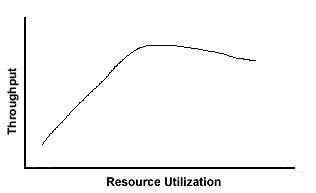
Like latency, throughput is highly dependent on resource utilization. As long as resources are not causing a jam, throughput will increase linearly along with the user load. However, once resources approach their maximum capacity, throughput will plateau and perhaps decrease as resource utilization approaches 100 percent utilization.
System resources, however, are not always the cause of a throughput plateau. Specific technologies frequently have throughput limitations because of the way they are designed. For example, some commercial distributions of LDAP directories are limited to 50 write requests per second. Other technologies, such as Web servers, are also limited in the number of threads they can handle at any given time. While Web servers can be configured to handle more threads, it's important to realize technological restrictions while designing your distributed application. Being forced to change a component midway through development because it doesn't meet your customer's performance expectations could be expensive.
My recommendations for measuring and fine-tuning throughput is similar to the methodology suggested for latency.
Measure the throughput for each system component. Measuring throughput for the overall system will not allow you to pin down problem areas.
Test each component with an average load, and increase that load until you reach your required peak load. Simply testing throughput under an average load will not guarantee that your system will perform under peak loads.
Eliminate bottlenecks by modifying system configurations, minimizing round-trips and scaling your system horizontally or vertically.
Resource Utilization
Resource utilization, another common performance bottleneck, refers to the usage level of system resources such as memory and CPU. It is typically measured as a percentage of the maximum available level of the specific resource.
As you'll notice during your performance tests, increasing throughput generally utilizes more system resources. If, at some point during your performance test, throughput plateaus, it's very likely that a system resource has reached its maximum available capacity. As a result, it has become the performance bottleneck.
Locating the bottleneck resource is a tedious process. In many cases, performance will start deteriorating well before the major system resources are used to their maximum capacity. It's therefore possible for CPU to be impacting latency or throughput even though it's only being used at 80 or 90 percent of its capacity. As such, the only way to identify resource bottlenecks is by running performance tests against your system while increasing the capacity of one single resource. If the performance of the system increases by adding capacity to that specific resource, you've identified the problem area. Otherwise, you must upgrade the next suspected resource and execute the performance test again.
When system resources become the bottleneck, you basically have two options: (1) Upgrade the specific resource with a higher capacity, or (2) modify your application to limit the use of the specific resource. While the first solution is definitely the simplest one, it's not necessarily the most cost-effective one. Generally speaking, customers are only willing to spend a certain amount on hardware to run your software, and if your recommendation exceeds their expectations, they will simply not purchase your solution. It's therefore important to realize that while scaling your distributed application vertically or horizontally is a feasible solution, it's not necessarily acceptable to your customers.
You now have a handle on the basics behind latency, throughput and resource utilization. You understand, at a high level, how to measure these performance metrics and optimize them. But how do you set SMART (Specific, Measurable, Achievable, Realistic and Time-bound) performance requirements, and how can you identify potential problem areas earlier in your development cycle? That will be the topic for Part 3 of Understanding Performance.