


Categories: Technology
Email has become an integral part of our live. Most of us use email as the default mode of communication in projects too. However, the abuse on email usage has reached a level that we often find ourselves caught in a situation where we need to catch up with torrent of emails flooding our inbox on a daily basis. This is due to the fact that email applications are so easy to use that sending a mail is just a click on a button regardless of how many people you are sending to. For this reason, many people have developed a habit of pressing 'Reply to All' or 'Forward' to have their email copied to many, somehow unrelated, people. People do this for various reasons without understanding the consequences and impacts that these actions could have on others. One good example is confidential email accidentally forwarded to people who shouldn't have seen it. Another good example is people in the CC list busy clearing emails in their inbox just because of two monkeys actively exchanging email conversations on a personal topic through the 'Reply to All' button.
Fortunately, there might be an end to all these email nonsense. I recently stumbled across this nifty tool "NoReplyAll" developed out of Microsoft Research (click here to download the tool). It does what its name says exactly. After installing, it creates extra buttons at the end of the ribbon in your Outlook as shown in the diagram below.
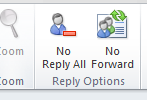 As the names suggest, clicking on these buttons will prevent recipients of your emails from performing those two actions; clicking again toggles the relevant option's state back again. However, this is not a strong and tight control as there are still ways to circumvent the control mechanism. I leave it to you to find out. Hence, do not take this tool as a strong security control to prevent your recipients from forwarding your email to other people. It is just providing a nice and convenient feature for your Outlook to prevent recipients to reply-to-all or forward your email to others. This could potentially help to reduce the problems related to abuse on email usage described above. On top of these, this tool also includes a smart feature that reminds you when you send out an email with a blank subject line. There is also a similar feature that scans the contents of your email for words like "attached" and "attachment" and warns you to include your attachment if any of these words are found.
Say goodbye to the embarrassing moments due to missing subject line or attachment…


