
Learn To Manage Dependencies. Part 1 - Learning Dependencies Between Tasks


| Recognizing dependencies between tasks is an important function that a project manager performs. Dependencies drive the project schedule. Once a task is linked every change you make to the Predecessor affects the Successor, which affects the next one, and so on.
In this Manage Dependencies series I’ll show one of the ways how I oversee portfolio with many programs and thousands of projects within them. I’ll start with the basics and then move it up to the next level. From managing dependencies between Tasks in a project. To managing dependencies between projects in a program to managing project dependencies within programs is a portfolio. You get an understanding where Microsoft Project, Project Server and Project Web App will be helpful in managing these dependencies.
In our example we’ll be working with Microsoft Project.
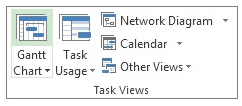
Steps to Link Tasks in Microsoft Project: From Main menu choose View > Gantt Chart.
Left Click the Task (in the Task Name column) that you want to have dependency on. Hold down Ctrl and Left Click on another Task (in the Task Name column) where you need that dependency to happen. From the Schedule menu section select Task > Link Tasks
If you’d made a mistake. Not to worry. Either select Ctrl and Z, short cut, to undo the previous step. Or from the Schedule menu section select the two linked Tasks and then choose Task > Unlink Tasks By default, the Project creates a simple Finish-to-Start task link, which means the first Task (the Predecessor) needs to finish before the second task (the Successor) can start.
All together there are 4 link type dependencies that can happen between Tasks.
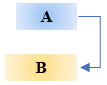
Finish-to-Start (FS) as mentioned before is created by default the dependency when you link two Tasks together.
The dependent Task B cannot begin until the task that it depends on Task A is complete. For example, if you have two tasks, Request For Proposal (RFP) and Select Vendor. The Select Vendor Task cannot begin until the Request For Proposal (RFP) Task is completed.
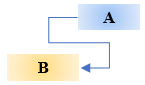
With Start-to-Start (SS) the dependent Task B cannot begin until the task that it depends on Task A begins.
The dependent Task can start at any time after the Task that it depends on begins. The SS link type does not require that both Tasks begin at the same time and if you need you can add additional Lag time. For example, if you have two Tasks, Vendor Selected and Vendor Starts Development Work. The Vendor Starts Development Work Task cannot begin until the Vendor Selected Task begins.
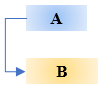
With Finish-to-Finish (FF) the dependent Task B cannot be completed until the task that it depends on Task A is completed.
The dependent Task can be completed at any time after Task that it depends on is completed. The FF link type does not require that both tasks be completed at the same time and if you need you can add additional Lag time. For example, if you have two Tasks, Launch Product and Lessons Learned. The Lessons Learned Task cannot be completed until the Launch Product Task is completed.
With Start-to-Finish (SF) the dependent Task B cannot be completed until the task that it depends on Task A begins.
The dependent Task can be completed at any time after the task that it depends on begins. The SF link type does not require that the dependent Task be completed concurrent with the beginning of the Task on which it depends and if you need you can add additional Lag time. For example, the engine for your flying car project is built off site. Two of the Tasks in your project are Engine Delivery and Assemble Engine in Chassis. The Assemble Engine in Chassis Task cannot be completed until the Engine Delivery Task begins.
Now you can go into the world and manage dependencies between Tasks in your project.
@AskPMP @AskProjectManager @TaskDependencies |
 icon.
icon.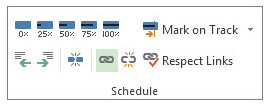
 icon.
icon.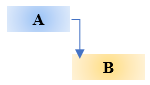
Organization’s Remote Work Environment - Are YOU Ready - For the Next Wave? (Part 3 of 3)
| In the Part 2 of this multi series article we have discussed:
We will conclude this article series with what it will take for organizations to Succeed in incorporating a permanent remote component into your organization’s work environment.
In the last 20 years, we've had six significant threats - SARS, MERS, Ebola, avian influenza and swine flu. Modelist and scientist don’t agree if the next wave of COVID-19 will be as deadly as this current outbreak. But most agree Coronavirus is not the last pandemic, BBC.com, 2020.
Organizations must be ready. I’ve created organizations Checklist for incorporating a remote component into work environment:
Scope: In Scope Technology tools selection and standardization of for remote employees. Workspace at Home equipment selection and standardization for remote employees. Management training on technology and communication. Remote employees training on technology and communication.
Out of Scope If telecommuting will continue once a vaccine is introduced and physical distancing and imposed quarantine are removed. If telecommuting will be employee’s personal choice. Whether staff feel confident about the safety of their work environment and the productivity that can be achieved either from home or from the workplace.
Financial Benefits Retention of top employees. Employer of choice for future employees. Retention of Clients or Members.
Cost Remote Technology. Equipment for Home Office. Management training on technology and communication. Employee training on technology and communication.
Success Metrics Your organization will be the Employer of Choice. Retention of employees. Organization’s KPIs at the same or above levels.
Create a Project Plan to identify the tasks, dependencies, duration, responsibilities and the scope. Include Tasks such as:
Measurable KPIs to Goals Align measurable key performance indicators (KPI's) tied to organization’s overall goals. This way you can more easily measure productivity and performance. Develop task-related processes such as setting clear goals and standards.
Communication, Communication, Communication Regularly communicate amongst all employees. This brings people together and fostering a sense of inclusion. Whether employee is on site of offsite regular contact helps build trust and confidence among team members. This provides ongoing opportunities for input and influence. Set expectations and accountability practices right from the get go. Manager must communicate and encourage their employees to take the needed brakes and not get burnout.
Establish Performance Standards Departmental leaders – you know what your department’s needs. Set benchmarks, sharing best practices, articulate standards by which your team’s performance will be evaluated.
Collaborative Mindset Foster an atmosphere of collaborative atmosphere in your team. Teams with collaborative mindset bring to the best of competition and cooperation, fostering respect for all team member with different interests, talents, and expertise. Focus on dynamic discussion of differences verses disagreement. It encouraging a focus on shared goals and mutual wins.
Team's Purpose Teams need to understand their reason for being. It allows teams and individuals in teams to ensure their focus is on delivering the right things to the right people at the right time in the right way. Team's Purpose is even more important for working remotely. Employees need to understand what specific results are expected, and how they contribute to the team as individuals and to the larger enterprise as a whole. Help telecommuters and other remote employees feel like they’re part of the team. Have a clear set of policies that brings telecommuting staff into key meetings. Periodically have remote team members come into the office. Make an extra effort to keeping telecommuters in the loop on company and department news, via corporate portal/emails. This is especially important if they spend a significant amount of time working off site.
Selecting the Right Technology Tools Microsoft Teams, Slack, Trillo, Google Hangouts and Skype for Business are some of the platforms that telecommuters can use to keep in touch throughout the day. And file-hosting services like SharePoint, OneDrive, or organization’s in-house portals can support collaboration and information sharing in real time. Technology like virtual desktops may replace bulky laptops and computers, enabling mobility inside and outside of an office building.
Creating the Right Workspace at Home Your facility department will play an important part in creating an ergonomic working space at home by selecting the right: desks, chairs, monitors, phones headsets.
Address Fairness for On Site Employees No one likes to be treated unfairly. Make sure that those who work on site are treated equitably. It can feel like a raw deal for the employees who are left to handle problems that can’t be performed remotely by telecommuting teammates. When it comes to job performance quality and deliverables, there should be no difference between the work an employee produces at the office or while they’re remote. Set equal standards for onsite and offsite employees with respect to office hours, responsiveness for emails and phone calls to external clients an internal stakeholder. Set core hours when all employees are required to be accessible. Create and update your Telecommuting Policy periodically. Over time, your guidelines need modification as technology progresses and the workplace practices continue to evolve, additional groups of employees can be offered remote work option.
Addressing the Legality Compliance and legal counsel should review any telecommuting programs to make sure the organization stays in compliance with employment laws. Some of the issues to consider include workers compensation and state overtime regulations, as well as the company property used offsite and individual responsibilities.
Training of Management According to Gallup, 2017, successful managers all stressed the importance of getting to know their employees as people and well as genuine caring for them as individuals. Training should include:
Managers Input Managers know which job functions are most suitable for remote work, and therefore, are in the best position to customize the program for their teams. Manager will decide whether all their staff working remotely, or a certain percentage of staff remote, or having staff work remote on specific days, or a hybrid between working in the office and at home. Questions that a manager might consider when evaluating whether a role is a good fit for remote work include: Is this position really right to independent work? Does the job require a lot communication that face time/videoconferencing alone can’t support effectively? Is there’s a negative impact, if any, on our teamwork, on our organizational culture, if few or all employees telecommuted regularly? In It's the Manager: Gallup, 2019, finds the quality of managers and team leaders is the single biggest factor in your organization's long-term success.
Managing of Telecommuters Managers must reiterate that remote workers keeping similar hours and maintaining similar levels of productivity. Telecommuting employees need to feel confident that their manager believes they will work as hard as they would in a regular office. If you as a manager unnecessarily checking in several times a day with your offsite workers just to “see how things are going,” those employees may feel like you don’t trust them.
Celebrate Successes Management should not just celebrate the end of the project but small wins as well. Feeling like a team means not just working together but being recognized for each members' sacrifices and accomplishments. Bringing your whole staff together at one location on occasion can help to build camaraderie and team spirit, while keeping social distancing in mind. If that’s not possible, try scheduling a videoconference on an annual basis using a platform like Microsoft Teams, GoTo Meeting or Zoom. |


