Learn To Manage Dependencies. Part 1 - Learning Dependencies Between Tasks


| Recognizing dependencies between tasks is an important function that a project manager performs. Dependencies drive the project schedule. Once a task is linked every change you make to the Predecessor affects the Successor, which affects the next one, and so on.
In this Manage Dependencies series I’ll show one of the ways how I oversee portfolio with many programs and thousands of projects within them. I’ll start with the basics and then move it up to the next level. From managing dependencies between Tasks in a project. To managing dependencies between projects in a program to managing project dependencies within programs is a portfolio. You get an understanding where Microsoft Project, Project Server and Project Web App will be helpful in managing these dependencies.
In our example we’ll be working with Microsoft Project.
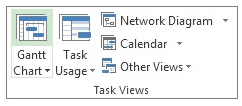
Steps to Link Tasks in Microsoft Project: From Main menu choose View > Gantt Chart.
Left Click the Task (in the Task Name column) that you want to have dependency on. Hold down Ctrl and Left Click on another Task (in the Task Name column) where you need that dependency to happen. From the Schedule menu section select Task > Link Tasks
If you’d made a mistake. Not to worry. Either select Ctrl and Z, short cut, to undo the previous step. Or from the Schedule menu section select the two linked Tasks and then choose Task > Unlink Tasks By default, the Project creates a simple Finish-to-Start task link, which means the first Task (the Predecessor) needs to finish before the second task (the Successor) can start.
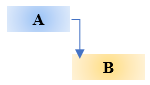
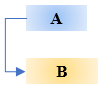
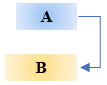
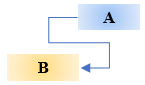
All together there are 4 link type dependencies that can happen between Tasks.
Finish-to-Start (FS) as mentioned before is created by default the dependency when you link two Tasks together.
The dependent Task B cannot begin until the task that it depends on Task A is complete. For example, if you have two tasks, Request For Proposal (RFP) and Select Vendor. The Select Vendor Task cannot begin until the Request For Proposal (RFP) Task is completed.
With Start-to-Start (SS) the dependent Task B cannot begin until the task that it depends on Task A begins.
The dependent Task can start at any time after the Task that it depends on begins. The SS link type does not require that both Tasks begin at the same time and if you need you can add additional Lag time. For example, if you have two Tasks, Vendor Selected and Vendor Starts Development Work. The Vendor Starts Development Work Task cannot begin until the Vendor Selected Task begins.
With Finish-to-Finish (FF) the dependent Task B cannot be completed until the task that it depends on Task A is completed.
The dependent Task can be completed at any time after Task that it depends on is completed. The FF link type does not require that both tasks be completed at the same time and if you need you can add additional Lag time. For example, if you have two Tasks, Launch Product and Lessons Learned. The Lessons Learned Task cannot be completed until the Launch Product Task is completed.
With Start-to-Finish (SF) the dependent Task B cannot be completed until the task that it depends on Task A begins.
The dependent Task can be completed at any time after the task that it depends on begins. The SF link type does not require that the dependent Task be completed concurrent with the beginning of the Task on which it depends and if you need you can add additional Lag time. For example, the engine for your flying car project is built off site. Two of the Tasks in your project are Engine Delivery and Assemble Engine in Chassis. The Assemble Engine in Chassis Task cannot be completed until the Engine Delivery Task begins.
Now you can go into the world and manage dependencies between Tasks in your project.
@AskPMP @AskProjectManager @TaskDependencies |
 icon.
icon.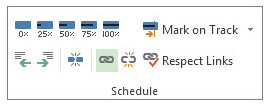
 icon.
icon.