Learn To Manage Dependencies. Part 1 - Learning Dependencies Between Tasks


| Recognizing dependencies between tasks is an important function that a project manager performs. Dependencies drive the project schedule. Once a task is linked every change you make to the Predecessor affects the Successor, which affects the next one, and so on.
In this Manage Dependencies series I’ll show one of the ways how I oversee portfolio with many programs and thousands of projects within them. I’ll start with the basics and then move it up to the next level. From managing dependencies between Tasks in a project. To managing dependencies between projects in a program to managing project dependencies within programs is a portfolio. You get an understanding where Microsoft Project, Project Server and Project Web App will be helpful in managing these dependencies.
In our example we’ll be working with Microsoft Project.
Steps to Link Tasks in Microsoft Project: From Main menu choose View > Gantt Chart.
Left Click the Task (in the Task Name column) that you want to have dependency on. Hold down Ctrl and Left Click on another Task (in the Task Name column) where you need that dependency to happen. From the Schedule menu section select Task > Link Tasks
If you’d made a mistake. Not to worry. Either select Ctrl and Z, short cut, to undo the previous step. Or from the Schedule menu section select the two linked Tasks and then choose Task > Unlink Tasks By default, the Project creates a simple Finish-to-Start task link, which means the first Task (the Predecessor) needs to finish before the second task (the Successor) can start.
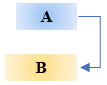
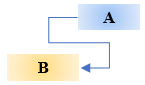
All together there are 4 link type dependencies that can happen between Tasks.
Finish-to-Start (FS) as mentioned before is created by default the dependency when you link two Tasks together.
The dependent Task B cannot begin until the task that it depends on Task A is complete. For example, if you have two tasks, Request For Proposal (RFP) and Select Vendor. The Select Vendor Task cannot begin until the Request For Proposal (RFP) Task is completed.
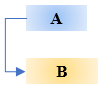
With Start-to-Start (SS) the dependent Task B cannot begin until the task that it depends on Task A begins.
The dependent Task can start at any time after the Task that it depends on begins. The SS link type does not require that both Tasks begin at the same time and if you need you can add additional Lag time. For example, if you have two Tasks, Vendor Selected and Vendor Starts Development Work. The Vendor Starts Development Work Task cannot begin until the Vendor Selected Task begins.
With Finish-to-Finish (FF) the dependent Task B cannot be completed until the task that it depends on Task A is completed.
The dependent Task can be completed at any time after Task that it depends on is completed. The FF link type does not require that both tasks be completed at the same time and if you need you can add additional Lag time. For example, if you have two Tasks, Launch Product and Lessons Learned. The Lessons Learned Task cannot be completed until the Launch Product Task is completed.
With Start-to-Finish (SF) the dependent Task B cannot be completed until the task that it depends on Task A begins.
The dependent Task can be completed at any time after the task that it depends on begins. The SF link type does not require that the dependent Task be completed concurrent with the beginning of the Task on which it depends and if you need you can add additional Lag time. For example, the engine for your flying car project is built off site. Two of the Tasks in your project are Engine Delivery and Assemble Engine in Chassis. The Assemble Engine in Chassis Task cannot be completed until the Engine Delivery Task begins.
Now you can go into the world and manage dependencies between Tasks in your project.
@AskPMP @AskProjectManager @TaskDependencies |
 icon.
icon.
 icon.
icon.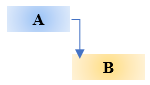
Protecting Against Phishing Is Everyone’s Responsibility. Following These Best Practices.
| This email is legit. It has my info and is asking me to verify my account. The email is from my boss. The website has “https” protocol and padlock icon. It is safe. I must respond right away. Right?
People have come to automatically responding to their bosses or their friends emails. As well as to click on a time sensitive deals. After all a dollar saved is a dollar earned. Generic salutations, misspellings or wrong domains within a link is a clear sign that the email is not legitimate.
However, there are malicious actors who are not fishing but are phishing when they send emails and host malicious websites. Malicious actors craft their phishing campaigns to use shortened URLs as a means of fooling Secure Email Gateways (SEG). Such as http://tinyurl.com/YouCanTrustUs
If you receive a suspicious email with a link from a known contact. Don’t just click on the link. First confirm that the email is legitimate by calling or emailing the contact. And do not reply directly to a suspicious email.
Phishing usually comes from an email from a recognized sender. Many attackers attempt to evade detection from email filters by incorporating legitimate links into their deceptive phishing emails.
When surfing the web people have come to rely websites who’s address start with “https” and also has a padlock icon in the address bar. And they feel secure as they browse the internet.
The HTTPS, Hypertext Transfer Protocol Secure, is an extension of the Hypertext Transfer Protocol. It is used for secure communication over a computer network, and is widely used on the Internet. In HTTPS, the communication protocol is encrypted using Transport Layer Security or, formerly, Secure Sockets Layer (SSL).
However, the protocol does nothing to ensure the site itself is not under control of some bad actors.
Next level of Phishing is Spear Phishing Spear Phishing is a more customizable email attack with the proper salutations and target’s name, position, company, and other information in an attempt to trick the recipient into believing that they have a connection with the sender. Attackers construct email with legitimate contact information that instructs recipients to click on a link in order to rectify a discrepancy with their account. In actuality, the link redirects to a website designed to impersonate vendors login page. That website collects login credentials from the victim when they try to authenticate themselves and sends that data to the attackers.
To Defend Against Deceptive Phishing In an email look out for generic salutations, grammar mistakes and spelling errors. Think before you click. Inspect URLs carefully by hovering over links that you are unsure of before clicking on them. Do they lead where they are supposed to lead.
Most popular Internet browsers can be customized with anti-phishing toolbars. These toolbars run quick checks on the sites that you are visiting and compare them to lists of known phishing sites. Keep operating system with security patches up to date. Check your online accounts regularly to see if someone hasn’t compromised them. Change Your password frequently. Use two factor authentication. Never share personal or financially sensitive information over the Internet. It could be used against you in a crafty email. Antivirus software is a must. Antivirus software use special signatures that guard against known technology workarounds and loopholes. Keep your software up to date. Anti-spyware and firewall settings should be used to prevent phishing attacks. Firewall protection prevents access to malicious files by blocking the attacks. Antivirus software scans every file which comes through the Internet to your computer. It helps to prevent damage to your system.
You don’t have to live in fear. By keeping these tips in mind, you should be able to enjoy a worry-free online experience.
#Security #Phishing #OrganizationalCulture |


Deep Dive Into Controlling Cost
| Project managers look inside the project to determine progress, measure variance, predict outcomes, report status and manage change. Earned Value (EV) is a quantitative technique to measure project performance against the project baseline. Through the use of EV analysis, one can detect and predict problems earlier, evaluate status, and report progress. There are two Earned Value performance indexes that are of particular value to project managers. First is the Cost Performance Index (CPI). CPI is the ratio of budgeted to actual costs for work performed. One can determine the relationship between estimated and actual costs. Second is the Schedule Performance Index (SPI). SPI is the ratio of work performed to work scheduled. SPI is an efficiency rating for work accomplished up to the time of the measurement.
First lets define some of the terms that are used in earned value analysis and explain what the results mean:
Planned Value (PV) - Answers what is the estimated value of the worked planned to be done.
Earned Value (EV) - Answers what is the estimated value of the worked actually to be done.
Actual Value (EV) - Answers what is the actual cost incurred for the worked accomplished.
Budget at Completion (BAC) - Answers what how much did we budget for the total project.
Estimate at Completion (EAC) - Answers what do we currently estimate the total project to cost.
Estimate to Completion (ETC) - Answers from current point how much more do we estimate it to cost to finish the project.
Variance at Completion (VAC) - Answers how much over or under budget do we estimate to be at the end of the project.
Now lets look at some of the financial calculations and understand what the results mean:
Formula for Cost Variance (CV) is: EV - AV
If the result is a Negative number that means that the project is over budget. If the result is a Positive number that means that the project is under budget.
Formula for Schedule Variance (SV) is: EV - PV
If the result is a Negative number that means that the project is behind schedule. If the result is a Positive number that means that the project is ahead of schedule.
Formula for Cost Performance Index (CPI) is: EV/AC
The result answers how much we are getting in turns of a $ worth of work out of every $1 spent. It answers whether the funds are or are not being used efficiently.
If the CPI is greater than one, the project is under budget, which means you are earning more than what you have spent If the CPI is less than one, the project is over budget, which means you are earning less than what you have spent. If the CPI is equal to one, earning and spending is equal, which means that the project is proceeding as per the planned spending.
Formula for Schedule Performance Index (SPI) is: EV/PV
The result answerers of how we are progressing at certain percentage of the rate originally planned. If the SPI is equal to one; the project is on schedule, the completed work is equal to the planned work. If the SPI is greater than one; the project is ahead of schedule, which means you have completed more work than planned. If the SPI is less than one, the project is behind schedule, which mean you have completed less work than planned work. If the SPI is equal to one; the project is on schedule, completed less work than planned work.
There are many formulas for Estimate at Completion (EAC):
The result answers as of now how much do we expect the total project to cost.
We use the following formula: BAC/CPI
If no variance from the BAC have occurred or continue at the same rate of spending
We use the following formula: AC + ETC
When original estimate was flowed. Actual plus a new estimate for remaining work.
We use the following formula: AC + (BAC - EV)
When current variance is thought to be different from the future. Actual to date plus remaining budget to perform.
We use the following formula: AC + (BAC - EV)/CPI
When current variance is through to be similar of the future. Actual to date plus remaining budget modified by performance.
Formula for Estimate to Complete (ETC) is: EAC - AC
The result answers how much more will the project cost.
Formula for Variance at Completion (VAC) is: BAC - EAC
The result answers how much over or under budget will we be at the end of the project.
Now take this knowledge and control your organizations project’s costs.
#CostManagement #ControllingCost |
Cost Management in a Nutshell
| Why Cost Management is Important? Cost Management is important because it:
You start cost management process in the planning phase of the project. Costs are approved by project owner and executive stakeholders in the project charter. As project is executed you monitored the expenses. At the close of the project you compare the actual costs to the estimated costs determined at the beginning of the project. Cost management is one of the triple constraint metrics that define a project: cost, scope and time.
Example of some of the fixed and variable costs, are shown in the diagram below:
What is Cost Management? The process of Cost Management is:
Cost Management Plan Cost Management Plan is a component of the overall project management plan. The better you are at cost precision and accuracy the better you’ll have control of your project costs. You control cost thresholds by knowing the cost variations and where you have wiggle room and where you don’t. Establish how the project performance will be measured in order to see if you’re meeting the goals and expectations of the project. Inputs into Cost Management Plan
Tools and Techniques in Cost Management Plan
Outputs of Cost Management Plan
Cost Planning As part of Cost Planning is you have to plan for resources. Resource planning is the process of determining future resource requirements for an organization or a scope of work. This involves the evaluation and planning of the use of the physical, human, financial, and informational resources required to complete work activities and their tasks. Resource planning begins in the scope and execution plan development process during which the work breakdown structure, tasks and execution strategy are developed. Resource estimating determines the activity’s resource quantities needed, such as hours, tools, materials. While schedule planning and development determines the work activities be performed. Resource planning takes the estimated resource quantities, evaluates resource availability and limitations considering project circumstances, and then iteratively optimizes how the available resources will be used in the activities over time.
Cost Estimation Cost Estimation is the process of quantifying the cost and price of the resources required by the project. The outputs of cost estimating are used as inputs for business planning, cost analysis, and decisions or for project cost and schedule control processes. The estimation of the time duration of activities must be considered concurrently with costs because costs are often dependent on time duration and resource requirements identified in cost estimating may affect the schedule. Iterative approaches are used because outcomes of a cost estimate often lead to changes in scope or plans. Estimating process can be viewed as part of the scope definition process because iterative trading off between cost and scope intertwine the processes. Inputs into Cost Estimation
Tools and Techniques of Cost Estimation
Outputs from Cost Estimation
Cost Budgeting Cost Budgeting is a sub-process within the cost estimating and is used for allocating the estimated cost of resources into cost accounts against which cost performance will be measured and assessed. Cost Budgeting forms the baseline for cost control.
Inputs into Cost Budgeting
Tools and Techniques of Cost Budgeting
Outputs from Cost Budgeting
Cost Control During Cost Control you measure the variances from the cost baseline and take necessary corrective action to achieve minimum costs. All of the changes to the cost baseline need to be recorded and the expected final total costs are continuously forecasted. When actual cost information becomes available you measure against the cost baseline to explain and determine what is causing the variance. Corrective action might need to be taken based on this analysis to avoid cost overruns.
Inputs into Cost Control
Tools and Techniques of Cost Control
Outputs from Cost Control
Now that you got the cost management is under your belt. You can be confident in managing your projects.
#CostManagement #ProjectControl #CostManagement Plan #CostPlanning #CostEstimation #CostBudgeting #CostControl |
Have You Ever Wondered How To Make Others Do What You Want To Do Without Having Authority Over Them? I Can Make You Do That – Because!
| Having people do certain things without having authority over them is difficult to say the least. One can use the Carrot and Stick approach. A Carrot and Stick approach is a traditional motivation theory that asserts, in motivating people to elicit desired behaviors, sometimes the rewards are given in the form of money, promotion, and any other financial or non-financial benefits and sometimes the punishments are exerted to push an individual towards the desired behavior. A better approach would be to use Because approach. Ellen Langer, a professor of psychology at Harvard, conducted a research in 1978 on the power of persuasion of the word "Because." Langer had people request to break in on a line of people waiting to use a busy copy machine on a college campus. In 1970′s people didn't have home computers nor printers. There were lines waiting to use a copy machine. The researchers had the people use three different, specifically worded requests to break in line:
Did the wording affect whether people let them break in line? You batcha. Here are the results:
Using the word “Because” and then giving a reason resulted in significantly more compliance. This was true even when the reason was not very compelling such as “Because I have to make copies". The researchers hypothesized that people go on automatic behavior as a form of a heuristic method of short-cut, and that hearing the word “Because” followed by a reason, no matter how poor it was, would cause them to comply. They repeated the experiment for a request to copy 20 pages rather than 5. In that case, only the “Because I’m in a rush” reason resulted in increased compliance. So, what does this all mean? When the stakes are low people will engage in automatic behavior. If your request is small, follow your request with the word "Because" and give a reason, any reason. However, if the stakes are high, then there could be more resistance, but still not too much.
Please let me know how this “Because” approach worked out for you. Because I asked nicely. #Because |