

 icon.
icon.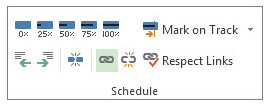
 icon.
icon.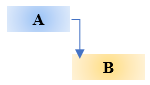



Guessing is not a strategy: How to build decision velocity with AI and real-time data
June 10, 2026 | Live Webinar

Memorial Day - A Day of Remembering the People Who Scarified Their Lives
5 New Year Resolutions Every Project Manager Should Make and Keep
How to Prioritize Your Company’s Projects
Country Opportunity and Company Project Compensation
Celebration, Communications Management, Controlling Cost, Cost Management, Cost Management, Cost Management Plan, Cost Planning, Getting Things Done, GTD, Indirect Authority, Leadership, Motivation, Organization, Organizational Management, Project Control, Remote Work, Risk Management, Task Dependencies, Task Management, WFH, Work From Home, WorkFromHome


| As we come closer to the Memorial Day in honoring and mourning the military personnel who have died in military duties while in service of the United States Armed Forces. For which this holiday was first observed on May 30 1868. One has to reflect on the meaning of life. The meaning of life is to find your gift. The purpose of life is to give it away. This statement is often attributed to the famed playwright William Shakespeare or the influential painter Pablo Picasso. As you reflect on the meaning of life. Take a moment to reflect on how’s the work that you are performing affects yours or someone else’s life. For me right now, at this moment, is working on enabling normal lives for patients with autoimmune diseases.
How is the work that you are performing brings meaning to yours or someone else’s life?
#Themeaningoflife |
| Celebrations of mothers and motherhood goes back to the ancient Greeks and Romans. One would think it should have been celebrated even further. In the US the Mother’s Day became an official holiday in May 9, 1914. While other countries celebrate Mother’s Day on different day. During this day the phone traffic around the world spikes more than any other day, only few counties are an exception. Guess those countries have the children nearby to tell how much they love their mothers in person.
To all the mothers – we would not be here without you. Happy Mother’s Day!
#MothersDay |
| Today is Earth Day!
Earth Day is an annual event held on April 22 to demonstrate support for environmental protection.
How do you support it? Do you Drive or Walk to the Earth Day meeting? Do you Wash your porcelain plates or use Paper plates and Recycle them recycle? Do you support it because its cool to do it? Or do you support it because it is the right thing to do?
We only have one Earth. So, treat it right.
#EarthDay |
| First Friday in March is an Employee Appreciation Day.
Organizational biggest asset is its employees. Without them there is no company. Most organizations know that a highly motivated employees are more productive employees. Thus, recognition and appreciation are key to keeping those employees continuing to be top performers. Employees are not dumb. If they hear their leaders and managers just give lip service and don’t mean what they say. The result will be more of a moral problem. So, leaders and managers remember what your mom used to tell you: “Mean what you say. And say what you mean.”
Does you organization give lip service. “We care about our employees.” Wink emoji ;) Or does your organization say, in more or less like: “You’re lucky to even have a job in this economy.”
Or does your organization on go all out and provide: Lunch with CEO! Time off! Company stock options!
What are some of the creative ways how your company shows appreciation to you?
#EmployeeAppreciationDay |
| Recognizing dependencies between tasks is an important function that a project manager performs. Dependencies drive the project schedule. Once a task is linked every change you make to the Predecessor affects the Successor, which affects the next one, and so on.
In this Manage Dependencies series I’ll show one of the ways how I oversee portfolio with many programs and thousands of projects within them. I’ll start with the basics and then move it up to the next level. From managing dependencies between Tasks in a project. To managing dependencies between projects in a program to managing project dependencies within programs is a portfolio. You get an understanding where Microsoft Project, Project Server and Project Web App will be helpful in managing these dependencies.
In our example we’ll be working with Microsoft Project.
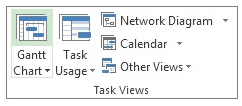
Steps to Link Tasks in Microsoft Project: From Main menu choose View > Gantt Chart.
Left Click the Task (in the Task Name column) that you want to have dependency on. Hold down Ctrl and Left Click on another Task (in the Task Name column) where you need that dependency to happen. From the Schedule menu section select Task > Link Tasks
If you’d made a mistake. Not to worry. Either select Ctrl and Z, short cut, to undo the previous step. Or from the Schedule menu section select the two linked Tasks and then choose Task > Unlink Tasks By default, the Project creates a simple Finish-to-Start task link, which means the first Task (the Predecessor) needs to finish before the second task (the Successor) can start.
All together there are 4 link type dependencies that can happen between Tasks.
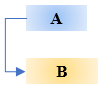
Finish-to-Start (FS) as mentioned before is created by default the dependency when you link two Tasks together.
The dependent Task B cannot begin until the task that it depends on Task A is complete. For example, if you have two tasks, Request For Proposal (RFP) and Select Vendor. The Select Vendor Task cannot begin until the Request For Proposal (RFP) Task is completed.
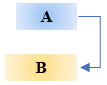
With Start-to-Start (SS) the dependent Task B cannot begin until the task that it depends on Task A begins.
The dependent Task can start at any time after the Task that it depends on begins. The SS link type does not require that both Tasks begin at the same time and if you need you can add additional Lag time. For example, if you have two Tasks, Vendor Selected and Vendor Starts Development Work. The Vendor Starts Development Work Task cannot begin until the Vendor Selected Task begins.
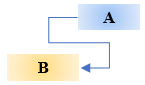
With Finish-to-Finish (FF) the dependent Task B cannot be completed until the task that it depends on Task A is completed.
The dependent Task can be completed at any time after Task that it depends on is completed. The FF link type does not require that both tasks be completed at the same time and if you need you can add additional Lag time. For example, if you have two Tasks, Launch Product and Lessons Learned. The Lessons Learned Task cannot be completed until the Launch Product Task is completed.
With Start-to-Finish (SF) the dependent Task B cannot be completed until the task that it depends on Task A begins.
The dependent Task can be completed at any time after the task that it depends on begins. The SF link type does not require that the dependent Task be completed concurrent with the beginning of the Task on which it depends and if you need you can add additional Lag time. For example, the engine for your flying car project is built off site. Two of the Tasks in your project are Engine Delivery and Assemble Engine in Chassis. The Assemble Engine in Chassis Task cannot be completed until the Engine Delivery Task begins.
Now you can go into the world and manage dependencies between Tasks in your project.
@AskPMP @AskProjectManager @TaskDependencies |
|
"I don't like work - no man does - but I like what is in the work - the chance to find yourself." - Joseph Conrad |