Happy Mother’s Day!
Categories:
Celebration
Categories: Celebration


| Celebrations of mothers and motherhood goes back to the ancient Greeks and Romans. One would think it should have been celebrated even further. In the US the Mother’s Day became an official holiday in May 9, 1914. While other countries celebrate Mother’s Day on different day. During this day the phone traffic around the world spikes more than any other day, only few counties are an exception. Guess those countries have the children nearby to tell how much they love their mothers in person.
To all the mothers – we would not be here without you. Happy Mother’s Day!
#MothersDay |
Today is Earth Day! Do your part!
| Today is Earth Day!
Earth Day is an annual event held on April 22 to demonstrate support for environmental protection.
How do you support it? Do you Drive or Walk to the Earth Day meeting? Do you Wash your porcelain plates or use Paper plates and Recycle them recycle? Do you support it because its cool to do it? Or do you support it because it is the right thing to do?
We only have one Earth. So, treat it right.
#EarthDay |
It’s Friday. You Worked Hard All Week. Do You Feel Appreciated?
Categories:
Organizational Management
Categories: Organizational Management
| First Friday in March is an Employee Appreciation Day.
Organizational biggest asset is its employees. Without them there is no company. Most organizations know that a highly motivated employees are more productive employees. Thus, recognition and appreciation are key to keeping those employees continuing to be top performers. Employees are not dumb. If they hear their leaders and managers just give lip service and don’t mean what they say. The result will be more of a moral problem. So, leaders and managers remember what your mom used to tell you: “Mean what you say. And say what you mean.”
Does you organization give lip service. “We care about our employees.” Wink emoji ;) Or does your organization say, in more or less like: “You’re lucky to even have a job in this economy.”
Or does your organization on go all out and provide: Lunch with CEO! Time off! Company stock options!
What are some of the creative ways how your company shows appreciation to you?
#EmployeeAppreciationDay |
Learn To Manage Dependencies. Part 1 - Learning Dependencies Between Tasks
| Recognizing dependencies between tasks is an important function that a project manager performs. Dependencies drive the project schedule. Once a task is linked every change you make to the Predecessor affects the Successor, which affects the next one, and so on.
In this Manage Dependencies series I’ll show one of the ways how I oversee portfolio with many programs and thousands of projects within them. I’ll start with the basics and then move it up to the next level. From managing dependencies between Tasks in a project. To managing dependencies between projects in a program to managing project dependencies within programs is a portfolio. You get an understanding where Microsoft Project, Project Server and Project Web App will be helpful in managing these dependencies.
In our example we’ll be working with Microsoft Project.
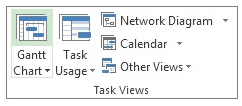
Steps to Link Tasks in Microsoft Project: From Main menu choose View > Gantt Chart.
Left Click the Task (in the Task Name column) that you want to have dependency on. Hold down Ctrl and Left Click on another Task (in the Task Name column) where you need that dependency to happen. From the Schedule menu section select Task > Link Tasks
If you’d made a mistake. Not to worry. Either select Ctrl and Z, short cut, to undo the previous step. Or from the Schedule menu section select the two linked Tasks and then choose Task > Unlink Tasks By default, the Project creates a simple Finish-to-Start task link, which means the first Task (the Predecessor) needs to finish before the second task (the Successor) can start.
All together there are 4 link type dependencies that can happen between Tasks.
Finish-to-Start (FS) as mentioned before is created by default the dependency when you link two Tasks together.
The dependent Task B cannot begin until the task that it depends on Task A is complete. For example, if you have two tasks, Request For Proposal (RFP) and Select Vendor. The Select Vendor Task cannot begin until the Request For Proposal (RFP) Task is completed.
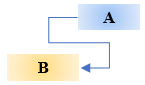
With Start-to-Start (SS) the dependent Task B cannot begin until the task that it depends on Task A begins.
The dependent Task can start at any time after the Task that it depends on begins. The SS link type does not require that both Tasks begin at the same time and if you need you can add additional Lag time. For example, if you have two Tasks, Vendor Selected and Vendor Starts Development Work. The Vendor Starts Development Work Task cannot begin until the Vendor Selected Task begins.
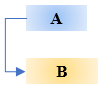
With Finish-to-Finish (FF) the dependent Task B cannot be completed until the task that it depends on Task A is completed.
The dependent Task can be completed at any time after Task that it depends on is completed. The FF link type does not require that both tasks be completed at the same time and if you need you can add additional Lag time. For example, if you have two Tasks, Launch Product and Lessons Learned. The Lessons Learned Task cannot be completed until the Launch Product Task is completed.
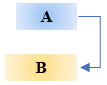
With Start-to-Finish (SF) the dependent Task B cannot be completed until the task that it depends on Task A begins.
The dependent Task can be completed at any time after the task that it depends on begins. The SF link type does not require that the dependent Task be completed concurrent with the beginning of the Task on which it depends and if you need you can add additional Lag time. For example, the engine for your flying car project is built off site. Two of the Tasks in your project are Engine Delivery and Assemble Engine in Chassis. The Assemble Engine in Chassis Task cannot be completed until the Engine Delivery Task begins.
Now you can go into the world and manage dependencies between Tasks in your project.
@AskPMP @AskProjectManager @TaskDependencies |
 icon.
icon.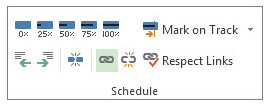
 icon.
icon.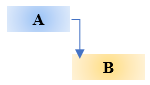
Protecting Against Phishing Is Everyone’s Responsibility. Following These Best Practices.
| This email is legit. It has my info and is asking me to verify my account. The email is from my boss. The website has “https” protocol and padlock icon. It is safe. I must respond right away. Right?
People have come to automatically responding to their bosses or their friends emails. As well as to click on a time sensitive deals. After all a dollar saved is a dollar earned. Generic salutations, misspellings or wrong domains within a link is a clear sign that the email is not legitimate.
However, there are malicious actors who are not fishing but are phishing when they send emails and host malicious websites. Malicious actors craft their phishing campaigns to use shortened URLs as a means of fooling Secure Email Gateways (SEG). Such as http://tinyurl.com/YouCanTrustUs
If you receive a suspicious email with a link from a known contact. Don’t just click on the link. First confirm that the email is legitimate by calling or emailing the contact. And do not reply directly to a suspicious email.
Phishing usually comes from an email from a recognized sender. Many attackers attempt to evade detection from email filters by incorporating legitimate links into their deceptive phishing emails.
When surfing the web people have come to rely websites who’s address start with “https” and also has a padlock icon in the address bar. And they feel secure as they browse the internet.
The HTTPS, Hypertext Transfer Protocol Secure, is an extension of the Hypertext Transfer Protocol. It is used for secure communication over a computer network, and is widely used on the Internet. In HTTPS, the communication protocol is encrypted using Transport Layer Security or, formerly, Secure Sockets Layer (SSL).
However, the protocol does nothing to ensure the site itself is not under control of some bad actors.
Next level of Phishing is Spear Phishing Spear Phishing is a more customizable email attack with the proper salutations and target’s name, position, company, and other information in an attempt to trick the recipient into believing that they have a connection with the sender. Attackers construct email with legitimate contact information that instructs recipients to click on a link in order to rectify a discrepancy with their account. In actuality, the link redirects to a website designed to impersonate vendors login page. That website collects login credentials from the victim when they try to authenticate themselves and sends that data to the attackers.
To Defend Against Deceptive Phishing In an email look out for generic salutations, grammar mistakes and spelling errors. Think before you click. Inspect URLs carefully by hovering over links that you are unsure of before clicking on them. Do they lead where they are supposed to lead.
Most popular Internet browsers can be customized with anti-phishing toolbars. These toolbars run quick checks on the sites that you are visiting and compare them to lists of known phishing sites. Keep operating system with security patches up to date. Check your online accounts regularly to see if someone hasn’t compromised them. Change Your password frequently. Use two factor authentication. Never share personal or financially sensitive information over the Internet. It could be used against you in a crafty email. Antivirus software is a must. Antivirus software use special signatures that guard against known technology workarounds and loopholes. Keep your software up to date. Anti-spyware and firewall settings should be used to prevent phishing attacks. Firewall protection prevents access to malicious files by blocking the attacks. Antivirus software scans every file which comes through the Internet to your computer. It helps to prevent damage to your system.
You don’t have to live in fear. By keeping these tips in mind, you should be able to enjoy a worry-free online experience.
#Security #Phishing #OrganizationalCulture |