Project Management

pmStudent

by
Ranting and raving about project management and systems engineering.

About this Blog

RSS

Recent Posts

The Problem with Project Management

The Problem with Project Management

The Problem with Project Management

LinkedIn Recommendations Are Easy

The Catch-22 of Project Management Certification and Experience

Categories

Agile, Career Development, Certification, Change Management, Communications Management, Cost Management, Documentation, Earned Value Management, Education, Integration and Test, Kanban, Leadership, Lean, Lessons Learned, Methodology, Misc, Multitasking, New Project, Operations, Planning, PMP, Productivity, Professional Development, Project Estimation, Project Leadership, Quality, Requirements Management, Risk Management, Schedule Management, Scope Management, Software, Systems Thinking, Tools, Video, Work Breakdown Structures (WBS)

Date

You Can't Solve Project Issues With a Calculator

Categories: Tools

linkedin twitter facebook Request to reuse this  

Sometimes we can get a bit project management tools crazy.

This can be a really big problem if we fall back on our spreadsheets, gantt charts, and staffing calculations in an attempt to solve our problems.  These are tools, and can be very useful in helping to model a plan that we can then go execute on.

But putting it into a tool doesn't make it happen, and trying to communicate via entries in a tool is not an effective way to solve problems.

I hear you mumbling..."of course Josh.  Duh!  Why would you even write about this?"

Unfortunately, I write about it because I see it happening every day.

When a problem arises, what's your first step? 

Do you go talk to your team and stakeholders, or do you first go to a schedule?

Calculators don't solve problems....people do.

Share this with your network
Posted on: March 15, 2011 08:22 AM | Permalink | Comments (0)

When Project Teams Collide

linkedin twitter facebook Request to reuse this  

I work in a project environment that consists of many project teams working on various systems that need to interface with each other. The interfaces between the systems can be the most difficult parts of the systems to manage.

Although we have interface specification documents (ISDs) and interface control documents (ICDs) some details of the interfaces still have problems.

So how do you make sure that project teams working together don't end up stepping on each others toes?
 

User stories

User stories by their very nature lend themselves to describe who needs what and why and this can apply to interfaces between systems very well. The format I use for user stories is the following:

"As (role), I (condition - need, do not need, expect, do not expect) (something), because (benefit). "

We also capture acceptance criteria to define how we know what 'done' looks like and a change log for reference when needs change.  We just started doing this in my current project environment, and based on my previous experience with implementing user stories I am very confident these will help us be on the same page with groups and individuals outside our project team.

User stories are mostly useful as a foundation for discussion with the various stakeholders that you have, and make sure that you fully discuss the scenario and have documented what the decision was.  On a project like mine, there are many situations where several ways to implement something exist, and it doesn't really matter which route we choose so long as everyone is on the same page.

Unfortunately, I have seen a lot of times in the past where one group thought that something was being implemented as A, and the group who was actually implementing it thought it was supposed to be B.  User stories can help with these situations because doing them forces you to think through these situations and really clarify what A or B really mean and which solution we are going to implement.

They take a lot of the assumptions out of the process.

Open Communication Channels

It's also very important that your team members are empowered to go have the necessary discussions with groups outside your team, at any time their spider-sense is tingling telling them there may be confusion or different assumptions across groups.  Everything does not have to go through the project manager.  Many of these discussions will result in minor changes to the implementation that will not be a change in scope, schedule, cost, or quality.

I still ask my team to keep me in the loop, and they do a great job of this in our daily tag-up meetings when I ask the question, "What did you work on yesterday."  In this way, we keep the whole team informed.

When changes do have potential impacts to the project's PMB (Performance Measurement Baseline) I am always involved.  For each of these changes we need to do an impact analysis and weigh the cost-benefit to see if we really want to make this change through our CCB (Configuration Control Board).

Continuous integration

One of the best things about an agile style process is that you end up doing a build and run through of your entire system from end to end every sprint. Although my teams are no longer doing strict time-boxed scrum, we are doing kanban in a modified way where we are still doing a build of the system every two weeks and running in from end to end.

In addition to running our own system we try as much as possible to get the most recent build from the other systems we interface with and build them as well. This is what I like to call continuous integration, and so far it's really helped us to identify the miscommunications that still occur even with good requirements, user stories, interface documentation, and all the other things that we try to do to make sure we don't step on each others toes.

Hey, if we're getting in each others' way I'd rather find out about it sooner than later.

On large projects, how do you keep your project teams from colliding?

Share this with your network
Posted on: March 05, 2011 10:44 AM | Permalink | Comments (0)

MBA: Do You Have The Right Mindset?

Categories: Education

linkedin twitter facebook Request to reuse this  

I just responded to a great question about whether an online MBA would be worth it for someone.

If I had the choice between an in-class degree versus an online degree, I might prefer the in-class option.  I like to badger the professors too much, and you don't get to see their faces get red too often when you are doing it virtually.  :-)

Seriously though, many people find themselves in a situation where an in-class program just isn't going to be a possibility, or at least not something they would be willing to make happen by moving or re-arranging their lives.

Personally, I wouldn’t shy away from an online degree if it were the best fit for my situation. The primary goal will be to study hard and learn tons of new information you can apply.

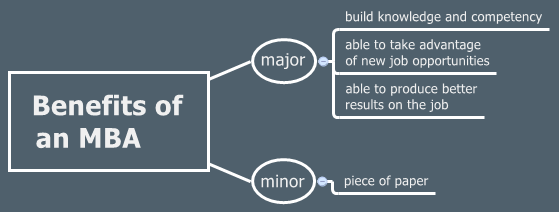
pmstudent.com - MBA benefits

The better question is to ask if you have the right mindset in the first place, for any form of learning.

As long as you have the right mindset (you are doing this to learn and make yourself more capable) then you can get as much if not more than other students who are doing an MBA program at an Ivy league school.

I am fairly certain that over half of my classmates when I went to college didn't have the mindset I'm talking about.  Having 'the mindset' can be inferred by behaviors like:

  • Doing independent research on your own that is not assigned, for nothing more than wanting to learn more about a specific topic.
  • Finding ways to incorporate what you are learning in class into your working day.
  • Asking lots of questions in class and of professors and aides between classes.  Real questions, trying to delve more deeply into concepts so you can master them.

Just remember, the piece of paper is not what matters. Building your competency is what matters, so more opportunities will become available to you as you network professionally. Networking and getting referrals from people who know you do good work is a much more effective way of getting your foot in the door.

If you’ve built your competency then you can knock their socks off after you’ve created the initial opportunity for yourself.

Share this with your network
Posted on: February 27, 2011 04:34 PM | Permalink | Comments (0)

Implementing User Stories in a Waterfall Paradigm

Categories: Agile

linkedin twitter facebook Request to reuse this  

Scriviamo le user stories Working on a large aerospace project the traditional requirements model applies. On my project user stories have not been used before to my knowledge.

Coming into this project after requirements had already been defined, I find that those requirements are somewhat lacking as a good description of what our software is supposed to do. They also do not function well as a springboard for further conversation. Now that I've been on the project for a while, I am ready to really start digging into using user stories and other agile concepts with my teams.

So far with one of my smaller teams we have been using user stories but not tracing them directly to requirements.  This is worked out pretty well for the smaller team, but with a larger more complex project this probably won't cut it. So, now I am starting a new release with one of my project teams and I will be creating a module in the requirements management tool that we use.  I will then trace the user stories to the requirements.

I have never done it this way before. In the past, I have always done either completely agile development with user stories and use case scenarios as the primary means of understanding what the customer needs or I have used a straight work breakdown structure and requirements framework.

The current plan is to not configuration manage the user stories at the same level we do our software requirements. With the user stories my team will essentially be the configuration management board, along with the customers for the specific functionality that we are developing. We have many customers including other software development teams, science users, and the mission operations personnel that will be using our software.

Do any of you have experience implementing user stories in a waterfall environment like this? If so I'd love to hear your suggestions and experiences on the topic.

Share this with your network
Posted on: February 26, 2011 09:42 AM | Permalink | Comments (2)

The Power of Focus

Categories: Kanban

linkedin twitter facebook Request to reuse this  

Today I'd like to share a few a success story that I've had recently with using kanban as a method for managing projects. In May of 2010 I decided to use this thing called kanban with one of my smaller project teams. The team was really excited about the idea although a little wary as well. I had only been there for about a month and already had a reputation as someone lets to try crazy weird new things.

It's been a little slow getting up and going with kanban and all of the concepts that come with it but I'm really happy with where we're at now. We finished out our first release using a kind of hybrid approach to kanban trying to not go to deeply into value stream mapping and user stories and some of the other concepts that come along with agile or kanban.

Value Stream Mapping


Workshop Value Stream Mapping de Mary Poppendieck. At the beginning of our second release we sat down as a team and figured out what our value stream looks like. A value stream is essentially just a series of toll gates that your project work moves through where each step adds value to the end product. It's a great way to understand the way that you're currently functioning as a team, and a visual way to understand how you could improve the process flow by which you produce the product.


Continuous Integration


In the process of developing our value stream we figured out doing things in real time is going to save time overall. For instance, with documentation, we used to wait until close to the release time where we were going to testing in order to hurry up and get all of our documentation done. I think the general assumption we had was that we didn't want to waste time doing documentation until we were finished coding because otherwise we may have to change the code and then go update the documentation again. In reality, working this way has saved us quite a bit of time.

For one thing the developers don't have to go back into their code and go through it again to try to remember what the heck they coded back three months ago. There is a lot of waste to get injected into a project when you wait so long between the time that you do the work and you try to document the system.


Focus


Focussing Hard Another major benefit we found from kanban in general and value stream mapping specifically, is the focus it helps create when we are working on tasks. With kanban a very important premise is that you limit the work in process. By mapping the value stream and making sure we only have one or two user stories or tasks in work and any given time, it helps protect the team from bad multitasking and getting distracted.

The kanban board also makes progress and status reporting extremely visual and easy to manage. In combination with the daily standup meetings that I started back in May. It has really improved our communication as a team.
 

Ahead of Schedule


Now, I'm happy to report that we are over a month ahead of schedule on our second release! The original baseline schedule was made at a time when we didn't have a lot of these practices in place that we now do. I have three other systems to experiment with, so the experiment will continue. But so far I'm really loving what kanban, user stories, daily tag ups, and continuous integration are doing for us.

Share this with your network
Posted on: February 25, 2011 10:47 AM | Permalink | Comments (0)
ADVERTISEMENTS

"A lie gets halfway around the world before the truth has a chance to get its pants on. "

- Winston Churchill

ADVERTISEMENT

Sponsors