pmStudent
by Josh Nankivel
Ranting and raving about project management and systems engineering.
Recent Posts
The Problem with Project Management
LinkedIn Recommendations Are Easy
The Catch-22 of Project Management Certification and Experience
Categories
Agile,
Career Development,
Certification,
Change Management,
Communications Management,
Cost Management,
Documentation,
Earned Value Management,
Education,
Integration and Test,
Kanban,
Leadership,
Lean,
Lessons Learned,
Methodology,
Misc,
Multitasking,
New Project,
Operations,
Planning,
PMP,
Productivity,
Professional Development,
Project Estimation,
Project Leadership,
Quality,
Requirements Management,
Risk Management,
Schedule Management,
Scope Management,
Software,
Systems Thinking,
Tools,
Video,
Work Breakdown Structures (WBS)
Date
|
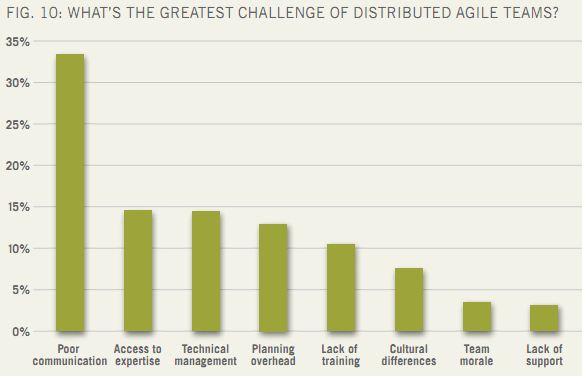
Projects At Work just released a new report called “Distributed Agile Teams”.
The whole report is interesting but I want to focus on a particular question.
21. What is the greatest challenge of working with a distributed agile team?

“Poor Communication” was the biggest challenge by far. Go figure!
Now I’ll be the first to admit that co-located teams is an optimal situation if you can get it. There is nothing like face-to-face interaction between team members. At the same time, there are some strategies for dealing with distributed teams that I believe many teams are not taking advantage of.
There are two root causes cited in the study I want to discuss: cultural/language issues and tools issues.
Cross-Cultural Teams
I have experienced first-hand the frustration of assuming communication has been smooth with someone who does not have the same language as you for their first language, only to find out it wasn’t.
This is where I think several options are available to ensure understanding across the entire team. This isn’t really limited to cultural differences within a team, miscommunications and different interpretations happen all the time regardless.
Make It Objective
It’s important to make sure you are using some kind of documentation that makes it clear what is being delivered. Good software requirements work, user stories, use cases, behavior-driven development, etc.
Regardless of the project, I’ve seen requirements that can be interpreted 57 different ways, and those are not good requirements. If you had to have been there when they were written and be told what the intent was, they are not good requirements.
Something I’ve started looking into heavily for my domain is behavior-driven development. It’s sort of like what I’ve known as test-driven development in the past, but much more user-focused. I like it. Aside from being very focused on the end user, it also makes it pretty darn clear what the functionality of the system is supposed to be. There is very little room for interpretation.
Make It Visual
The best way to communicate a concept clearly is through visuals, in my opinion.
This is why I love the kanban board. The whole team can see what’s going on at any given time. There are many online options available for distributed teams.
A picture is worth a thousand words, and it’s true. A diagram can convey a level of understanding that you just can’t get from words alone. Even when speaking to one another about parts and pieces of a system, our hands wave about wildly to illustrate specific points. At some point one of us usually says “Let’s go find a whiteboard, this is going to be much better if we can draw it.”
Well you can do the same with virtual teams too. Screen sharing and whiteboard tools are everywhere, free and paid. For my team members who are offsite, I love to use the desktop screen sharing application while on the phone with them. Either of us can convey understanding and have in-depth discussions this way as if we were in the same room.
Sometimes, the desktop sharing actually makes it seem better than being in the same room. You don’t have to lean over someone else’s shoulder or stare at a projector screen. You have the other person’s desktop right there in front of you.
Independent Validation
Having someone else on the team independently validate the work of other team members after development is finished is critical.
Why?
Not only for quality. No, this really helps teams gel in my experience. They get to know how their team members work better. They share tips and advice. They encourage each other. You know you’ve reached a good spot with independent validation as a part of your teams’ culture when people start actively seeking review from each other. That means they truly value each other’s opinions and communication is going to be enhanced as a result. It needs to be really easy to pick up the phone and just talk!
Tools For Distributed Teams
I think there is a lot of reliance on the wrong kind of tools out there for distributed teams. Task assignments shouldn’t be done through a software tool. In fact with something like kanban or some implementations of agile, it’s not even necessary. Self-organizing teams pull their own work out of the backlog.
Direct communication where possible is best, and so I really don’t believe in many of the tools out there today that get all whiz-bang about task assignments and capturing estimates in the tools, etc.
I’d rather have a simple kanban board, screen sharing software, a phone, and instant messaging. You can do time-boxed Agile just fine with a kanban board.
How do you think communication can be improved among distributed Agile teams?
|
Posted on: April 23, 2012 08:24 PM
|
Permalink |
Comments (1)
|

image by DailyPic via Flickr
When it comes to communicating with your project stakeholders, setting appropriate expectations and following through is king.
I was reminded of this important fact recently.
My Blunder
With four systems, I have a lot of key stakeholders. I had not properly communicated with one of those key stakeholders. At least, I should have done better.
I met with her this week and disovered she had specific worries about the system's useability that had not previously been uncovered. Had I been more dilligent, I could have easily addressed those concerns over a year ago. I came to this program after the design phase was complete, so I wasn't involved with eliciting requirements initially or working on system design.
I Was Lucky
I was able to address the concerns on the spot, but I was lucky. For other stakeholders, holding reservations like this for a long period of time could easily span resentment and cynicism toward the project.
The truth is, many people will avoid a conversation if they expect it might be unpleasant. Most of the time it isn't a conscious decision, but a heightened ability to rationalize behavior that avoids the confrontation.
I became aware of the fact I hadn't done enough to communicate with this stakeholder a few months ago. The opinions of my team made me think she would be very difficult to deal with, because everyone thought she'd want some functionality that our design just won't allow. So I rationalized that I really had to have my ducks in a row before I even attempted to speak with her. I had to justify the design all over again, and be sure I had talking points to respond to any objection.
Lesson Learned
In short, I wasted a lot of time and effort due to an imagined fear. It turned out she was very receptive to our design, she just didn't fully understand it and how she would be able to interact with the system.
If I had done a better job of communicating all along, her expectations as a stakeholder would have been clear to me and my team. In response, I could have ensured her expectations were set correctly and met.
I think it's important to acknowledge times like these when we fail to meet our own expectations. It's theraputic and educational. Here's another lessoned learned for the books.
Will you share a communication or setting expectations blunder in the comments? That way I don't feel so stupid. :-)
|
Posted on: October 14, 2011 06:05 PM
|
Permalink |
Comments (4)
|

"Do you know of any material, studies or other which covers agile project management but with geographically disparate participants. I have a couple of projects where this is difficult - design team in Bay Area, coders in Malaysia, China, India and Pakistan, customers/user reps across dozens of countries and project team in Singapore... timezones are killing me!"
In terms of Agile, I don't know of any training specifically for remote teams.
I do have some personal experience with it though. I currently manage 2 teams of which some members are remotely located.
I think Kanban does a lot for this scenario, primarily because it enables some self-organization that I think doesn't necessarily happen easily with something like straight forward scrum. The best thing is that you can use the kanban board even while not doing strict Kanban..and use it with any methodology, such as scrum or even waterfall.
It allows my team to conduct our daily stand-up and update the kanban board - even when I'm not able to be there. And yet I am able to see what updates were made later and still have a good view of what is going on with each project.
My recommendation to you would be to first learn about kanban if you don't already know much about it, then look into the many hosted electronic kanban boards for use on your teams. I personally love leankitkanban - but agilezen and others are very good too.
|
Posted on: May 14, 2011 04:38 PM
|
Permalink |
Comments (5)
|

We've all been there.
We have all been in terrible meetings or run terrible meetings. I know I have. I catch myself even now doing a poor job at planning and managing a discussion well.
It's so simple to do it well. Why don't we do it more often? Why do I forget the basics sometimes?
Here's a reminder for me, myself, I, and you too.
What's the Goal?
Have a clear goal going into the discussion. Is it a decision or set of decisions you want to come out with? Is it to communicate status?
Make sure the goal is clear to everyone, and that the goal is stated in such a way that you know when you've acheived it.
This is why an agenda is so important, even if it's just a few lines of text in the calendar item or in an email. It doesn't have to be formal, but it does have to clearly communicate the goal(s) clearly.
Respect People's Time
Schedule meetings to be 15 or 30 minutes by default. Most scheduling software automatically defaults to an hour. Change the defaults.
Limiting yourself to shorter meetings will keep them more focused and productive. I would rather have 2 30-minute meetings than a single 1-hour meetings if it makes sense. Sometimes that can be a good strategy, especially when it's a decision-making discussion. Expect actions and follow-up activity to come out of the first discussion, and get finalized in the second.
Shorter meetings also makes it easier for you to keep the group on track. If someone gets off topic, you can steer them back by interjecting "we only have a few minutes left for this discussion, so let's table that topic for now and deal with it individually or in a new meeting."
If you are scheduled for 30 minutes and you acheive the goal in 10 minutes, declare victory and get the heck out of there. Get everyone back to moving your project forward.
Additionally, start the meeting on time. Waiting around for 5 minutes for other people to arrive is pretty painful for everyone. In some cases you have to wait...if so, try to get some cheerful banter going at least...otherwise it's just boring silence.
Follow Up
If there are actions from the meeting, follow up on them. Make sure other people are as well.
Sending out meeting minutes is a great way to 1) ensure people know their responsibilities, 2) you remember who you are expecting updates from, and 3) help ensure understanding by re-stating the decisions in your own summary.
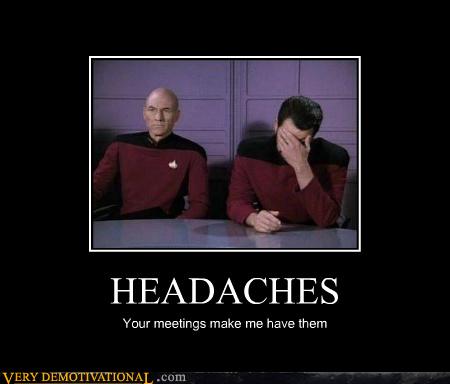
What ineffective behaviors do you catch yourself or others doing that give you a headache?
|
Share this with your network |
 |
 |
|
Posted on: March 19, 2011 05:33 PM
|
Permalink |
Comments (13)
|

I work in a project environment that consists of many project teams working on various systems that need to interface with each other. The interfaces between the systems can be the most difficult parts of the systems to manage.
Although we have interface specification documents (ISDs) and interface control documents (ICDs) some details of the interfaces still have problems.
So how do you make sure that project teams working together don't end up stepping on each others toes?
User stories
User stories by their very nature lend themselves to describe who needs what and why and this can apply to interfaces between systems very well. The format I use for user stories is the following:
"As (role), I (condition - need, do not need, expect, do not expect) (something), because (benefit). "
We also capture acceptance criteria to define how we know what 'done' looks like and a change log for reference when needs change. We just started doing this in my current project environment, and based on my previous experience with implementing user stories I am very confident these will help us be on the same page with groups and individuals outside our project team.
User stories are mostly useful as a foundation for discussion with the various stakeholders that you have, and make sure that you fully discuss the scenario and have documented what the decision was. On a project like mine, there are many situations where several ways to implement something exist, and it doesn't really matter which route we choose so long as everyone is on the same page.
Unfortunately, I have seen a lot of times in the past where one group thought that something was being implemented as A, and the group who was actually implementing it thought it was supposed to be B. User stories can help with these situations because doing them forces you to think through these situations and really clarify what A or B really mean and which solution we are going to implement.
They take a lot of the assumptions out of the process.
Open Communication Channels
It's also very important that your team members are empowered to go have the necessary discussions with groups outside your team, at any time their spider-sense is tingling telling them there may be confusion or different assumptions across groups. Everything does not have to go through the project manager. Many of these discussions will result in minor changes to the implementation that will not be a change in scope, schedule, cost, or quality.
I still ask my team to keep me in the loop, and they do a great job of this in our daily tag-up meetings when I ask the question, "What did you work on yesterday." In this way, we keep the whole team informed.
When changes do have potential impacts to the project's PMB (Performance Measurement Baseline) I am always involved. For each of these changes we need to do an impact analysis and weigh the cost-benefit to see if we really want to make this change through our CCB (Configuration Control Board).
Continuous integration
One of the best things about an agile style process is that you end up doing a build and run through of your entire system from end to end every sprint. Although my teams are no longer doing strict time-boxed scrum, we are doing kanban in a modified way where we are still doing a build of the system every two weeks and running in from end to end.
In addition to running our own system we try as much as possible to get the most recent build from the other systems we interface with and build them as well. This is what I like to call continuous integration, and so far it's really helped us to identify the miscommunications that still occur even with good requirements, user stories, interface documentation, and all the other things that we try to do to make sure we don't step on each others toes.
Hey, if we're getting in each others' way I'd rather find out about it sooner than later.
On large projects, how do you keep your project teams from colliding?
|
Share this with your network |
 |
 |
|
Posted on: March 05, 2011 10:44 AM
|
Permalink |
Comments (0)
|
A cat is a lion in a jungle of small bushes.
- English proverbs
|