


Good Meetings Are Simple. Really.
Categories:
Communications Management
Categories: Communications Management


|
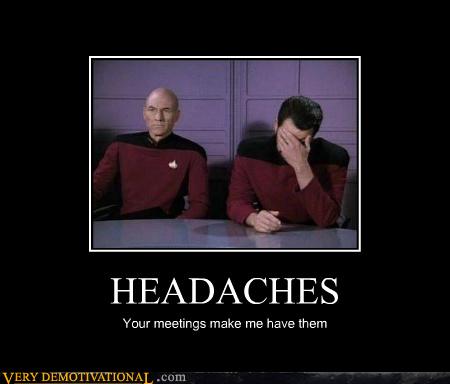
We've all been there. We have all been in terrible meetings or run terrible meetings. I know I have. I catch myself even now doing a poor job at planning and managing a discussion well. It's so simple to do it well. Why don't we do it more often? Why do I forget the basics sometimes? Here's a reminder for me, myself, I, and you too. What's the Goal?Have a clear goal going into the discussion. Is it a decision or set of decisions you want to come out with? Is it to communicate status? Make sure the goal is clear to everyone, and that the goal is stated in such a way that you know when you've acheived it. This is why an agenda is so important, even if it's just a few lines of text in the calendar item or in an email. It doesn't have to be formal, but it does have to clearly communicate the goal(s) clearly. Respect People's TimeSchedule meetings to be 15 or 30 minutes by default. Most scheduling software automatically defaults to an hour. Change the defaults. Limiting yourself to shorter meetings will keep them more focused and productive. I would rather have 2 30-minute meetings than a single 1-hour meetings if it makes sense. Sometimes that can be a good strategy, especially when it's a decision-making discussion. Expect actions and follow-up activity to come out of the first discussion, and get finalized in the second. Shorter meetings also makes it easier for you to keep the group on track. If someone gets off topic, you can steer them back by interjecting "we only have a few minutes left for this discussion, so let's table that topic for now and deal with it individually or in a new meeting." If you are scheduled for 30 minutes and you acheive the goal in 10 minutes, declare victory and get the heck out of there. Get everyone back to moving your project forward. Additionally, start the meeting on time. Waiting around for 5 minutes for other people to arrive is pretty painful for everyone. In some cases you have to wait...if so, try to get some cheerful banter going at least...otherwise it's just boring silence. Follow UpIf there are actions from the meeting, follow up on them. Make sure other people are as well. Sending out meeting minutes is a great way to 1) ensure people know their responsibilities, 2) you remember who you are expecting updates from, and 3) help ensure understanding by re-stating the decisions in your own summary. What ineffective behaviors do you catch yourself or others doing that give you a headache?
| |||||


You Can't Solve Project Issues With a Calculator
Categories:
Tools
Categories: Tools
|
Sometimes we can get a bit project management tools crazy. This can be a really big problem if we fall back on our spreadsheets, gantt charts, and staffing calculations in an attempt to solve our problems. These are tools, and can be very useful in helping to model a plan that we can then go execute on. But putting it into a tool doesn't make it happen, and trying to communicate via entries in a tool is not an effective way to solve problems. I hear you mumbling..."of course Josh. Duh! Why would you even write about this?" Unfortunately, I write about it because I see it happening every day. When a problem arises, what's your first step? Do you go talk to your team and stakeholders, or do you first go to a schedule? Calculators don't solve problems....people do.
| |||||

When Project Teams Collide
|
I work in a project environment that consists of many project teams working on various systems that need to interface with each other. The interfaces between the systems can be the most difficult parts of the systems to manage. User storiesUser stories by their very nature lend themselves to describe who needs what and why and this can apply to interfaces between systems very well. The format I use for user stories is the following: "As (role), I (condition - need, do not need, expect, do not expect) (something), because (benefit). "
We also capture acceptance criteria to define how we know what 'done' looks like and a change log for reference when needs change. We just started doing this in my current project environment, and based on my previous experience with implementing user stories I am very confident these will help us be on the same page with groups and individuals outside our project team. They take a lot of the assumptions out of the process. Open Communication ChannelsIt's also very important that your team members are empowered to go have the necessary discussions with groups outside your team, at any time their spider-sense is tingling telling them there may be confusion or different assumptions across groups. Everything does not have to go through the project manager. Many of these discussions will result in minor changes to the implementation that will not be a change in scope, schedule, cost, or quality. I still ask my team to keep me in the loop, and they do a great job of this in our daily tag-up meetings when I ask the question, "What did you work on yesterday." In this way, we keep the whole team informed. When changes do have potential impacts to the project's PMB (Performance Measurement Baseline) I am always involved. For each of these changes we need to do an impact analysis and weigh the cost-benefit to see if we really want to make this change through our CCB (Configuration Control Board). Continuous integration
One of the best things about an agile style process is that you end up doing a build and run through of your entire system from end to end every sprint. Although my teams are no longer doing strict time-boxed scrum, we are doing kanban in a modified way where we are still doing a build of the system every two weeks and running in from end to end. On large projects, how do you keep your project teams from colliding?
| |||||

MBA: Do You Have The Right Mindset?
Categories:
Education
Categories: Education
| I just responded to a great question about whether an online MBA would be worth it for someone. If I had the choice between an in-class degree versus an online degree, I might prefer the in-class option. I like to badger the professors too much, and you don't get to see their faces get red too often when you are doing it virtually. :-) Seriously though, many people find themselves in a situation where an in-class program just isn't going to be a possibility, or at least not something they would be willing to make happen by moving or re-arranging their lives. Personally, I wouldn’t shy away from an online degree if it were the best fit for my situation. The primary goal will be to study hard and learn tons of new information you can apply.
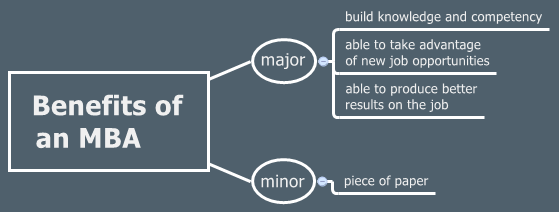
The better question is to ask if you have the right mindset in the first place, for any form of learning. As long as you have the right mindset (you are doing this to learn and make yourself more capable) then you can get as much if not more than other students who are doing an MBA program at an Ivy league school. I am fairly certain that over half of my classmates when I went to college didn't have the mindset I'm talking about. Having 'the mindset' can be inferred by behaviors like:
Just remember, the piece of paper is not what matters. Building your competency is what matters, so more opportunities will become available to you as you network professionally. Networking and getting referrals from people who know you do good work is a much more effective way of getting your foot in the door. If you’ve built your competency then you can knock their socks off after you’ve created the initial opportunity for yourself.
| |||||
Implementing User Stories in a Waterfall Paradigm
Categories:
Agile
Categories: Agile
|
| |||||



