Getting the Stains Out of Your Requirements


|
Here are some tips for your own situations where you must "scrub the stains" out of a set of requirements, as opposed to dealing with change management on one specific requirement. Make it EasyWe use DOORS to manage our requirements. For me, step 1 is to export from DOORS to an excel file. Getting these requirements into a format people are comfortable with is very important. Next, I trim away the fields that don't really matter for what I'm trying to do, and then copy/paste the requirements into a blank Word document. The reason for this will be come clear in a moment. Track Changes, with CommentsI turn on the "tracking changes" option in Microsoft Word, and go to it. Whenever a change is made, a comment accompanies it. I speak to my audience, the customer, so they will easily be able to understand why I am proposing some changes. In this case, I want to add clarity and also specify some functionality that has become known as a user need over time, but wasn't captured in the original requirements. Review With The TeamI always like to review any requirement changes with my teams before proposing them to the customer. This way, I can be sure I'm on the same page as my team members and there aren't any communication gaps about the needed functionality. Many times, the understanding I've gained about new wants and needs comes directly from my team members, who are interacting with the customer and future users of the system. It would be very bad if I had a misunderstanding on a particular requirement and ended up making that part of the baseline, when it's really describing the wrong thing. Meet with CustomerNext I meet with the customer to ensure the changes I'm proposing make sense to them. The comments I did earlier come in really handy, and the better they were, the easier this process is. In my environment, I prefer to do this before having it come up at a Change Control Board (CCB) meeting as a change request. I want the customer to be knowledgeable about the proposed changes and see the value in them before having to make a decision. Change Control BoardThe final step is to "make it official". If you don't have a change control board in your project environment, you should set one up. It doesn't have to be complicated, but it does require that everyone on the project understand that changes don't get made to the project baseline unless they are approved by the CCB. The customer and sponsor should be voting members, and in my environment the customer is the chair of the CCB. That means they have the final word on whether a proposal will be approved or not. If you are in a different contract environment, it may be a CCB internal to your own company/contract you are interacting with.
| |||||
 Having taken over a project, I find myself in the awesome position of needing to revise requirements with my customers that are pretty obviously in need of some spring cleaning.

Conflict Resolution Diagram For Projects
Categories:
Systems Thinking
Categories: Systems Thinking
| If you are a fan of Theory of Constraints (TOC) as I am, you may know of the Evaporating Cloud Diagram. As I have been using Kanban for some time now, I have found myself going back to my TOC roots and unpacking some of the tools I am somewhat familiar with, but haven't used nearly enough in practice until recently. The following figure is an example of this tool put to use. Conflict Resolution Diagram
The GoalThis tool is useful when you have two competing interests that appear to be at odds. Mapping it out like this helps walk through the assumptions being made. Each of the arrows carries at least one assumption, perhaps many assumptions. The 5 sentences below the diagram are the default assumptions being made here. So in the main, this helps everyone understand the underlying assumptions so they can be analyzed with a skeptical eye. Let's Walk it ThroughThe objective here is to have a cost-effective, quality system. We want to maximize quality and minimize costs at the same time. I'm sure this is just a weird example, we've never run into this before, right? One of these assumptions as I walk through them stands out to me. Do we really have to sacrifice functionality and scaleability in order to minimize costs? What about that statement seems like it may not be quite right? In this example, I discovered that "minimize costs" was a requirement, but put this way, it was being assessed in the narrow and short-term way of project cost. The life time cost (and from all sources) were not being properly factored into the ROI equation. Quality was being assessed as a lifetime dimension of the system...but because of accounting practices and separate funding sources, costs were only being assessed in the scope of the project. Looking at it this way (and using this as a tool to help senior management understand) is a great method to apply systems thinking to conflict resolution on your projects. It's helped me personally to help sponsors "see the light" when it comes to justifying the expense of licensing software, procuring specific hardware, etc. It has helped me in many instances. Give it a shot!
| |||||

Smaller Batch Sizes = Higher Quality
Categories:
Agile
Categories: Agile
|
I've recently experienced an epiphany. I should have seen it earlier. I mean, duh! I have been using kanban with my teams for some time now, and up until now we have been mostly focused on limiting work in progress (WIP) and evolving our value stream. Only recently did we start trying to reduce the batch sizes of code being worked through the system. The Changes Have Been DramaticRather than trying to peer review a whole slew of code, the team is engaged in more frequent, shorter peer reviews that are highly focused on just a small bit of code, individual features in most cases. As a direct result, I believe we are producing higher quality software. Mind you, I can't prove it quite yet. In our waterfall paradigm, it's going to be a little while before we get to a full release where we go through formal acceptance testing. Because this is the way it's always been, defects in code are going to have to be measured against the previous benchmark established in previous releases. It Makes SenseI mean really, this is a no-brainer. If someone has to spend 4 hours scouring through hundreds of lines of code, it's going to get glossed over and things will be missed. If someone knows they will get through a peer review in 10 minutes, it's a lot different. Easier to focus. Higher scrunity on the code. Better solutions are developed and collaborated on. Awesomeness ensues. Not to mention, there is a shorter turnaround time from when the developer codes to when they receive feedback, and when they can disposition comments and make it better. Less knowledge lost, more value gained. Now the nagging question is....why didn't we start doing this earlier?
| |||||

Sell Your Teams on Why!
Categories:
Leadership
Categories: Leadership
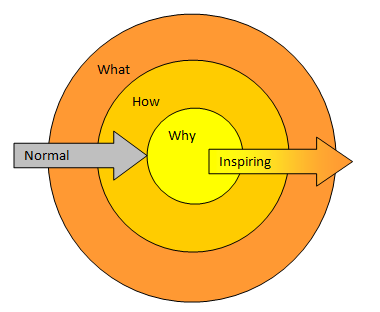
| I absolutely love this TED talk by Simon Sinek and had to share it with you. I want to draw out some of these ideas and apply them to project leadership and project management. A great example of this principle in action for projects are implementations of particular methodologies driven by calls for efficiency or because all of the hip kids are doing it. Countless organizational change iniatives fall prey to this same failure of trying to sell what and how, not why. How many of us have had process change around us because someone thought it would be a good idea, but we have no idea why the change is happening or why we should care? If you adopt agile or kanban or whatever whiz-bang method of working, are your teams and organization following because they have to, or because they want to? Have you sold them first on the why? I think this is an area I can improve on, as I'm sure almost all of us can. I have implemented agile methods of working with teams without any more justification then "trust me, I think this will really help us work better." I was luck in that my teams have usually had some knowledge of agile and were positive on the general approach. So I was relying on their own internal reasons for why in those cases. Below is my own representation of Sinek's "Golden Circle". The normal method of selling stakeholders and project teams on a project vision is to start with the what, figure out the how, and probably barely touch on the why. For many project team members, the best answer they have to "why?" is "because it's my job." On the other hand, the inspiring arrow shows a project leader who sells their stakeholders and teams on the core "why?" question first, by answering it in a compelling way. From then on, the details of what, how, when, etc. get worked out in light of the primary answer to "why?" - The Goal.
Please check out his TED talk below. I think you'll enjoy it. People don't buy what you do. They buy why you do it. ~Sinek
| |||||
Good Meetings Are Simple. Really.
Categories:
Communications Management
Categories: Communications Management
|
We've all been there. We have all been in terrible meetings or run terrible meetings. I know I have. I catch myself even now doing a poor job at planning and managing a discussion well. It's so simple to do it well. Why don't we do it more often? Why do I forget the basics sometimes? Here's a reminder for me, myself, I, and you too. What's the Goal?Have a clear goal going into the discussion. Is it a decision or set of decisions you want to come out with? Is it to communicate status? Make sure the goal is clear to everyone, and that the goal is stated in such a way that you know when you've acheived it. This is why an agenda is so important, even if it's just a few lines of text in the calendar item or in an email. It doesn't have to be formal, but it does have to clearly communicate the goal(s) clearly. Respect People's TimeSchedule meetings to be 15 or 30 minutes by default. Most scheduling software automatically defaults to an hour. Change the defaults. Limiting yourself to shorter meetings will keep them more focused and productive. I would rather have 2 30-minute meetings than a single 1-hour meetings if it makes sense. Sometimes that can be a good strategy, especially when it's a decision-making discussion. Expect actions and follow-up activity to come out of the first discussion, and get finalized in the second. Shorter meetings also makes it easier for you to keep the group on track. If someone gets off topic, you can steer them back by interjecting "we only have a few minutes left for this discussion, so let's table that topic for now and deal with it individually or in a new meeting." If you are scheduled for 30 minutes and you acheive the goal in 10 minutes, declare victory and get the heck out of there. Get everyone back to moving your project forward. Additionally, start the meeting on time. Waiting around for 5 minutes for other people to arrive is pretty painful for everyone. In some cases you have to wait...if so, try to get some cheerful banter going at least...otherwise it's just boring silence. Follow UpIf there are actions from the meeting, follow up on them. Make sure other people are as well. Sending out meeting minutes is a great way to 1) ensure people know their responsibilities, 2) you remember who you are expecting updates from, and 3) help ensure understanding by re-stating the decisions in your own summary. What ineffective behaviors do you catch yourself or others doing that give you a headache?
| |||||