Disciplined Agile
by Tatsiana Balshakova,
Mark Lines, Mike Griffiths, James Trott, Bjorn Gustafsson, Curtis Hibbs, Scott Ambler

This blog contains details about various aspects of PMI's Disciplined Agile (DA) tool kit, including new and upcoming topics.
View Posts By:
Tatsiana Balshakova
Mark Lines
Mike Griffiths
James Trott
Bjorn Gustafsson
Curtis Hibbs
Scott Ambler
Past Contributors:
Joshua Barnes
Michael Richardson
Daniel Gagnon
Valentin Tudor Mocanu
Kashmir Birk
Glen Little
Klaus Boedker
Recent Posts
DA 5.6 is released
Disciplined Agile 5.5 Released
Choose Your WoW! Second Edition Is Now Available
Requisite Agility applied in Project Management
Disciplined Agile and PMBoK Guide 7th Edition
Categories
#ChoiceIsGood,
#ChooseYourWoW,
#ConsumableSolution,
#ContinuousImprovement,
#CoreAgilePractices,
#experiment,
#Experimentation,
#GuidedContinuousImprovement,
#Kaizen,
#LifeCycles,
#ProcessImprovement,
#TealOrganizations,
Adoption,
agile,
agile adoption,
Agile Alliance,
Agile Business Analyst,
Agile certification,
agile data,
agile governance,
agile lifecycle,
agile metrics,
agile principles,
agile transformation,
Agile2018,
Agile2019,
Agile20Reflect,
AgileData,
Analogy,
announcement,
Architecture,
architecture,
architecture owner,
Articles and publications,
Asset Management,
Atari,
Backlog,
Barclays,
being agile,
benefits,
bi,
blades,
book,
Branching strategies,
Browser,
Business Agility,
business intelligence,
business operations,
capex,
Case Study,
Certification,
certification,
charity,
Choose your WoW,
CMMI,
cmmi,
Coaching,
Collaboration,
Communications Management,
Compliance,
Compliancy,
Conference,
Construction,
Construction phase,
Context,
Continuous Improvement,
coordination,
COVID-19,
Culture,
culture,
Cutter,
DA,
DAD,
DAD Book,
DAD discussions,
DAD press,
DAD roles,
DAD supporters,
DAD webcast,
DADay2019,
Data Management,
database,
dependencies,
Deployment,
Development Strategies,
DevOps,
disaster,
Discipline,
discipline,
Disciplined Agile,
disciplined agile delivery,
disciplined agile delivery blog,
Disciplined Agile Enterprise,
disciplined devops,
Documentation,
Domain complexity,
dw,
DW/BI,
Energy Healing,
Enterprise Agile,
Enterprise Architecture,
Enterprise Awareness,
enterprise awareness,
Essence,
estimation,
Evolving DA,
Executive,
Experiment,
facilitation,
FailureBow,
feedback-cycle,
finance,
Financial,
FLEX,
Flow,
foundation layer,
Funding,
GCI,
GDD,
Geographic Distribution,
gladwell,
global development,
Goal-Driven,
goal-driven,
goals,
Governance,
GQM,
Guideline,
Hybrid,
Improvement,
inception,
Inception phase,
India,
information technology,
infosec,
Introduction,
iterations,
Kanban,
large teams,
layer,
lean,
Lean Startup,
learning,
Legal Project Management,
LeSS,
Lifecycle,
lifecycle,
Manifesto,
mark lines,
marketing,
MBI,
Metaphor,
Metrics,
metrics,
mindset,
Miscellaneous,
MVP,
News,
News and events,
Non-Functional Requirements,
non-functional requirements,
Non-solo development,
offshoring,
Operations,
opex,
Organization,
Outsourcing,
outsourcing,
paired programming,
pairing,
paper,
People,
People Management,
phases,
Philosophies,
Planning,
PMBoK,
PMI,
PMI and DA,
PMI Chapter,
Portfolio Management,
post-format-quote,
Practices,
practices,
Principle,
Process,
process improvement,
process tailoring,
Product Management,
product owner,
Product Owners,
productivity,
Program Management,
Project Management,
project-initiation,
Promise,
Quality,
quality,
rational unified process,
Refactoring,
Reiki,
Release Management,
release management,
Remote Training,
Remote Work,
repeatability,
requirements,
Requirements Management,
research&development,
responsibilities,
retrospectives,
Reuse,
Reuse Engineering,
ride for heart,
rights,
Risk Management,
Risk Management,
Risk management,
Roles,
RUP,
SAFe,
sales,
Scaling,
scaling,
scaling agile,
Scheduled Workshops,
SCM,
scorecard,
Scrum,
ScrumMaster,
SDLC,
Security,
security,
self-organization,
SEMAT,
serial,
skill,
solutions software consumable shippable,
Stakeholder Management,
strategy,
Support,
Surveys,
Teal organizations,
team development,
Team Lead,
team lead,
Teams,
Technical Debt,
Teleconferencing,
Terminology,
terraforming,
test strategy,
testing,
time tracking,
Tool kit,
Toolkit,
tools,
traditional,
Transformation,
Transition iteration,
transition phase,
Uncategorized,
Upmentors,
Using PMI Standards,
value stream,
velocity,
vendor management,
Virtual Training,
Workflow,
workflow,
workspaces
Date
Viewing Posts by Scott Ambler
| 
In this blog posting we describe four general release management strategies that support DevOps. These strategies, from least effective to most effective, are:
- Release windows (slow cadence). A release window is a period of time during which one or more teams may release into production. A release slot is subset within that release window (and may be the entire window) during which a team may deploy their solution into production. For example, your organization may have a policy that production releases occur between 1am and 5am on Saturday evenings (the release window) and that up to four releases may occur during that window (the release slots). In lean terms, a release slot is effectively a Kanban card that allows a team to deploy. Release windows tend to align with periods where system usage is lower, although in the modern world of global 24/7 operations these periods have all but disappeared. With a slow cadence approach to this strategy the release windows occur far apart, as seldom as once a week or even longer. The advantages of this approach are that it provides a consistent release cadence to business stakeholders and it provides consistent release date targets for delivery teams. The primary disadvantage with slow cadence release windows is that they become bottlenecks for release management processes that need to support multiple teams. There are only so many release slots available during each window and this number can be easily exceeded, forcing teams to aim for a future release window. This problem becomes exacerbated when teams start to move to a continuous delivery strategy.
- Release train. The idea with a release train is that every team involved with that “train” has the same release cadence – for example this train releases once a quarter, or once a month, or even once a week. This strategy is commonly used in large programs, or teams of teams, where the individual teams are each working on part of a larger whole. Having the common drumbeat of a release train provides a consistent release schedule for stakeholders and serves as a rallying point for development teams. The train metaphor works quite well in practice. If your team misses the release date, if you miss the train, then the train goes on without you and you need to wait for space on the next on. Dependencies are also respected. For example, if several components need to ship together they must all go on the same train (similar to a family taking a trip together). The primary disadvantage is that development teams are constrained to a common release schedule, making it difficult to support lean or continuous delivery strategies. A potential disadvantage is that release trains may also suffer from the bottleneck problems of slow cadence release windows.
- Release windows (quick cadence). To support continuous deployment, particularly across many delivery teams, you will need a large number of release slots. The implication is that you will also likely need more release windows more often. The advantage of quick cadence release windows is that they are less likely to suffer from the bottleneck challenges associated with slow cadence release windows and release trains.
- Continuous release availability. With this approach delivery teams are allowed to release their solutions into production whenever they need to. In many ways this is simply an extension of the release window strategy to be 24/7. This is the only strategy that truly supports continuous delivery. To make it work a host of DevOps practices are required, such as fully automated deployment, fully automated regression testing, feature toggles, self-recovering components, and many others are required.
Our experience is that most enterprises today employ a slow cadence release window approach although are starting to evolve into the quick cadence version of this strategy. This is usually motivated by the adoption of agile techniques by solution delivery teams and more often than not by continuous delivery practices. We also see large programs take a release train approach, a strategy pioneered in the 1990s by large software companies such as Microsoft and Rational that sold software suites comprised of many products that needed to be shipped together. In recent years the OpenUP and SAFe frameworks have popularized the release train strategy. The strategy of continuous release availability is commonly used in advanced DevOps organizations such as Etsy and Amazon.
An important point to be made is that there are several options available to you, each of which has its advantages and disadvantages. No single approach is perfect, and no single approach works in all situations. You not only need to have choices, it’s good to have choices.
The next blog posting in this series continues with more release management DevOps strategies.
|
Posted
by
Scott Ambler
on: March 09, 2015 06:17 PM
|
Permalink |
Comments (1)
|
In this blog posting we describe two issues for organizing your release management strategy: How to scope release management and how to organize the team.
There are two fundamental issues to consider when scoping your release management efforts:
- Paradigm support. Will your release management process focus on supporting one paradigm, such as agile/lean teams or will it provide a more holistic strategy to also support agile/lean teams, traditional teams, iterative teams, and even ad-hoc teams? Many people who are currently writing about release management tend to focus on a single paradigm, although they may not explicitly state this, but the reality is that most enterprise-class organizations need multi-paradigm support in practice.
- Domain support. Will your release management process focus on IT-related issues or will it address the full range of business-related release issues? IT-related release issues include deploying new software and hardware into production. Business release issues may include marketing campaigns, training your sales force, and organizing external support mechanisms for end users to name a few. This is particularly important for commercial solutions being produced for the end customer of your organization.
These two issues lead us to the following quadrant chart depicting the potential scope for release management:

From a Disciplined DevOps point of view we of course promote a Holistic Enterprise scoping strategy. Whatever scoping strategy you choose your release management strategy will need to be able to support the scaling situations faced by your delivery teams. This includes teams of various sizes, different levels of geographic distribution, dealing with different levels of domain and technical complexity, teams that are organizationally distributed, and teams in compliance situations.
There are three strategies to consider for organizing your release management team:
- Operations led. In many small to medium-sized organizations release management is one of many activities that are performed by the operations team. With this approach a “release team”, in some cases an individual, is put together to release a solution on a project-by-project basis. Although there is often a hand-off point from the development team to the operations team, the operations team may require several members of the development team to be actively involved with the deployment. The advantages of having operations manage releases are that they are very familiar with the current state of your production environment and they know what other releases are happening in parallel (if any) and thereby have an integrated view of the overall situation. The primary disadvantage is that they will not know the intricacies of the new release of the solution, hence the need to include development team members.
- Separate release team. Larger organizations will often have an explicit release management team, often a subgroup of their operations department. The advantages of a separate team include the ability to grow expertise in release management, familiarity with your production environment, and the ability to manage releases in an integrated manner. The disadvantages are the lack of familiarity with solution(s) being released and the potential to inject overhead into the overall release process.
- Delivery team led. This approach is common in very small organizations that do not have separate operations teams and in organizations delivery teams have adopted at very disciplined approach to DevOps that supports the practice of continuous deployment. The advantages of a delivery team approach are that that team is very familiar with how the solution is built and they are given greater flexibility to deploy as needed into production. The disadvantages are that there is a risk of deployment collisions in multi-team environments and integration problems in production between disparate systems. Luckily these disadvantages can be addressed via a combination of development-oriented DevOps practices and the following release management practices.
|
Posted
by
Scott Ambler
on: March 07, 2015 07:23 AM
|
Permalink |
Comments (1)
| There is no such thing as a “best practice”, except perhaps from a marketing point of view. All practices (and strategies) are contextual in nature. In some situations a practice works incredibly well and it other situations a practice can be the kiss-of-death. Two of the philosophies behind the Disciplined Agile (DA) tool kit are that choice is good and that you should understand the trade-offs of the options available to you. In short, practices are contextual in nature and you should strive to adopt the ones that work best for the situation that you find yourself in.
Let’s work through an example. A hot button for many people are strategies around cost estimation, typically used for budgeting and forecasting purposes. In DAD initial estimation is addressed by the Plan the Release process goal, the goal diagram for which is shown below. As you can see with the Estimating Strategy factor there are several options available to you. We’re not saying that these are all of the potential estimating options available, but we are saying that this is a fairly good representative range. The arrow on the left-hand side of the strategies list indicates that the strategies towards the top of the list are generally more effective for initial planning than the strategies towards the bottom of the list. Your mileage may vary of course.
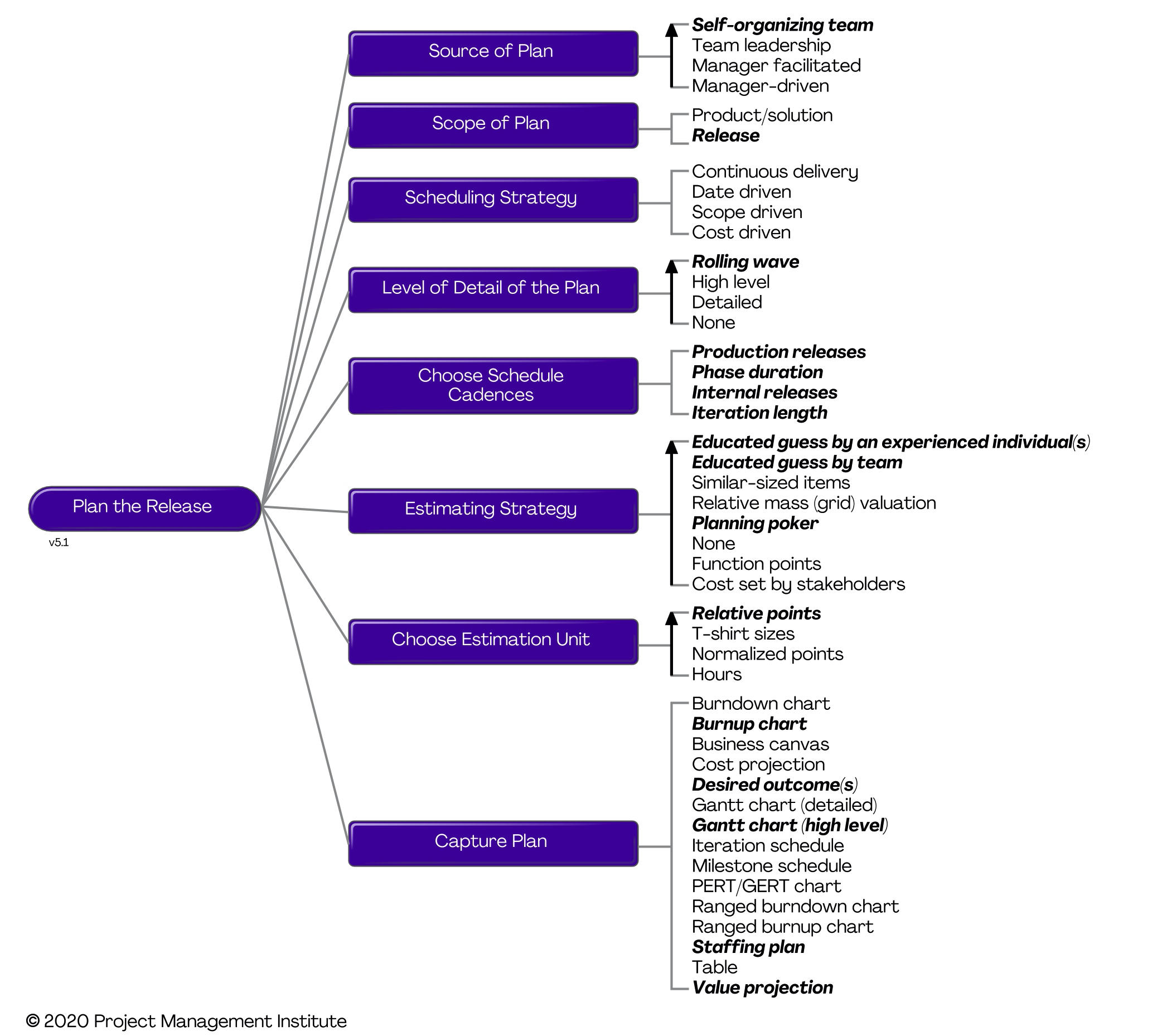
The following table summarizes the trade-offs involved with two of the estimating strategies, in the case formal point counting (such as function points) and an educated guess by an experienced individual. One of the reasons why Choose Your WoW! is so thick is that much of it is tables like this communicating the trade-offs of the hundreds of practices and strategies encapsulated by the toolkit. As you can see, there are advantages and disadvantages to both strategies. You can also see that there are situations where each strategy potentially makes sense. Although you may not like a given strategy, I personally abhor formal point counting, you should still respect the fact that the strategy is viable in certain situations (perhaps not yours).
| Strategy |
Advantages |
Disadvantages |
Considerations |
| Formal point counting |
- Fulfills contractual obligations in some situations – for example, the US Government often requires function-point based estimates.
- Provides a consistent way to compare projects and team productivity.
- Often increases the political acceptability of the estimate due to the complexity of the effort to create it.
|
- Greatly extends the Inception phase effort.
- Provides a scientific façade over the estimation activity, even though estimation is often more of an art in practice.
- Reduces team acceptance of the estimate because the estimate is typically produced by a professional estimator.
- Historical data won’t exist for new technology platforms or development techniques, requiring you to guess the value of some complexity factors.
- Provides a mechanism to compare the productivity of development teams, which can motivate them to over estimate and thereby decrease comparability and the value of your historical database.
- Total cost of ownership (TCO) is very high as it motivates questionable specification practices, which in turn motivate change prevention and other poor behaviors by the development team.
|
- Overly long estimation efforts in an effort to get the “right answer” often prove to be far more costly than the actual benefit provided.
- Beware of misguided desires for “accurate” or “consistent” estimates which prove costly to produce in practice yet don’t improve the decision making ability of senior management to any great extent
|
| Educated guess by experienced individual |
- Very quick and inexpensive way to get a reasonable estimate.
|
- Requires that you have an experienced person involved with your project (if you don’t, then you should consider this a serious risk).
- Explicitly reveals to stakeholders that estimating is often more art than science.
- Some stakeholders may be uncomfortable with the fact that you’re guessing.
|
- Beware of estimates by people who are inexperienced with the platform or domain or who do not know the abilities of team.
|
There are several reasons why DAD’s goal-driven approach is important:
- It makes your choices explicit. If your team wants to truly own your process then it first needs to know what choices are available to it.
- It makes it clear that practices are contextual in nature. No practice is perfect for all situations, every single one has advantages and disadvantages. Are you choosing the ones that are most appropriate for your situation?
- You can have more coherent discussions of the trade-offs that you’re making. We have endless religious battles in the IT industry around process-related topics. This often happens because people choose to focus on the benefits of their favorite practices and to downplay the disadvantages (or worse yet are oblivious to them). To help your team move to more effective practices it’s important to recognize the trade-offs involved with each, to then discuss them rationally, and then decide to adopt the strategy that is most viable given your situation. Note that this doesn’t necessarily mean that you’re going to adopt the best practice from the start, but that instead you’ll adopt the best one that you can right now. Later on, perhaps as the result of a retrospective, you’ll decide to make improvements to your approach (in the case of process factors where the strategies are ranked by effectiveness, your team may choose to adopt a strategy higher in the list).
- Improves the effectiveness of retrospectives. During a retrospective it is fairly straightforward to identify potential problems that you’re facing, what isn’t as easy is identifying potential solutions. You can improve retrospectives by having these process goal diagrams available to you to suggest potential strategies that you should considering adopting.
- You can avoid reinventing existing practices. Many very smart and very experienced people have found ways to deal with the same challenges that you’re facing today. Furthermore, many of them have shared these strategies publicly. If you don’t know that these strategies exist you are at risk of wasting time reinventing them, time that could be better spent adding real value to your organization.
- It enables scaling. Teams in different situation will make different process decisions. Although teams at scale, perhaps they are large teams or geographically distributed, will follow many of the same practices as small co-located teams they will also adopt a few strategies that make sense for them given their situation. DAD’s process goals provide the insight that teams need to understand how they can address the challenges associated with the scaling factors that they face.
For a more detailed discussion about the challenges around “best practices”, you may find the article Questioning Best Practices to be an interesting read.
|
Posted
by
Scott Ambler
on: March 05, 2015 05:16 AM
|
Permalink |
Comments (0)
|

In this blog posting, part of our continuing series on DevOps, we explore solution support strategies. There are several solution support (help desk) strategies, which can be combined, that you may choose to adopt. These options are:
- Online information. A very common “self serve” support strategy is to develop and maintain online assets such as frequently asked questions (FAQ) pages, training videos, and user manuals to name a few. This enables end users to potentially support themselves, although suffers from the TAGRI (They Ain’t Gonna Read It) syndrome.
- Online discussion forums. Many organizations choose to implement internal discussion forums so that their end users can help each other in learning how to use their systems. This is effectively a collaborative self-serve support option for end users. The primary advantage is that your “power users”, or in some cases members of the development team, will come to the aid of other users who are struggling with an issue. A potential disadvantage is that you risk your discussion forum becoming a complaints forum if problems aren’t addressed in a timely manner.
- Asynchronous support. With asynchronous support strategies an end user will put in a request for help and then sometime later somebody gets back to them with help (hopefully). Common ways to implement asynchronous support include implementing a standard support email or a support request page/screen. It is common in many organizations to put a service level agreement (SLA) in place putting limits on how long people will need to wait for help.
- Synchronous support. With synchronous support strategies end users are put in contact with support people (who may even be one of the application developers) in real-time. This is often done via online chat software, video conferencing, or telephone calls. The key advantage of synchronous support is responsiveness. However, synchronous support can be expensive to operate and potentially frustrating for end users, particularly when the support desk function is outsourced to people following scripts.
- Support alerts. With this strategy your solution itself detects serious problems affecting end users, such as a data source or a service/component being unavailable. When such an event occurs, and the solution isn’t able to swiftly recover, the end user is informed of the problem and presented with a “Would you like help?” option. If yes, they are put in direct contact with an appropriate support person who then helps them in real-time. This is part of your solution’s self-recovery process.
- Developer-led support. This strategy has development teams performing the support services for their own solutions and was described previously in DevOps Strategies: Development.
In the next installment in our DevOps series we will describe release management strategies.
|
Posted
by
Scott Ambler
on: February 27, 2015 06:54 AM
|
Permalink |
Comments (0)
| 
There are several technical strategies that support the operational aspects of DevOps:
- Solution monitoring. As the name suggests, this is the operational practice of monitoring running solutions and applications once they are in production. Technology infrastructure platforms such as operating systems, application servers, and communication services often provide monitoring capabilities that can be leveraged by monitoring tools (such as Microsoft Management Console, IBM Tivoli Monitoring, and jManage). However, for monitoring application-specific functionality, such as what user interface (UI) features are being used by given types of users, instrumentation that is compliant with your organization’s monitoring infrastructure will need to be built into the applications. Development teams need to be aware of this operational requirement or, better yet, have access to a toolkit that makes it straightforward to provide such instrumentation.
- Standard platforms. Software development practices, such as continuous deployment and initial architecture envisioning, are enabled by consistency within your operational infrastructure. It is much easier to deploy to a handful of standard hardware configurations than it is to a myriad of unique ones. It is easier to deploy when there are consistent versions of infrastructure software (e.g. operating systems, databases, middleware, and so on) deployed across your environment. For example, all instances of your Oracle DB are 11.2.1.3, you don’t have 11.2.0.0, 12.0.1.0, and 11.2.1.3 installed in various places. Furthermore, it is much easier to make architecture decisions when there is consistency of infrastructure software packages in the first place. For example you standardize on Linuz for your server operating system, you don’t also have Windows, z/OS and others also in production (and if you do you’re actively retiring them).
- Deployment testing. After a solution, or an update to a component of your operational infrastructure, has been deployed you should run a quick set of tests to verify that the deployment was successful. Were the right versions of the files installed where they need to be? And were they deployed to all appropriate servers? Were database transformations applied successfully? Did the appropriate announcements, if any, get sent out? Did the overall deployment process run within the desired time frame?
- Automated deployment. Deployments should be automated, not manual. This increases the consistency of your deployments and supports the practice of continuous deployment. Part of your automation effort should be to support both self-recovery and self-testing as native aspects of your deployment strategy.
- Support environments. Anyone doing solution support, even if it is the development team itself, is likely to need an environment in which they can reproduce problems that end users experience. There are several options available to you:
- Production. In some cases your production environment is sufficient, although many regulatory regimes, particularly life-critical and financial-critical ones, will not allow this.
- Pre-production test sandbox. Some support teams will find that they can use their pre-production test environment to try to simulate production problems. The advantage is that you don’t put production at risk when trying to reproduce problems, the disadvantage is that you the test environment will be different than production and as a result you may not be able to simulate all reported problems.
- Support sandbox. Some organizations choose to have a specific environment set up to enable support staff to simulate production problems. This strategy has the same tradeoffs as using a pre-production test sandbox plus the additional cost and maintenance associated with yet another environment.
In the next blog posting in this DevOps series we will explore solution support strategies.
|
Posted
by
Scott Ambler
on: February 19, 2015 04:59 AM
|
Permalink |
Comments (0)
|
"When I have a kid, I wanna put him in one of those strollers for twins, then run around the mall looking frantic."
- Steven Wright
|







