


Effective Daily Stand Up Meetings


|
A few weeks ago one of my customers asked me for advice about daily standup meetings (also called Scrum meetings, morning meetings, or better yet coordination meetings). Her feeling was that her teams could become more disciplined in their approach to coordination meetings so she asked if it would be possible to see how teams in other companies run their meetings. I indicated that there are a lot of good videos on YouTube and that I would write something up soon in a blog posting. So here goes.
Here’s a few interesting videos that I found on YouTube:
|

Improve Retrospectives with Process Goals
| Retrospectives are a great way for teams to explore potential improvements to the way that they work. A team will get together, discuss what is working well for them, what is not working so well, and hopefully identify ways that they could improve. It’s this last activity that can be challenging. You may know that your team is facing a problem but you might not understand your options. For example, perhaps your team is struggling with the way that it is being funded. The current funding mechanism is to estimate the cost up front and then allocate these funds to your team. This motivates your team to be wary of changing requirements due to the fear of going over budget, something that decreases your ability to produce a solution that meets the true needs of your stakeholders. You have suggested to management several times that a time and materials (T&M) approach would be more appropriate, but you have gotten nowhere with that conversation. This is where DAD’s process goal-driven approach can help out. In this case the goal Secure Funding provides some insight. The process goal diagram, see below, along with the supporting descriptions of each technique, their advantages and disadvantages, and advice for when the technique is applicable can help your team to understand their options and hopefully argue for a better funding strategy. Although a T&M approach might not be palatable to your financial team right now, perhaps they would be willing to consider a stage gate approach to funding. Or, perhaps they would be open to a T&M approach but they just don’t understand the tradeoffs between T&M and fixed cost. With DAD’s goal-driven approach the team can arm itself with the arguments that it needs to have a knowledgeable conversation with the actual decision makers.
Of course this is just one example. The DA toolkit addresses a range of goals pertinent to successful agile solution delivery, all of which can provide team’s insight into potential process improvement options. Knowing your options is an easy way to up your game during retrospectives. |
.jpg)
Does your team own its process or merely rent it?
Categories:
agile,
Adoption,
Context,
Scrum,
Philosophies,
Kanban,
lean,
culture,
process improvement,
goal-driven
Categories: agile, Adoption, Context, Scrum, Philosophies, Kanban, lean, culture, process improvement, goal-driven
|
An important philosophy within both the agile and lean communities is that a team should own its process. In fact, one of the principles behind the Agile Manifesto is “At regular intervals, the team reflects on how to become more effective, then tunes and adjusts its behavior accordingly.” The idea is that teams should be empowered to choose their way of working (WoW), to "own their process," including both their team structure and the process that they follow, to meet the unique needs of the situation that they find themselves in. Teams that own their process will tailor it over time as they learn how to work together, adopting new techniques and tweaking existing ones to increase their effectiveness. As with most philosophies this one is easy to proselytize but not so easy to actually adopt. When it comes to process improvement, teams will exhibit a range of behavior in practice. Some teams see process as a problem and actively seek to ignore process-related issues. Some teams are ambivalent towards process improvement and generally stick with what they’ve been told to do. And some teams see process improvement as an opportunity to become more effective both as a team and as individuals. This range of behaviors isn’t surprising from a psychology point of view although it can be a bit disappointing from an agile or lean point of view. It has led me to think that perhaps some teams choose to “own” their process but many more still seem to prefer to simple rent it. The behaviors of people who rent something are generally different than those who own something. Take flats for example. When you rent a flat (called an apartment in North America) you might do a bit of cosmetic work, such as painting and hanging curtains, to make it suitable for your needs. But people rarely put much more effort than that into tailoring their rental flat because they don’t want to invest money in something that isn’t theirs, even though they may live in the flat for several years. It isn’t perfect but it’s good enough. When you own a flat (called a condo in North America) you are much more likely to tailor it to meet your needs. Painting and window dressings are a good start, but you may also choose to renovate the kitchen and bathroom, update the flooring, and even reconfigure the layout by knocking down or moving some walls. One of the reasons why you choose to own a flat is so that you can modify it to meet your specific needs and taste. You can observe similar behaviors when it comes to software process. Teams that are merely “process renters” will invest a bit of time to adopt a process, perhaps taking a two-day course where they’re taught a few basic concepts. They may make a few initial tailorings of the process, adopt some new role names, and even rework their workspace to better fit the situation that they face. From then on they do little to change the way that they work together. They rarely hold process improvement sessions such as retrospectives, and if they do they typically adopt changes that require minimal effort. Harder improvements, particularly those requiring new skills that require time and effort to learn, are put off to some point in the distant future which never seems to come. Such behavior may be a sign that this “team” is not even be a team at all, but instead a group of individuals who are marginally working together on the same solution. They adopt the trappings of the method, perhaps they spout new terminology and hold the right meetings, but few meaningful changes are actually made. Process owners behave much differently. Teams that own their process will regularly reflect on how well they’re working and actively seek to get better. They experiment with new techniques and some teams will even measure how successful they are implementing the change. Teams that are process owners will often get coaching to help them improve, both at the individual and at the team level. Process owners strive to understand their process options, even the ones that are not perfectly agile or lean, and choose the ones that are best for the situation they find themselves in. The Disciplined Agile (DA) tool kit is geared for teams that want to own their process. The DA tool kit is process goal-driven, not prescriptive, making your process choices explicit and more importantly providing guidance for selecting the options that make the most sense for your team. This guidance helps your team to get going in the right direction and provides options when you realize that you need to improve. DA also supports multiple life cycles because we realize that teams find themselves in a range of situations – sometimes a Scrum-based life cycle makes sense, sometimes a lean life cycle is a better fit, sometimes a continuous delivery approach is best, and sometimes you find yourself in a situation where an exploratory (or “Lean Startup”) life cycle is the way to go. You have choices, and DA helps guide you to making the choices that are right for you in your given context. By providing process guidance DAD enables your team to more easily own its own process and thereby increase the benefit of following agile or lean approaches. |

Accelerate Value Delivery
Categories:
agile,
Goal-Driven,
Construction phase,
testing,
DevOps,
Scrum,
goals,
scaling,
Documentation,
Construction
Categories: agile, Goal-Driven, Construction phase, testing, DevOps, Scrum, goals, scaling, Documentation, Construction
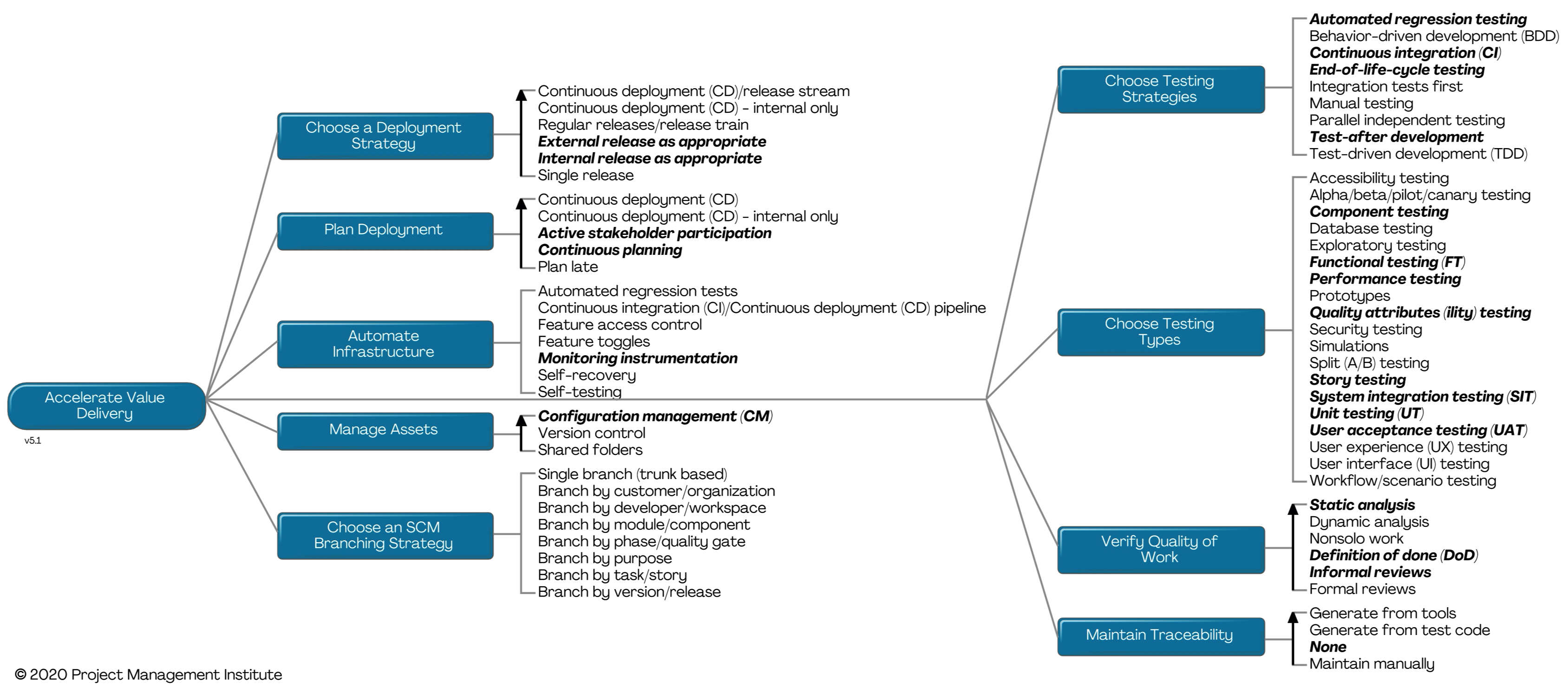
| One of the process goals that a disciplined agile team will want to address during construction is Accelerate Value Delivery. Ideally, in each construction iteration a team will move closer to having a version of their solution that provides sufficient functionality to its stakeholders. This implies that the solution is a minimally viable product (MVP) that adds greater business value than its cost to develop and deploy. Realistically it isn’t a perfect world and sometimes a team will run into a bit of trouble resulting in an iteration where they may not have moved closer to something deployable but hopefully they’ve at least learned from their experiences. This is an important process goal for several reasons. First, it encompasses the packaging aspects of solution development (other important development aspects are addressed by its sister goal Produce a Potentially Consumable Solution). This includes artifact/asset management options such as version control and configuration management as well as your team’s deployment strategy. Second, it provides deployment planning options, from not planning at all (yikes!) to planning late in the lifecycle to the more DevOps-friendly strategies of continuous planning and active stakeholder participation. Third, this goal covers critical validation and verification (V&V) strategies, many of which push testing and quality assurance “left in the lifecycle” so that they’re performed earlier and thereby reducing the average cost of fixing any defects. The process goal diagram for Accelerate Value Delivery is shown below. The rounded rectangle indicates the goal, the squared rectangles indicate issues or process factors that you may need to consider, and the lists in the right hand column represent potential strategies or practices that you may choose to adopt to address those issues. The lists with an arrow to the left are ordered, indicating that in general the options at the top of the list are more preferable from an agile point of view than the options towards the bottom. The highlighted options (bolded and italicized) indicate default starting points for teams looking for a good place to start but who don’t want to invest a lot of time in process tailoring right now. Each of these practices/strategies has advantages and disadvantages, and none are perfect in all situations, which is why it is important to understand the options you have available to you.
Let’s consider each process factor:
We want to share two important observations about this goal. First, this goal, along with Explore Scope, Coordinate Activities, and Identify Architecture Strategy seem to take the brunt of your process tailoring efforts when working at scale. It really does seem to be one of those Pareto situations where 20% addresses 80% of the work, more on this in a future blog posting. As you saw in the discussion of the process issues, the process tailoring decisions that you make regarding this goal will vary greatly based on the various scaling factors. Second, as with all process goal diagrams, the one above doesn’t provide an exhaustive list of options although it does provide a pretty good start. We’re firm believers that a team should tailor their strategy, including their team structure, their work environment, and their process, to reflect the situation that they find themselves in. When it comes to process tailoring, process goal diagrams not only help teams to identify the issues they need to consider they also summarize potential options available to them. Agile teams with a minimal bit of process guidance such as this are in a much better situation to tailor their approach that teams that are trying to figure it out on their own. The DA too lkit provides this guidance. |
Identifying Your Initial Architecture Strategy
| When a disciplined agile project or product team starts, one of the process goals which they will likely need to address is Identify Architecture Strategy. This is sometimes referred to as initial architecture envisioning or simply initial architecture modeling. This is an important process goal for several reasons. First, the team should think through, at least at a high level, their architecture so as to identify a viable strategy for moving forward into construction. A little bit of up-front thinking can increase your effectiveness as a team by getting you going in a good direction early in the life cycle. Second, the team should strive to identify the existing organizational assets, such as web services, frameworks, or legacy data sources, that they can potentially leverage while producing the new solution desired by their stakeholders. By doing this you increase the chance of reuse, thereby avoiding adding technical debt into your organizational ecosystem, and more importantly you reduce the time and cost of delivering a new solution as the result of reuse. You will do this by working with your organization’s enterprise architects, if you have any. This is an aspect of Disciplined Agile’s mindset of working in an enterprise aware manner. This is an important goal for several reasons:
The process goal diagram for Identify Architecture Strategy is shown below. The rounded rectangle indicates the goal, the squared rectangles indicate issues or process factors that you may need to consider, and the lists in the right hand column represent potential strategies or practices that you may choose to adopt to address those issues. The lists with an arrow to the left are ordered, indicating that in general the options at the top of the list are more preferable from an agile point of view than the options towards the bottom. The highlighted options (bolded and italicized) indicate default starting points for teams looking for a good place to start but who don’t want to invest a lot of time in process tailoring right now. Each of these practices/strategies has advantages and disadvantages, and none are perfect in all situations, which is why it is important to understand the options you have available to you.
Let’s consider each process factor:
We want to share two important observations about this goal. First, this goal, along with Explore Scope, Coordinate Activities, and Accelerate Value Delivery seem to take the brunt of your process tailoring efforts when working at scale. It really does seem to be one of those Pareto situations where 20% addresses 80% of the work, more on this in a future blog posting. As you saw in the discussion of the process issues, the process tailoring decisions that you make regarding this goal will vary greatly based on the various scaling factors. Second, as with all process goal diagrams, the one above doesn’t provide an exhaustive list of options although it does provide a pretty good start. We’re firm believers that a team should choose their own way of working (WoW), including their team structure, their work environment, and their process, to reflect the situation that they find themselves in. When it comes to process tailoring, process goal diagrams not only help teams to identify the issues they need to consider they also summarize potential options available to them. Agile teams with a minimal bit of process guidance such as this are in a much better situation to tailor their approach than teams that are trying to figure it out on their own. The DA tool kit provides this guidance, particularly via Guided Continuous Improvement (GCI). |



