Assigning Responsibility in Earned Value Management
Categories:
earned value
Categories: earned value


|
The Practice Standard for Earned Value sets out the Assign Responsibility process, which is simply a way of making sure everyone knows who is doing what. It’s important in earned value because you need someone to take ownership for every piece of work – that’s the best way to track at each individual element of the work breakdown structure. InputsThere is only one input to the Assign Responsibility process and that’s the scope baseline. What to doAssigning responsibility isn’t a great name for this process, because ideally individuals in the team will volunteer for the responsibility, knowing that it is part of their job role. I prefer to allow people to step into the responsibility rather than forcing it on them, because I think you gain better buy in and results that way. However, sometimes I have been known to specifically say, “So I’ll write you down as the owner for that task?” and call out someone as the individual responsible, in a nice way. Assigning responsibility is about more than someone knowing it is their job to do the work. It’s also about making sure everyone else knows that it is their role, and that it is officially documented somewhere. That’s what this process does. Create an organisation structure for the project. I tend to do that in PowerPoint, simply making a structure chart with names on that I can then drop into the relevant project documentation. You might have to create several ‘layers’ of your chart so that everyone responsible for substantive pieces of work for the purposes of EV tracking has their information documented. The Practice Standard recommends that you take the list of people responsible for things and map them against the WBS to create a matrix instead of using an org chart structure. That certainly gives you more granularity and makes it very clear who is doing what.
OutputsThe outputs for the Assign Responsibility process are:
The RAM matrix is a bit different to the traditional RACI matrix because it lists the work packages from the WBS across the top and then the teams or individuals down the side. Look at the relevant intersections and where they meet, put a cross to mark the fact that this person (or team) is responsible for this part of the WBS. Each X marks a control account: an area of work that is going to be tracked and managed by a control account manager. This is the team leader responsible for doing the work, but CAM is the term used in the world of earned value. How detailed should you make the plans?There’s no right answer to this. The WBS and the OBS should be as detailed as necessary to get the job done. Go down to the right level for your project – you’ll have to use your professional judgement for this. Ideally you are looking for control accounts to be at a level of complexity and scale that makes it possible for them to be managed adequately by one person. Too detailed, and you’ll end up with people responsible for fragments of work and so many control accounts that they are hard to manage in their entirety. Too few and the CAMs won’t truly be able to control the work within them as the tasks will rely on too many people or activities outside of their control. Plus, think about how much time and energy you and the CAMs have got to dedicate to the admin of running a low-level, detailed plan. Do you really want to take on the management of a lot of tiny things? Isn’t there some saving to be had in combining a few more work packages and making your control accounts sit at the next level up? Ultimately, you’ll have to make the call but don’t make it too hard for yourself or your team. Managing changesYou might be thinking: that’s all very good but what happens when things change? Well, things always change, and you have to be alert to that. Respond to changes as and when they happen, using the change control process that you’ve adopted. Make sure that the CAM impacted by the change (or group of CAMs if there are several) know what has changed and what that means for their work. Update the documentation accordingly. That assumes that you know about the change before the CAM – and sometimes that won’t be the case. They’ll be coming to you with suggestions for changes, so in that case, push them through the change control process and update the rest of the team as appropriate. The Assign Responsibility process is really all about making sure people know what falls into their remit. If you work with an experienced in-house team, you probably won’t have much difficulty here. If you work with contractors, sub-contractors or external suppliers, make sure that the boundaries of their work are clear – this process helps formalise all of what you should be doing already. Pin for later reading
|


5 Strategies for Managing Opportunities
Categories:
risk
Categories: risk
|
Opportunities are positive risks – the risks we don’t spend much time thinking about because everyone assumes risk is bad! However, if we use Dr David Hillson’s definition of risk as being uncertainty that matters, then some uncertainty could most definitely lead to a positive outcome for the project. Those are opportunities, and we handle them in the same way that we do the ‘negative’ risk or threats. There are 5 strategies for responding to opportunity risk and they are:
Let’s look at each of those. 1.EscalateEscalation is also a tactic to use for threat risk and the same approach applies here. When the opportunity is bigger than the project and falls outside of the scope of your work, escalate it up to the programme manager or portfolio manager, or simply pass it on to your boss. There’s nothing you can personally do about it as the opportunity falls outside of your level of authority. Your job is to make sure that the information you have is passed on to someone who can best act on it. You can continue to support whomever picks up the information but you don’t have to track and manage the risk any longer. 2.ExploitThis strategy is where you basically force the risk to happen so you benefit from whatever good things are coming your way. You want to increase the probability of occurrence to 100% because it’s worth it. That might include spending money or changing the direction of the project to make sure that you get the outcome you want. For example, you could pull resources from other projects on to your project to make the work take less time, you could upgrade some infrastructure to take advantage of technological advances by being able to use new solutions and so on. I don’t really use this strategy much because I tend to think that if we take steps to make something happen, it’s not a risk any more, but that’s just how I think – I know the literature talks about this as a particular, specific strategy. For me, I wouldn’t ever have it on the risk register, it would be something we discuss as a team and then adapt our plans via a change request to make it happen. What would you do? Let me know in the comments below. 3.EnhanceThe Enhance strategy is similar to Exploit in that you want to make the opportunity happen, but here all you are doing is influencing the outcome – you aren’t forcing the probability to turn to 100%. What you try to do is increase the likelihood of it happening or increase the impact it would have if it did happen. You don’t have a guarantee of the outcome but you are influencing and negotiating your way to being able to capitalise on that fab opportunity. I think this is hard to articulate because your response plan relies so much on what the opportunity is. We identify opportunities throughout the project life cycle and don’t always record them as risks. For example, if something came up in a team meeting where we could potentially complete a task more quickly if we had an extra pair of hands, we would decide there and then to do it and hope for the return, without necessarily formally documenting the risk. Perhaps that tells you more about my lackadaisical approach to opportunity management than it does about the Enhance strategy! 4.ShareSharing is a little bit like transference for threat risk. It’s where you split the benefit with a third party on the proviso that they help you try to get the opportunity. For example, you might share resources for a better outcome, you might set up a joint venture or create a specific team. All of those things might mean sharing the risk and therefore the benefit between several entities or teams, but overall may make the potential benefit larger. 5.AcceptFinally, the classic strategy of do nothing. This is also a valid response and useful when there isn’t much to be had by way of opportunity. You basically sit it out and wait to see if the benefit occurs and you might want to have a contingency approach in place in case it happens and you want to act then. However, as with accepting threat risk, make sure that you are constantly monitoring the situation and actively discussing these risks with their risk owners and the team. You don’t want to be in a situation where you miss an opportunity because the context or environment changed and your risk response plans weren’t updated as a result. Which of these have you used? Share your best tips for managing opportunity risk in the comments below. So far, all we’ve achieved in the risk management process is working out how to respond to risk, but it’s all been about talk and planning. Next time I’ll be looking at how to implement risk responses and make sure the work to deal with risk actually gets done. Pin for later reading
|


What to do when resource costs spiral [Video]
|
When you have to pay for internal or external resources, the costs can soon mount up. It’s not difficult to find yourself with spiralling resource costs, even if they are just wooden dollars being moved between departments. The most likely causes are poor estimating and too many change requests. It’s often hard to drill down into the detail of where a resource is spending time, especially if you don’t have a timesheet application. If you don’t record time, then start doing that first! It will really help you improve your estimates over the longer term. Short term, you need to sit down with your team and reforecast the whole project. If you then can’t afford to do all the work that you’ve planned out, you need a frank conversation with your project sponsor about what can be taken out of scope for this phase. This video explains more. Pin for later reading
|

EV: Start by Organising Your Project
|
The first process detailed by the Earned Value standard is ‘Organise Project’. Basically, you can’t run earned value management on your project if your project is a disorganised mess. But it also means more than that: you have to have an understanding of scope so you can split the project into work packages that make sense and can be tracked. How do you work out the scope?The easiest way to work out the scope of the project is from the charter: this outlines what you were tasked with doing. The requirements documentation will also have useful information. However, that’s all likely to be quite high level. To get to work package level, you have to use decomposition. All this means is breaking down big chunks of work into smaller sections until you get to a level where it’s possible for someone to take responsibility for managing the thing. This is how you create the work breakdown structure: take the high level requirements and decompose them, structure them, into something that gives you a logical overview of what is happening on the project. You might think it’s not worth starting at the top and breaking it down. Why not start at the bottom and build it up? I suppose either works fine. For me the default would be to start with the big picture because then we make sure that what we build meets that need. There’s a chance that if you start at the bottom and build up, what you actually end up with isn’t quite what was asked for. However, do what works for you: as long as you end up with decomposed work packages (as in, broken down, not mouldy), then you’re good. The WBS is linear, in that the branches don’t twine together. Once you’re on a branch, you stay on that branch, and all you are doing is breaking the work down further and further. How do you know when to stop? I say that’s a judgement call. The work package size needs to be controlled enough for someone to feel like they can get their arms around it and lead it, but not so detailed that you are creating a ton of WBS paperwork for something that ends up taking a couple of hours. How to represent your WBS: diagram or list?When you see WBS info in textbooks, and indeed, in the EV standard, you’ll see it as a picture; a kind of tree diagram or hierarchy chart. Personally, I don’t think in pictures so I prefer to create a numbered list. I love the fact that my scheduling tool of choice will add in the WBS numbering automatically as I create the list. Creating your WBS directly into your scheduling tool is not (in my view) a great practice, but it works for the kind of projects I do as they are generally pretty small at the moment. Your project is organisedThe end result of the first EV process is that you end up with a WBS and some other scope documentation that fleshes out what you have agreed to do, like the scope statement and a plan for managing scope should things change. If you’re going down the route of preparing a ‘proper’ WBS instead of a simple numbered list of tasks – which is necessary if you are handing work packages over to teams to run with – then you’ll also have a WBS dictionary which is the text part that adds detail and colour to the titles on the WBS diagram. All this forms your scope baseline: the official statement of what it is you intend to deliver. The important thing to remember is that you do not create this alone – just don’t! Scope needs to be created with input from technical experts because you don’t know what you don’t know. Even if you think you are an expert in the subject – or you were at some point in your career – the people doing the work need a say in what they are doing so they can start thinking about how best to do it. Collaboration is your friend: yes, it takes longer but the end result is a project that everyone can buy into, and that will save you a lot more time in the long run. Setting up your project for success with a solid scope is important all the time, but if you are going to follow the EV standard, it’s essential. You can’t measure project performance unless you know what you should be performing! Pin for later reading
|


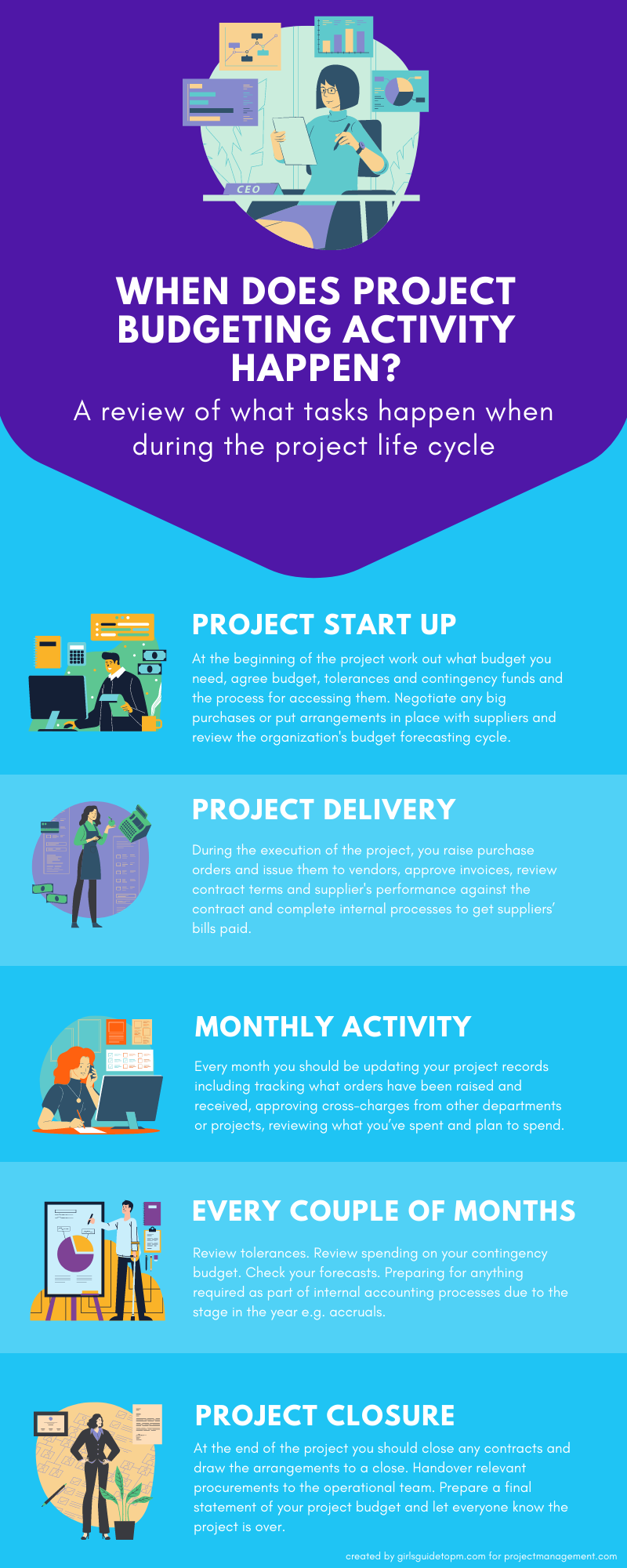
When does project budgeting activity happen? [Infographic]
Categories:
budget
Categories: budget
| Let’s look at what tasks happen when during the project life cycle. Different budget requirements fall into different parts of the project, from start up through to delivery and closure, with different tasks required every month and then different tasks again every couple of months. The infographic below explains what to be focused on at different points in the project life cycle. What would you add? Let me know in the comments!
|