How to Handle Management Reserves [Video]
Categories:
budget
Categories: budget


|
Ah, the mythical management reserve. This hits project managers who have sponsors that are poor at following through on their promises. The sponsor says that there is some kind of ‘contingency’ or ‘management reserve’ that can be spent at their discretion if required, say, in the event of an unplanned project disaster. Said disaster happens and suddenly they don’t have authority to access those funds, or another project has used them, or you need to write a business case to access them… How to fix it: You will struggle to fix this one in advance but your best bet is to make sure that you have full confidence that any pot of money that is being held outside your official project budget does actually exist and is there for you. Of course, the best thing to do will be to manage the project so you don’t need to tap into additional reserves. I explain more about how to handle management reserves in this video. Pin for later reading:
|

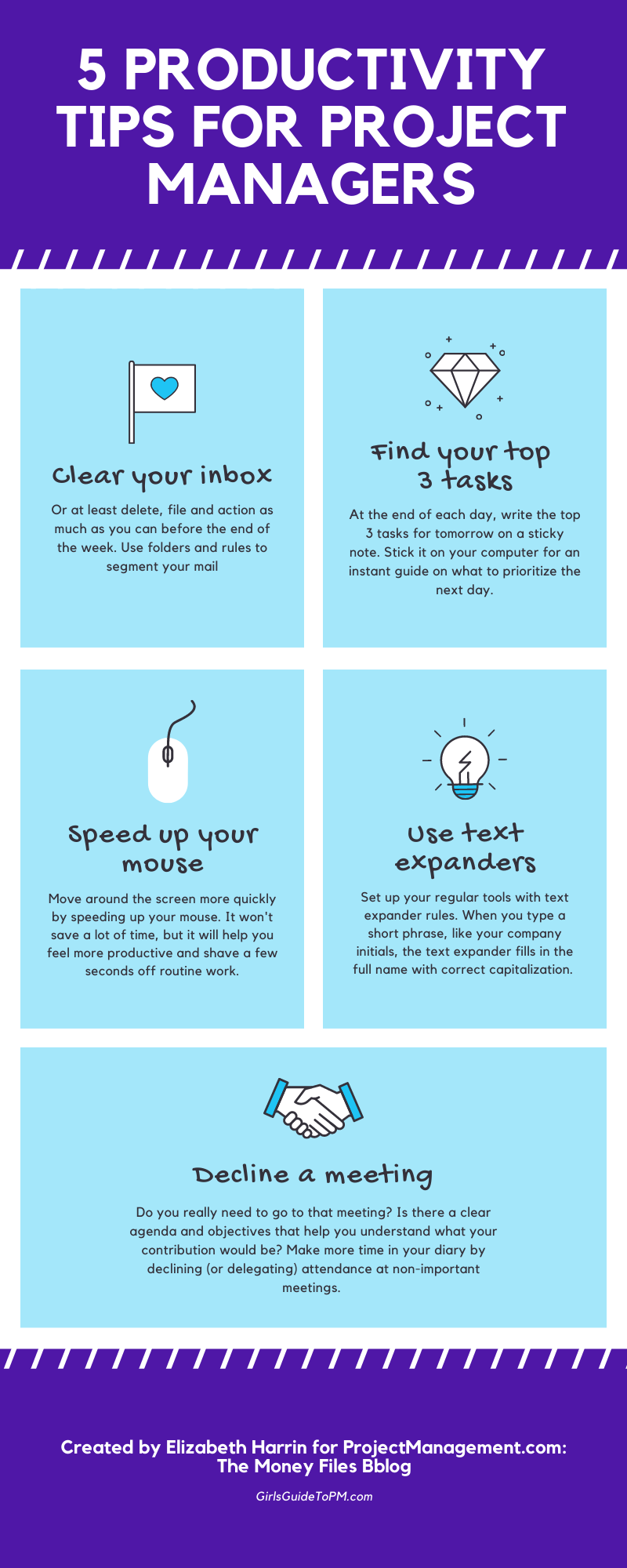
5 Productivity Tips [Infographic]
Categories:
productivity
Categories: productivity
| We all have the same number of hours in the day, so how come some people seem to get more done? Well, there is no magic secret. They probably are just very good at focusing and prioritising their work. They get more done – or at least, they appear to – by doing the right things. That said, there are a few tips and tricks I’ve discovered over the years that help me speed up my daily work. First: get a super-fast internet connection! Once you’ve got that, you’ll get less frustrated waiting for pages to load. It’s amazing how much we need to use online services and tools in the course of our day jobs, and for everything else that’s a ‘home’ job too. After that, try the tips in the infographic below and see if you can use them to improve your focus and shave a few seconds off your regular routine tasks.
|
Tech Trends: Analytics
|
Data is a differentiator. Companies that can capture what customers buy, like, and use can interrogate that data to provide insights that help them stay ahead of the curve. Big data is the term given to the storage and analysis of workplace data for the purpose of creating meaningful management information. The data from collaboration and project management tools is a subset of all this data. Real-time project analytics can add huge value to streamlining project management processes and in identifying early warning signs for projects. Being able to parse a discussion thread from your collaboration tool and single out potential risks and issues could change the role of the project manager in the future. Furthermore, natural language searches will make it easier to include narrative discussions, meeting minutes, and more in the data analysis, saving hours of time when investigating or predicting problems. All of this data could be used to predict the future success (or otherwise) of projects. There is already work happening in this sphere: The PMO Flashmob here in the UK held a session recently looking at the role of AI in the project office and project management domain. While I didn’t attend, they did publish some interesting Inside PMO report on the topic. There’s also been a discussion around RPA – robotic processing automation (in other words, using algorithms to process info instead of humans – it’s not ‘real’ robots sitting at a desk next to you doing PMO work). There is a lot of scope for development in this space, freeing up knowledge workers to – you know – actually use their brains for stuff and building relationships to help get projects done. Data presentation techniquesAllied to the big data revolution is the rise of data presentation techniques, because the trouble with all that data is that it is very difficult to understand. There is a trend toward simple, clean designs for websites and tools with high usability and a very visual impact. The growth of social media sites like Instagram and Pinterest, plus the sudden, recent spike in the number of infographics doing the rounds on sharing sites shows that users are gravitating toward images. This is relevant to project management collaboration tools because project managers have to adapt the way they communicate to suit the needs of stakeholders. If the needs of stakeholders are evolving to include a requirement for more visuals, then project managers will need to move away from text-based project reports to a more engaging way of sharing status updates. Visual data presentation is not new to project management—after all, that’s really what a Gantt chart is. Kanban, too, is a visual project management approach and many agile teams work with visual plans. We could well see the visual preference for presenting data manifesting itself in more tools that use images and visual workflows in conjunction with traditional Gantt charts.
Pin for later reading:
|
 This article includes a few points that were made in my PMI book: Collaboration Tools for Project Managers. Given what we’ve been going through and seeing so far this year, it felt appropriate to try to pick out some comments on tech for teams and where that might be taking us – because it seems to me that virtual working is here to stay.
Project Risk Management Planning
Categories:
risk
Categories: risk
|
This article is part five of my look into project risk management, and today the topic is planning risk management, as determined by the PMBOK® Guide – Sixth Edition. Read part 1 here: An introduction to risk management Read part 2 here: Trends and Emerging Practices in Project Risk Management (Part A) Read part 3 here: Trends and Emerging Practices in Project Risk Management (Part B) Read part 4 here: Tailoring Risk Management Plan Risk Management is the first process in the Project Risk Management Knowledge Area. It’s defined as: The process of defining how to conduct risk management activities for a project. If you are anything like me, you probably haven’t spent a lot of time thinking about how you are going to do risk management – you just do it. However, if you are new to project management, managing in a different way to how you have done before, or with a larger, more complex or strategic project, leading a project at a new organisation or similar, you will want to spend some time mapping out how the project will approach risk management. InputsThe inputs to this process are:
OutputsThere’s only one output to the process and that’s the risk management plan. You can create a risk management plan that’s a few lines long and says you’ll follow the PMO approach for risk management, or you can create a full, detailed, bespoke risk management plan. Do what you need to do for your project. I’m lucky in that I’ve always worked in organisation’s where we’ve either had a PMO for guidance or had experienced project managers. Not that being experienced is a shortcut for doing risk management well – you do still need to put some thought into it. I do think, though, that over time, some of the planning activities are done quickly because they are the same as the last 10 projects you’ve run and the act of planning has become so ingrained that you don’t think about the ‘how’ any more, you just focus on the ‘what’. Anyway, part of being able to apply business acumen and critical thinking is that you make the right choices for your project, so don’t assume that because you’ve run a project before that you don’t need to do any risk management planning. Tools and TechniquesThe tools and techniques you’ll use to come up with your risk management plan are the things you would expect:
TimingThe Plan Risk Management process is something you should do before the project begins working on tasks to complete deliverables. So get your risk management plan completed as quickly as you can before the project begins. You can, of course, review and update the approach to risk management as the project evolves. Something might happen that means it’s worth reviewing the context for risk management and updating the plan. As with all aspects of the project, keep revisiting it to make sure what you are doing is fit for purpose and updating the associated documentation for the record. Planning risk management shouldn’t take you too long. It’s about establishing the framework for doing risk management on the project and getting agreement about the activities required to manage risk effectively. If you’ve already got organisational policies that cover risk, or a project risk management process from your PMO, you’re halfway there. Next time I’ll be looking at what goes into a risk management plan. Pin for later reading:
|


Where do requirements come from? [Video]
Categories:
requirements
Categories: requirements
|
I had a question recently which was: Where do project requirements come from? In this quick video I try to answer that question! The TL;DR (or should that be DW?) is that you have to spend the time to talk to the whole stakeholder community to find out what requirements they have and what they are expecting. Only then can you start to prioritise and plan what’s actually going to be in the scope of the project. How do you elicit requirements? Let us know in the comments section!
|