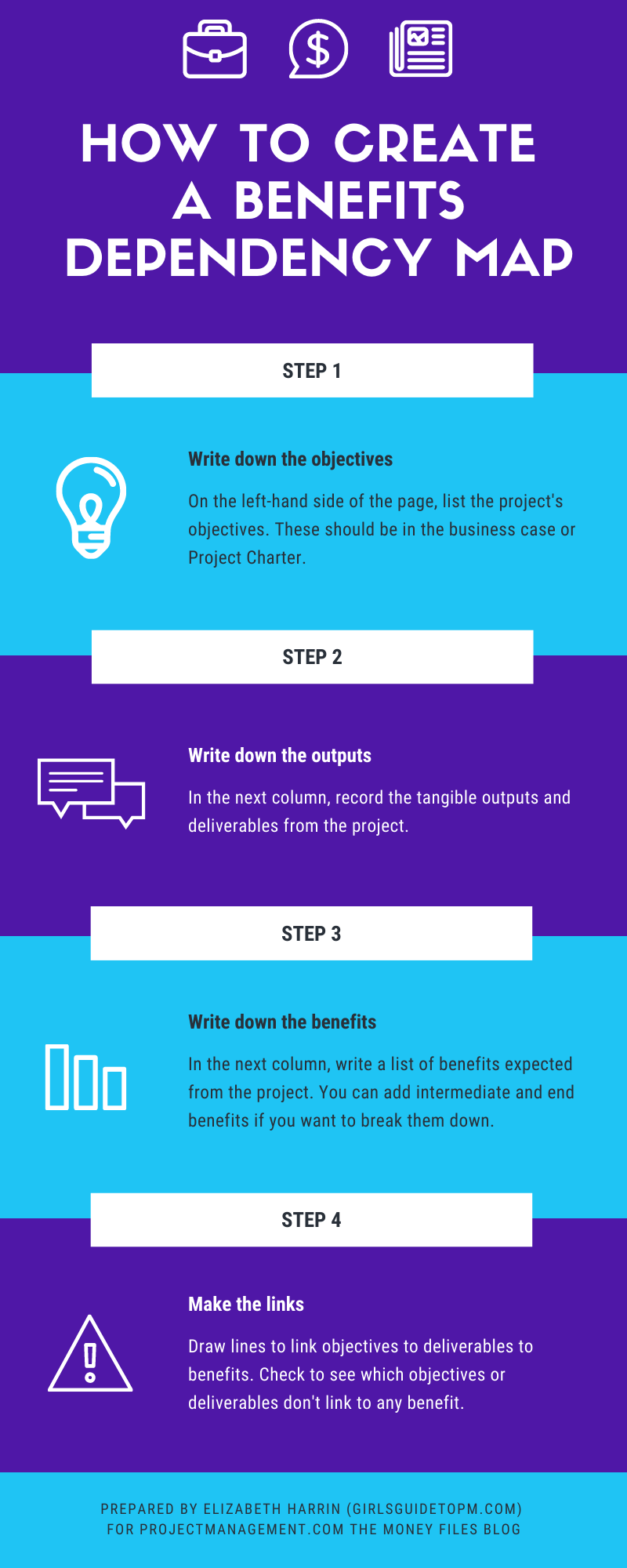
How to Make a Benefits Dependency Map [Infographic]
Categories:
benefits
Categories: benefits


| Benefits management: I wish we spent more time on this as I think it would help the wider project management community deliver more successfully. We’d know what success looked like, for a start. And we would hopefully work on fewer vanity projects because they would be weeded out – only projects with a decent return on investment (whatever that means to you and however you measure ‘return’) would get started… and hopefully completed. A benefits dependency map is an easy thing to create to bring some sense of clarity to the benefits you see on a project. This infographic gives you the headlines: it’s all about linking project objectives through to deliverables and then intermediate and end benefits. Then you can easily see how the project is going to achieve that return the business case talks about. And if it isn’t clear, you’ve got time to do something about it before realising the project isn’t going to deliver the benefits you expected. Tweak the objectives, change the deliverables – do something to bring the project back in line. Find out more about benefits mapping here.
|
Digital working: It’s not all about the tools
Categories:
collaboration tools
Categories: collaboration tools
|
Disruptive technologies such as big data are hitting businesses across all functional areas, not just project management. And with the recent uptake of collaboration tools for virtual teams because we haven’t been able to get into offices in the way we could before, it’s even more important to understand what that tech might mean for us. Companies have to come up with practical ways to incorporate this massive amount of change and to sift through the trends that are worth adopting while ditching those that are not relevant at this time. This is starting to come to the fore in the form of the chief digital officer or other digital leadership position at the very top of businesses. We are also seeing digital PMOs—divisions supporting the project structure in the way a traditional PMO would, but with a leaning toward paperless, integrated, and online ways of working, along with the culture changes that brings. Shadow IT – a challengeShadow IT is another challenge for the person or team taking on digital leadership within their organization. This is where employees have downloaded their own apps or software for work purposes. I think it’s common in businesses where IT processes are slow and bureaucratic. When individuals don’t want to have to wait for software to be formally approved and installed, the Internet makes it possible for them to download pretty much anything they want and get started immediately. This forces business leaders to look for adaptable, speedy, and flexible models and processes while also giving them the headache of managing data security and unapproved software. The culture of collaborationIt’s not all about the tech. Part of the challenge facing the digital leader, be that a project manager or a PMO director, is managing flatter teams, both across business teams and within projects. Employees create their own internal networks outside of the traditional hierarchy, which potentially makes many of the formal line management structures redundant and forces the organization to become flatter. The digital divide—those employees who are familiar with digital working practices and those who are not—is a further team-related problem that digital leaders have to face up to and proactively manage. Successful collaboration and teamwork comes from a culture that supports those ways of working. If virtual teams are to be successful, and if collaboration tools are to be fully embedded in the working practices of the team, then it’s important for businesses to invest in collaboration offline as well.
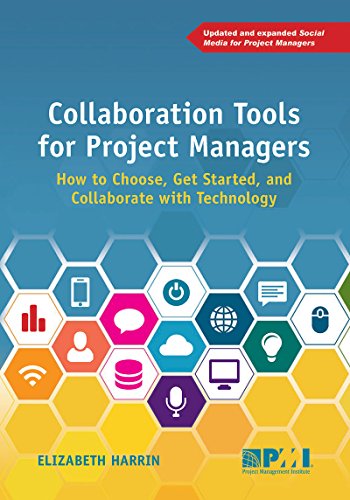
It also supports the urgent need for knowledge sharing in a global economy that is facing significant talent gaps. As the Baby Boomer generation leaves the workplace, taking with them an incredible amount of organizational knowledge, companies need to find alternative ways to capture and maintain their knowledge assets. Technology (like wikis) has a part to play, as well as collaborative work environments where knowledge is freely shared. This article includes a few points that were made in my PMI book: Collaboration Tools for Project Managers. Given what we’ve been going through and seeing so far this year, it felt appropriate to try to pick out some comments on tech for teams and where that might be taking us – because it seems to me that virtual working is here to stay. Pin for later reading:
|
 I think as we move forward, we’ll see greater investment in building corporate culture, fostering employee engagement, and creating the environment to deliver successful change. All of this underpins the use of any technology and supports the business objective of getting the right people to do the right things the first time, which cuts down on overall project costs.
What goes into a project risk management plan?
Categories:
risk
Categories: risk
|
This article is part six of my look into project risk management, and today the topic is the project risk management plan. Read part 1 here: An introduction to risk management Read part 2 here: Trends and Emerging Practices in Project Risk Management (Part A) Read part 3 here: Trends and Emerging Practices in Project Risk Management (Part B) Read part 4 here: Tailoring Risk Management Read part 5 here: Planning Risk Management So: risk management plans. What should you expect to see in one? Here are some things you can include in your risk management plan. You don’t always need all of them – good project management is all about tailoring, so pick and choose what is appropriate and necessary for your project. Risk strategyThis is a statement about the general approach you are taking to managing risk on the project. You can reference any organisational guidelines, the risk appetite of the company and the business context for risk management. MethodologyThe methodology section is where you define the specific way you are going to manage risk on the project. That includes the approaches you will use, any software tools or other tools that are available to you and that you’ll use, and the places you’ll get data from to make decisions about risk actions and planning. Include information about tracking risks: how will this be done? How will you record what has happened and how will adherence to the process be audited (if it will)? Roles and responsibilitiesI think it’s always useful to have this section in the risk management plan, even if you refer to the main roles and responsibilities document or a different place in the project management plan. I think it helps to know who is responsible for what, and for everyone to see that it is everyone’s responsibility to be on the look out for new risks. Document who is going to lead risk management, any supporting roles, and who else is ‘hands on’ with the risk management process. Explain what their responsibilities are. Risk budgetIt’s also handy to record the project funding available for risk management (if you are lucky enough to have a dedicated risk budget). I think it’s worth calling out even if there is no dedicated risk budget, because it makes it clear to senior execs and the project sponsor that managing risk takes money, and if there is none, there’s a limit on what you can usefully do to avoid or mitigate the risk. In this section you’ll want to talk about how you can access the risk budget – because let’s be positive and assume there is one – and how the funding will be tracked and reported so you can see when it’s running out. Timing and reportingWrite a short section that talks about how often you’ll do risk management reviews, when each part of the process takes place and how risk management is woven into your project schedule. I would include formal risk workshops in here, alongside a formal monthly risk review, while noting that risk management is an ongoing activity bound into everything else we do on the project. You can also record how and when risk reporting is going to be done, and what is going to be included in the risk reports. I would mention what level of risk is going to be reported in each place. For example, in Steering Group meetings I would report every significant risk. In monthly project reporting, the template we used to use only had space for the top 3 risks. Categorisation of riskFinally, document how you are going to categorise risk on the project. You might already have organisational-wide definitions and categories, in which case you should use them. If you don’t, you can easily make up some categories. Things like Technical, Commercial, Reputational, Environmental etc are all common categories. Think about what the project is trying to achieve and what departments are involved, and that can be the basis for your categorisation. I would start with a simple list and allocate each risk to one category only. If you want to get a bit more detailed and dive into risk management further, you can create a risk breakdown structure which is a useful way of grouping risks and seeing how they interact and relate to each other. Risk appetiteInclude a statement about how much risk the project (or organisation) is prepared to accept. You’ll get this either from ‘official’ company sources or from the project sponsor. Remember that risks can aggregate together: lots of small, insignificant risks can make for one massive problem if they all happen at the same time. Definitions and matrixInclude definitions of how you calculate probability and impact. It’s really important that everyone understands what these two concepts are and then what the different levels mean. Ideally, you should have this at PMO level if not organisational level, because then you can more easily comparer the risk profile of different projects. Alongside your definitions, include the probability and impact matrix that helps you assess the risk score. Or link to where it can be found – there’s no need to reinvent the wheel or create lots of additional pages in your documentation, just reference the PMO documentation if there is any. Pin for later reading:
|
How to Handle Management Reserves [Video]
Categories:
budget
Categories: budget
|
Ah, the mythical management reserve. This hits project managers who have sponsors that are poor at following through on their promises. The sponsor says that there is some kind of ‘contingency’ or ‘management reserve’ that can be spent at their discretion if required, say, in the event of an unplanned project disaster. Said disaster happens and suddenly they don’t have authority to access those funds, or another project has used them, or you need to write a business case to access them… How to fix it: You will struggle to fix this one in advance but your best bet is to make sure that you have full confidence that any pot of money that is being held outside your official project budget does actually exist and is there for you. Of course, the best thing to do will be to manage the project so you don’t need to tap into additional reserves. I explain more about how to handle management reserves in this video. Pin for later reading:
|

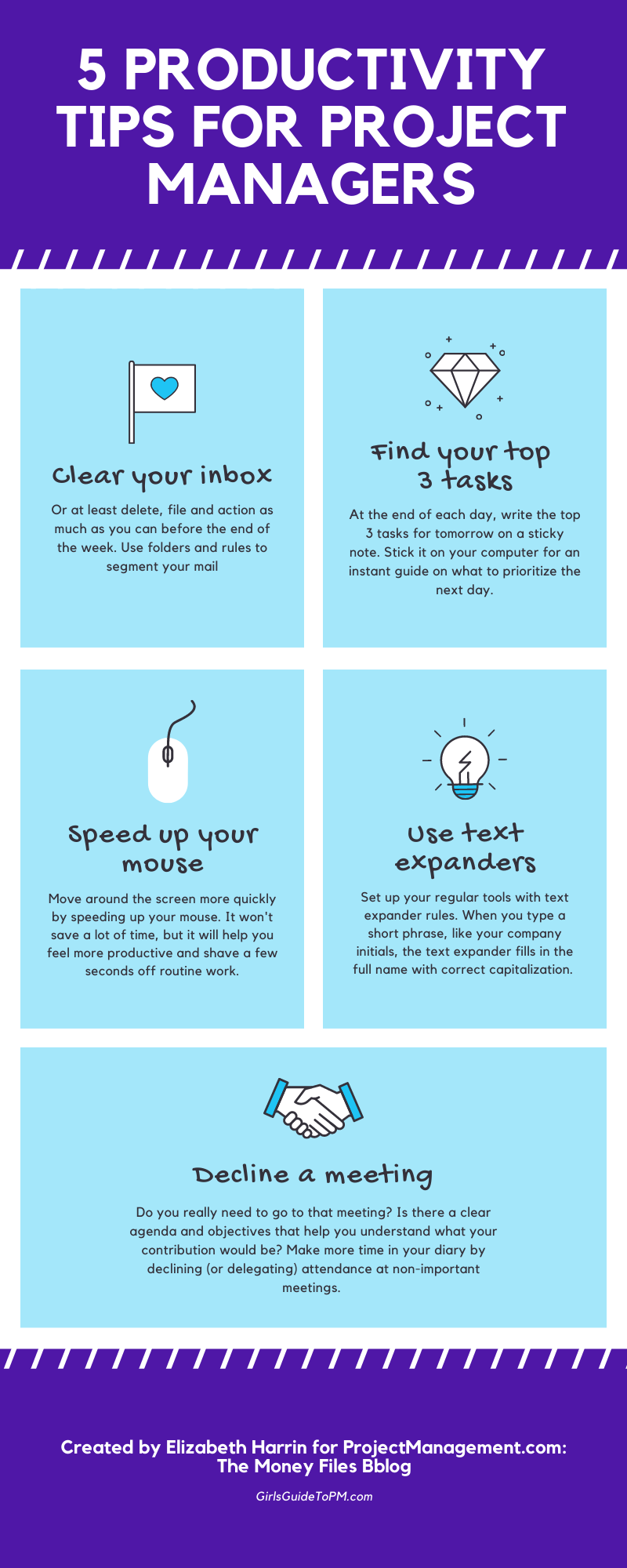
5 Productivity Tips [Infographic]
Categories:
productivity
Categories: productivity
| We all have the same number of hours in the day, so how come some people seem to get more done? Well, there is no magic secret. They probably are just very good at focusing and prioritising their work. They get more done – or at least, they appear to – by doing the right things. That said, there are a few tips and tricks I’ve discovered over the years that help me speed up my daily work. First: get a super-fast internet connection! Once you’ve got that, you’ll get less frustrated waiting for pages to load. It’s amazing how much we need to use online services and tools in the course of our day jobs, and for everything else that’s a ‘home’ job too. After that, try the tips in the infographic below and see if you can use them to improve your focus and shave a few seconds off your regular routine tasks.
|