3 Ways to Think About Risk [Video]
Categories:
risk
Categories: risk


| Getting a handle on risk is so important when it comes to keeping your project under control. There are plenty of different ways to categorise and think about risk, and today’s video considers three ways you can group risk:
Watch the video below and then let me know – do you agree with these categories, or do you use a different way of bundling your risks together? Pin for later reading:
|

5 Non-Financial Benefits for Your Business Case
Categories:
business case
Categories: business case
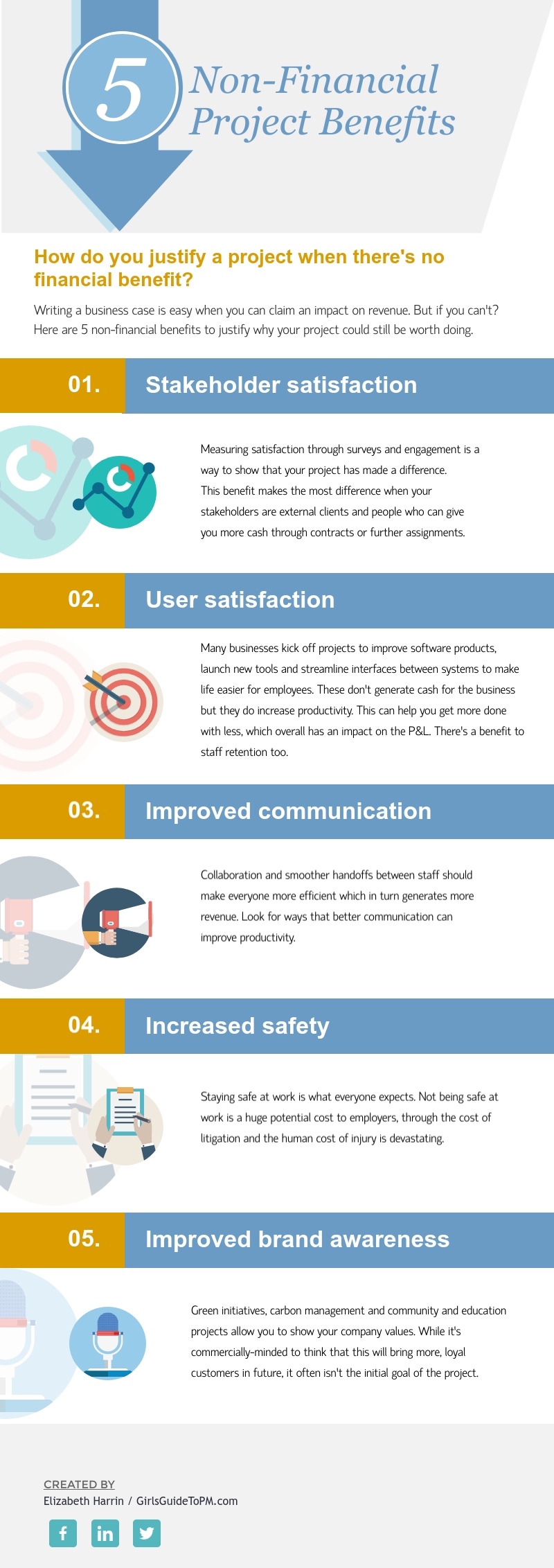
| When your project is making a tangible financial contribution to the company’s profit or revenue, then putting your business case together is pretty easy. If the financial case stands up, many execs will put a tick in the box. But when you can’t demonstrate that there are financial reasons to do your project, should you put the business case in the bin? No, of course not. There are lots of non-financial reasons to invest money in a project. And some of them might even pay back in cash! It’s just that measuring them and attributing the benefit specifically to your project could be difficult to do. Here are 5 common non-financial benefits that you could consider adding into your business case, even if there are plenty of cash benefits too.
There’s more information about the concepts of non-financial benefits in this article. |
Stage Budgets (for Project Board Members)
Categories:
budget
Categories: budget
|
So you’re a new member of the Project Board? And wondering how to approve funding for the project? Come in, sit down, let me tell you what to expect! First, you should know that every project-led organisation tends to do things in a slightly different way, and managing money is no exception. So you’ll need to find out exactly how your PMO process works for project funding. What I’ll describe here is a generic, common process. There might be unique tweaks for your environment, depending on how your PMO and exec team work together, what country you are in, whether you are a non-profit, and so on. But broadly, this is how project funding approvals work. Funding in principle: the business caseProjects start with a good idea, which is summarised and explained in the business case. At this point, senior decision makers will choose to accept (or reject) the project. If it goes ahead, they’ve approved the funding in principle, even though no one actually gets the money to spend at that time. Typically, projects are prioritised by importance and need, so your project might not get started for a few more months. When the time comes for your project to start, the project moves into project initiation (kick off) and work can begin. Stage budgetsBudgets are typically handed out in phases. If you have a 5-year project, for example, you won’t get handed all the cash on Day 1. That’s bad business planning because there might be other things you can be doing with the Years 2-5 money right now. Plus, I expect it would give your business a massive cashflow problem to tie up money for that length of time when you aren’t forecasting to spend it for ages. So money is dripped out, normally linked to the project stage. When the project begins, you’re in the kick off and planning phase, so the money is allocated for the planned work happening in the current phase. When you reach the end of this phase, you’ll move into the next phase of the project. There’s normally a Project Board meeting or other approval point, at which everyone agrees that the project is on track, going to deliver what it said it would, and it’s worth carrying on with the work. You approve the project to continue, and that is the milestone that releases the next wave of funding for the next phase of planned work. Change budgetsYou’ll also be asked, in your capacity as a Project Board member, to have some degree of oversight over the change budget. Change budgets are money set aside to pay for changes. The project budget only covers the planned work. Changes – the clue is in the name – are changes to the original scope that you didn’t know about at the time of planning the original budget. And normally changes cost more. You’re either paying to redo work, or to increase the scope and add extra stuff in. The change budget is there to cover the cost of changes. The Project Board can sign off on a change and release the money from the change budget to pay for it. Note: the change budget isn’t there as a lovely cushion for overspending. If the project manager asks to dip into it but there isn’t actually an associated change, then your answer should be no. It’s not there to fund general bad planning. If no one requests a change, then you can’t spend it! Risk budgetThe final type of budget that the Project Board will get involved with is the risk budget. Again, this is a budget only to be used for certain things, not as a slush fund to dip into whenever you feel like the project needs a bit extra to help get over a challenge. The risk budget is to pay for risk management activities and the impact of risk. Once a risk has been identified, and the financial impacts of it are known, the project manager can ask the Project Board to approve spending. The money goes towards taking steps to mitigate or better manage the risk in some way. Or it could be used to pay for whatever is needed at the point the risk occurs. Don’t let project managers spend it without it being attributed to a specific risk management task! And if you are feeling really strict (or if your PMO dictates) you shouldn’t use the risk budget for any risk other than the one that was specifically allocated at the time. Personally, that final clause feels a bit draconian, but look at your local rules. So that begs the question: if you can’t use change and risk budgets to deal with things other than changes and risks, what happens when the project goes over budget? Great question! You decide. The Project Board either needs to decide that the project is “worth” the extra and puts extra money into the project. Or it decides the business can’t fund that. Your business is not an unlimited pot of money. Being careful with how it is managed is the only way to ensure more projects come in on budget, every time. Pin for later reading:
|

Project Scope Management Part 4: Create WBS
Categories:
scope
Categories: scope
|
It’s time for part 4 of our journey through the Scope Management Knowledge Area from the PMBOK Guide®-- Sixth Edition. Today, we’re looking at the Create WBS process. You can find the previous parts here: The point of this process is to move from having the scope statement (from the Define Scope process) to a scope baseline. The Work Breakdown Structure (the WBS of the process name) gives you the baseline for what the project is going to create. It’s scope, but in a lot more detail than a scope statement. Personally, I don’t often use the full WBS process. If you are on a small project, or leading a project where you have done similar work in the past and are working with an experienced team, or you have a scope that isn’t easy to button down, then approach the WBS process with an open mind. I have lost too much time in the past creating a full WBS and WBS dictionary, with lovely descriptions of everything, only to find that the next week the scope changes due to the whim of senior management, and all my work is rendered pointless. So this is definitely a process where tailoring comes into play, especially if your ‘predictive’ environment isn’t really that predictive! You need a scope baseline in order to exercise change control, but you might not need to follow this process to the letter to get it. Just sayin’. Create WBS ProcessThis is the fourth process in the Knowledge Area. We are still in the Planning process group. While I might not use the full WBS process and terminology, the overall objective of this process is to break down the work into smaller components that are more manageable to deliver. You take your scope statement and basically turn it into chunks of work that people can actually do. This is a process you can do at various points in the project so you might not be able to decompose everything at the beginning and that’s fine. Repeat the decomposition effort as you move through the project and more scope is known, or you find out you have to break it down further to get where you want to be. InputsThere isn’t much that has changed from the Fifth Edition with this process, and in fact the only small changes are here with the inputs. The inputs to this process are:
Tools & TechniquesNothing has changed with the Tools and Techniques. The list still remains:
Although if you want to get picky I think they were listed in the other order in the Fifth Edition. Frankly, I don’t think the order of techniques matters much. I have never thought they were listed in priority order. OutputsOnce again, there are no new or changed outputs to this process. You still end up with the scope baseline, which was the ultimate goal of doing the WBS and ‘project documents updates’, which is so broad it could include anything. However, it’s really talking about updating any documents that need a reference to the final scope. People often think of the WBS as a diagram, but it’s much more than that. The graphic is useful, but on larger projects they can get so complicated they are difficult to interpret. Also, I’m not a visual thinker – I expect that’s another reason why me and the WBS have never really got on. The scope baseline includes: The scope statement – you probably won’t need to amend this much from previously, but you might want to check it over as you work through the detail of the scope, to make sure it remains consistent.
I do like the idea of work packages, and I do use this concept on my projects. If the language of work package isn’t understood, I create a terms of reference which covers the same main elements as a work package, and this can go to workstream leaders. Next time I’ll be looking at the fourth process in this Knowledge Area: Validate Scope. Pin for later reading:
|
What to ask your supplier [Video]
Categories:
supplier management
Categories: supplier management
|
I’ve worked on projects where all the resources are in house, but it’s more common (at least in my experience, to have some external supplies needed on a project. Whether that’s external legal advice or buying a software product, many project managers have to work with suppliers. But what should you ask them before you start work? This video gives you 3 key questions you should talk to your vendors about before the project starts. They give you a way to have a conversation about working practices and expectations before you start really building one of the most important relationships you’ll have on this project. Watch the video below and then share what you typically ask suppliers in the comments below. For more information about working with suppliers, and a bonus 2 extra questions to ask, check out this article. Pin for later reading:
|