Make or Buy Decisions [Video]
Categories:
procurement
Categories: procurement


|
Your project needs things. But should you buy them, or make them yourself? It’s a big decision, and one that affects lots of industries and deliverables. My experience has mainly been make or buy in the software world. Should we develop our own software, or buy a tool that is known to be best in class? With software particularly, there are a lot of considerations. Cost. How easy it will be to interface any off the shelf product with your existing architecture. Supporting it once it’s built and installed. Managing upgrades. So many questions! While this video doesn’t have all the answers, it might help clarify the big picture for you so you can start a confident conversation with your management team about the things you need to procure for your project. For more information on project procurement and what you should be considering, check out this article. Pin for later reading:
|


The Project Manager’s Budget Checklist
Categories:
budget
Categories: budget
|
I’m often asked: “What do I need to include in a budget?” I figured it was time to put together a list of what should be included when you are putting together your project budget. So here goes… EquipmentRecord any goods you need to buy. Record what you need to hire and the duration you’ll need it for. All these things should be in your procurement plan, so use that as a reference. Make sure you’ve put everything from your procurement plan into your budget. Consumable suppliesConsumable supplies are different to equipment because they are things that get used up. For example:
Again, check the procurement plan to make sure that you’ve included everything you said you would need to buy. Essentially, the difference between equipment and consumables is the difference between capex and opex. External staffMany projects rely on external resources, either from a manufacturer/supplier e.g. to help you install and set up new equipment, or as consultancy resource to do a particular skill e.g. requirements analysis. Look at the equipment and supplies you need, and see if any of them have the requirement to rely on their own resource – if so, you will need to budget for the people to come with the goods. Consider what services or skills are required, and whether or not you have them in house. If not, you should budget for buying in those skills e.g. test manager, specialist developer, auditor, health and safety expert, lawyer etc. If you have to hire people from overseas, or have contractors who will charge in a different currency, read this article on how to manage multi-currency budgets. Internal staffCompanies vary in how they account for internal staff. You may be expected to cross-charge a department for using internal resource on your project. Or you might be able to use the people “for free”. Check what your internal rules are. Budgeting for internal staff is one of the hardest things to do on a project, in my opinion. You aren’t charged for their person at their salaried rate, so you’ll need to find out the appropriate charge to budget for. TaxesMake sure your project budget includes applicable taxes at the relevant rate. Often, suppliers provide estimates without taxes included, and if you don’t increase the quote amount by the tax amount, you’ll find your budget is wrong. ExpensesExpenses relate to the costs for the people involved. Whether you are using internal staff, external staff or a mixture of both, they will likely incur some expenses for travel and accommodation. For example, if a supplier attends a meeting at your office, they will most likely charge for their travel to that destination, and hotel accommodation if they need to stay over, and meals. Some companies also (or instead of) charge a ‘per diem’ which is a daily fee to offset incidentals that consultants away from home incur. It may include a meal allowance, newspaper, laundry etc, but instead of invoicing you directly for all of these incidental costs, the company charges you a flat rate per person per day. Contingency/Risk management budgetContingency funds are there to offset risk. Contingency planning can be in the form of time or money. Time also costs money, so either way, make your contingency explicit in the budget. Management reservesAs well as contingency, it’s also worth including management reserves if you can. This is a figure put aside to deal with unknowns. However, you’ll also hear people refer to management reserves as the ‘contingency budget’ because sometimes they don’t know the difference, or because in their organisation, ‘contingency’ really does mean ‘money put aside in cases of emergency and we don’t know if we’ll use it up but it’s nice to have just in case.’ If you aren’t clear on the preferred jargon of your business, ask the question. Make sure you and your finance team (and sponsor) are talking about the same thing. Read more about the difference between management reserves and contingency. Watch this video for tips on how to reduce your project budget. Pin for later reading:
|
3 Ways to Create a Project Budget [Video]
Categories:
budget
Categories: budget
|
My favourite way of creating a project budget is to first ask how much money I’ve got, and then go from there :) I know it’s not the best way – or even the most ‘project management-y’ way – but sometimes it’s worth cutting to the bottom line and using that as a starting point. What a waste of time costing out a project beautifully only to have executives tell you to try again, and make the number 50% less. Let’s just start with where we are supposed to end up! However, that’s only one way to create a budget, and, as I say, is hardly best practice. In this short video, we’ll look at 3 more reliable ways to build out your project costs so you can establish how much your project budget will be overall. For more background on how to create a project budget, this article will help you get your thoughts together before you dive in. Pin for later reading:
|


Deep Dive: Project Scope Management Part 2: Collect Requirements
Categories:
scope
Categories: scope
|
It’s time for part 2 of our journey through the Scope Management Knowledge Area from the PMBOK Guide®-- Sixth Edition. Today, it’s the turn of the Collect Requirements process. This process happens early in the project so that everyone has clarity on what the project is supposed to deliver. It also has the output of the requirements traceability matrix, which, if you are working on a project with many requirements and moving parts, is really helpful. I’ve only used the matrix properly on one project – much of what I do doesn’t require a full traceability matrix. So don’t feel you have to use one if it will not make your life easier and add value to the whole process. Collect Requirements ProcessThis is the second process in the Knowledge Area. The term ‘collect’ doesn’t sit very well with me. I know, from talking to business analyst friends, that the language has moved towards ‘eliciting’ requirements. Requirements aren’t simply lying around waiting to be collected. There needs to be some active involvement in finding them, understanding them and collating them into a format and structure that can be used by the project team. You could argue that elicitation is only part of this process, but personally, I prefer to talk in the round about eliciting requirements. InputsThe inputs have changed from the Fifth Edition, but not substantively. The inputs to this process are:
The objective of this process is to create the requirements documentation – in other words, to arrive at a position whereby everyone has a clear understanding of the agreed project scope. Tools & TechniquesWhile the list of tools and techniques looks quite different, I don’t think they are substantively different. The new tools and techniques for the Sixth Edition are:
Tools that have dropped off the list include:
You can see why I think the lists are different, and yet… not really that different. These are all things you can do to elicit requirements and gain consensus on what really should be in the scope of the project. You wouldn’t want to use them all, but you would pick and choose different tools and techniques to ensure you were making progress towards getting that final list. OutputsThere is nothing new in the outputs to this process. At the end of working through this process, you’ll have the requirements documentation and the requirements traceability matrix prepared and written (and approved). There’s nothing formal that defines what format your requirements documentation should be in. I tend to use work package description documents, product breakdown structure documentation, and sometimes simply a list of bullet points. You could use user stories. Your requirements paperwork can be as detailed and formal as you like. Do what’s required based on the level of commitment you seek to get and the need to be specific at this point in the project. Trends and tailoring is something we’ll come to at the end of this process, but remember it applies the whole way through – you can make the process as big or small, as simple or involved as you want to. Next time I’ll be looking at the third process in this Knowledge Area: Define Scope. Pin for later reading:
|


How To Measure Project Performance
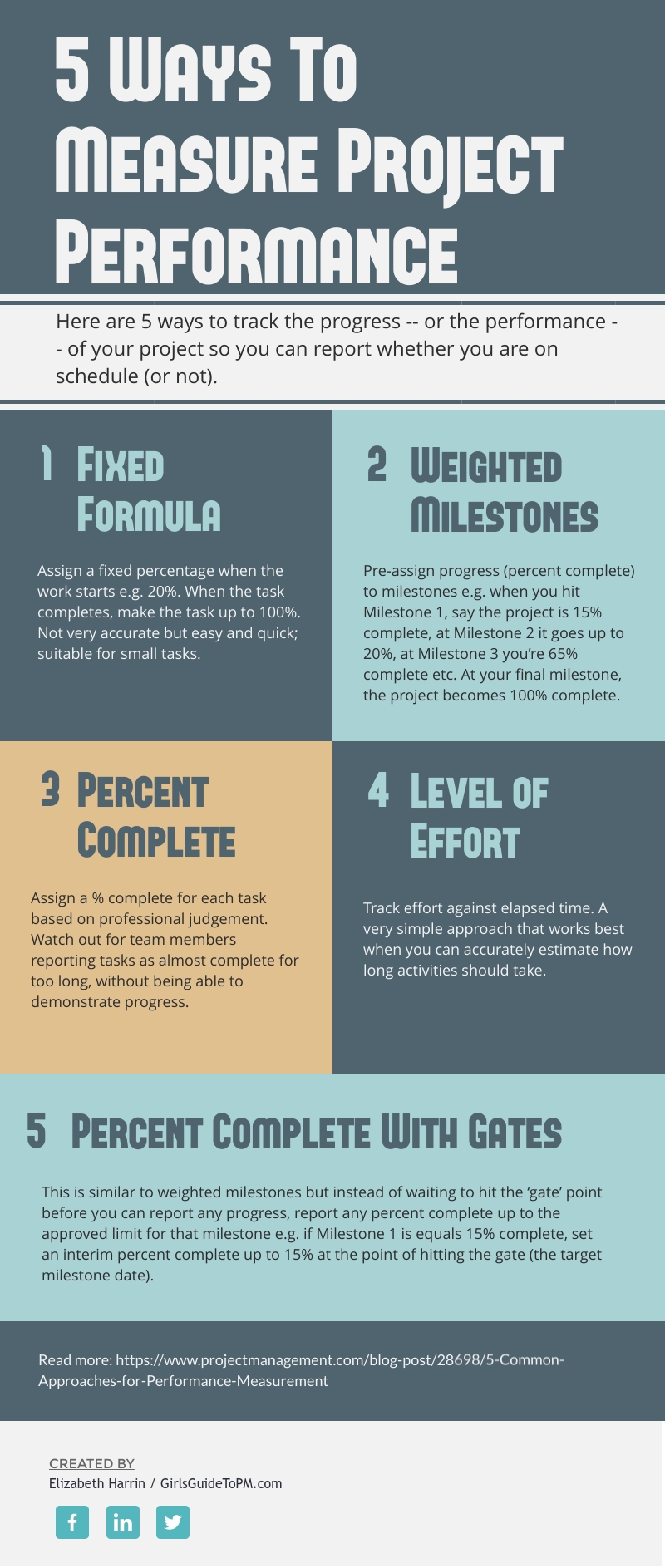
| We need to measure project performance to see if the project is on track. The graphic below shares some ideas on the different ways you can measure work performance. None of these suggestions is better than any other – they are all appropriate for different projects, environments and levels of project management maturity.
Do you use any of these approaches to measure progress on your projects? Why (or why not)? Let us know in the comments section below! For more on this idea, and a bit more background on the performance measures, check out this article: |