The Difference Between Regulations and Standards


|
When you’re planning how to deliver quality results, and what needs to go into your project schedule, it’s worth looking at what regulations and standards you need to adhere to. In this article we’ll look at the difference between regulations and standards and what that means to you managing a project. What is a regulation?A regulation is a requirement for your project. You have to follow regulations. Regulations include applicable laws. For example, there are a range of regulations that can influence the way you approach your project and what you can and cannot do. Here are some areas affected by regulation:
Laws vary between countries, so check what is applicable to where you are based. Also note that in multinational projects, the laws and regulations might differ for people on your teams in different locations. What is a standard?A standard is a guideline. Your project should follow guidelines because they are there for a reason, but if you can justify why you need to approach something in a different way, then you don’t have to follow the standard. For example, it might be the standard that no one in your office works on a bank (public) holiday. Let’s say it is normal for the office to close over the end of year period when many colleagues are celebrating Christmas. However, your project is to upgrade the telephony switches. Knowing that the call volumes will be low and no one will be around to answer calls anyway, you might decide that the Christmas period is the perfect time to do that project work. It’s not standard, but it’s the most appropriate solution for your project and least disruptive for the business. Not all standards or regulations are going to affect every project. It’s important to have a view as to what is important for this project. It is something I would consider and resolve as part of project initiation, so that I can go into project planning with all the information needed.
How do standards and regulations affect projects?Standards and regulations affect projects in a number of ways. 1. By affecting project schedulingAny time legal compliance is required, you can bet you need to add extra time to the schedule to have the legal team check out what you are doing and ensure the project is ticking all the boxes. Build in enough time for regulation-related checks and work. Equally, with resource-related regulations, you may have to constrain working time which will have an implication for the schedule. For example, you may not be able to use overtime hours, or you might have to factor in travel time to your schedule if your resources aren’t permitted to go over a certain amount of travel before taking a break. Some of these constraints could be legislation affecting workers, others might be the way your company operates (or as PMI would define them, enterprise environmental factors). An example would be dictating that the standard working week is 40 hours. You would take that data and ensure your schedule reflects a 40-hour standard working week. 2. By affecting project qualityIf you have to follow regulations or stick to standards, this could have an implication for project quality. You might have to do additional quality checks, or use particular materials. An example would be building control. In the UK, you need building control to sign off on construction work. You can’t simply carry on building or assume everything will be OK without having someone come round and inspect the site. That’s an external quality check you have to consider and plan for. 3. By affecting project budgetsIf your project needs a building control check, you have to pay for that. The building controller will charge you for his or her time. That cost needs to go into your project budget forecast. Depending on what regulations and standards you have to abide by, your project costs will need to accommodate the related charges. Once you understand the standards and regulations that affect your project, and how they are likely to affect the project, you are able to plan for them. Some might need mitigating factors and adding to the risk register. Others will be easy to manage, perhaps by adding a little extra time or an additional task to the schedule. Do a bit of research at the start of your project and then incorporate what you need to so that your project, and your organisation, stay compliant with the relevant regulations and standards. Pin for later reading:
|


Deep Dive: Project Schedule Management: Develop Schedule
Categories:
Scheduling
Categories: Scheduling
|
I’m working my way through the Knowledge Areas and process of the PMBOK Guide®-- Sixth Edition, and at the moment we’re in Project Schedule Management. Last time I looked at the Estimate Activity Durations process. That means today is the turn of Develop Schedule. Develop Schedule ProcessThis is the fifth process in the Knowledge Area. We’re still in the Planning process group – although this is the last Planning process for this Knowledge Area. Finally, after what seems like ages of gathering data, we are now in a position to actually create the schedule. Unsurprisingly, the main output is your schedule. There are some other outputs too, and we’ll come on to those, but the schedule is the biggie. InputsThere are quite a few changes to the Inputs between the PMBOK Guide® -- Fifth Edition and Sixth Editions, and as we saw with the last process, it’s mainly items being removed. This time we’ve lost 11 specific documents. These have been replaced with the generic Project Management Plan, project documents and agreements. Agreements refers to documents from third parties that talk about how they will do their tasks. You could use contract schedules for this, or a statement of work. I think agreements should also refer to the arrangements you have with line managers to use their staff on projects. Getting this firmed up will help massively with being able to build a schedule because you’ll be confident that the people you need are available to you. As we’ve now got ‘project documents’ as a handy catchall, it might be useful to clarify exactly what they could mean. Here’s a (non-exhaustive) list of the documents you could refer to during this process:
|


Your First Project Budget: What You Should Know
Categories:
budget
Categories: budget
|
So you’ve been given a project with a budget? Or you’ve been asked to create a project budget for the first time? Here’s what you should know. The expected totalEven if you’ve been told to create a budget from scratch, the person who asked (your project sponsor) already has an idea in mind for what the “right” number is. Save yourself some time and ask them to tell you what their expectations are for the final figure. Now you have to work out how close you can get to that number. Breaking down the cost elementsYou need to work out how much each individual element of the project is going to cost. This is called bottom up estimating. Take your list of items and estimate a cost for each one. Involve any subject matter experts in this and make sure that you take into account any constraints and assumptions. The aim is to get a detailed and accurate (albeit estimated) take on how much each element costs. Add the individual estimates together, and that’s your total expected spend. Hopefully, this matches the initial expectations of your manager or project sponsor. Review against expectationsOnce you’ve done some work on the budget, you’ll have an idea of whether you can hit the target they have in mind. If it looks like you’ll need more than that, you can start to position the scope of the project in a way that helps you get closer to the number. Here are some suggestions:
Or, of course, you could build a robust defence for why your project is going to cost more than your sponsor originally expected! Use data and facts to create the justification. Next, you should talk to your sponsor about the other budget areas that should be considered before the budget is considered final. Add management reserves and contingencyYou can find out more about management reserves and contingency in this article, including how they fit into your overall budget. Talk to your project sponsor about making sure there is adequate contingency for the project, and management reserves as required. Add a risk management fundIf your project is relatively large and likely to be affected by significant risk, then it’s worth building in a risk management fund (more details on that here). Basically, a risk management fund helps you pay for the activities required to mitigate, transfer or otherwise deal with risks. Instead of just tracking the risks, you can actually do something useful with your pot of money to offset the impact they might have on the project. Set tolerancesFinally, talk to your sponsor about budget tolerances. That basically means the boundaries within which you can act without going to them for further approval. On a budget of £1m, you don’t want to be asking them for sign off because you need to spend an extra £10. Set some limits with which you are both comfortable and that give you freedom of action but ensure some rigour. Note: tolerances in this instance specifically relate to financial boundaries, but the concept of tolerance is useful for other areas of project management too, like setting boundaries for schedule and risk. Tolerances provide you with guidance around how you can act without escalating. Finally…With all the calculations and discussions out of the way, you should be at a point now to agree the final budget. This figure is what you will work to and track against during the life cycle of the project. It’s the figure approved for your project, and you’re responsible for using the money wisely. Report spending to the project board or steering committee and make sure you keep your numbers up to date. If you need help with tracking spend in a way that is considered appropriate by your company, start with the PMO. They probably have software or spreadsheets you can use to store all the financial figures. If you’re lucky, it might automatically create the information required for your financial reporting too! Want more tips on creating a budget? Read this next: 5 Ways to Create a Budget Pin for later reading:
|

7 Cost Management Terms You Should Know
Categories:
cost management
Categories: cost management
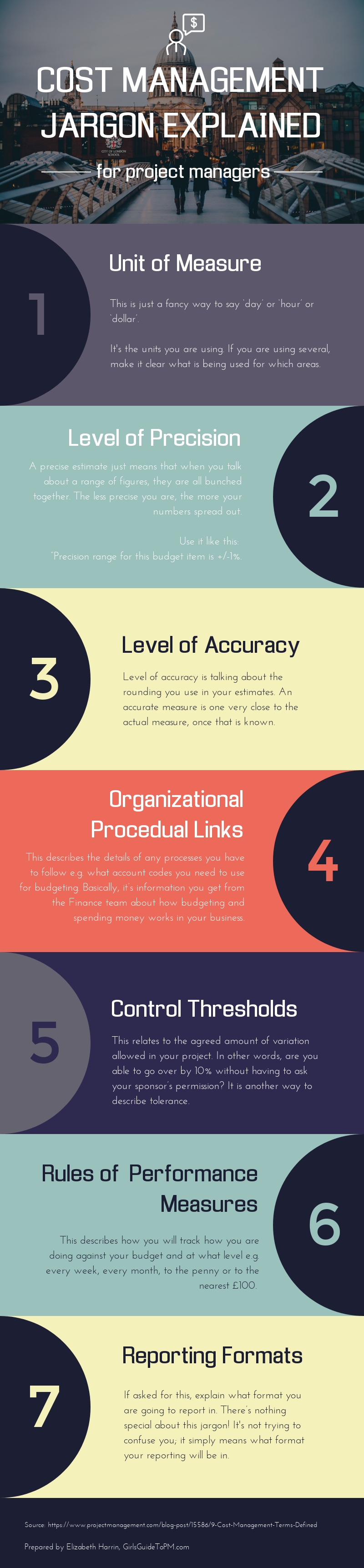
| There’s a lot of jargon in project cost management, and your cost management plan is full of terminology you might not have come across before. There’s nothing difficult about the vocab, and it’s not trying to catch you out. However, if you are finding there are sections of your cost management plan that you don’t know how to complete, it could be because the jargon is new to you. This infographic sets out 7 of the common cost management terms that you’ll come across when preparing a cost management plan, and explains them in simple language!
|
Deep Dive: Project Schedule Management: Estimate Activity Durations
Categories:
Estimating
Categories: Estimating
|
Last time in the deep dive into the PMBOK Guide®-- Sixth Edition I looked at Project Schedule Management and the Sequence Activities process. You’d expect today’s instalment to be covering Estimate Activity Resources, which is what came next in the PMBOK Guide® -- Fifth Edition. However, that process has now moved to the Resource Management Knowledge Area so we skip ahead to Estimate Activity Durations. Estimate Activity Durations ProcessThis is (now) the fourth process in the Knowledge Area. We’re still in the Planning process group. The point of this process is to work out how long each activity is going to take. You’ve already got the tasks in a logical sequence. Next it’s time to work out the overall duration of the project based on the duration of the individual tasks. The main output is a set of estimates. These feed into the next process, where you create a project schedule. In my experience, building the schedule and working out the activity estimates are two processes that overlap majorly. I’ll start creating the schedule in my project management software from the task list, and update the task information with durations as and when I know them. So the schedule is developed as each estimate (and other information like resource availability) is added. Go into this process knowing how the estimates are going to be used, and you might save yourself some time when it comes to adding them into your schedule. This is all about being effective and managing your planning in an integrated way. Right. Let’s look at the detail of this process starting with the Inputs. InputsThere are quite a few changes to the Inputs between the PMBOK Guide® -- Fifth Edition and Sixth Editions. Mainly, it’s items being removed. We’ve lost eight specific documents and replaced them with the generic Project Management Plan and Project documents. This is a trend in the new edition. It’s a good trend too, as it allows us to be more flexible with the Inputs and use the paperwork that is most relevant to the project. The important parts of the project management plan are the schedule management plan (as this includes some background info on expected level of accuracy and possibly other criteria useful for starting out estimating) and the scope baseline (as the WBS dictionary may include some criteria that would affect the estimate e.g. technical details or constraints). Useful project documents to refer to during estimating include:
|