


Predictive Software: The Next Step for Collaboration Tools
Categories:
collaboration tools
Categories: collaboration tools


|
How much time do you spend doing routine tasks? Just think about how long it takes you to type things like your company name or location details when they get mentioned in an email. For a long time, Outlook (and I expect other tools) have had autocorrect functions that allow you to type something and have it ‘autocorrect’ to something else. It’s a text expander feature – and you get tools that lay on top of your normal suite of applications that just do text expanding. I even have that function built into my iPad, which is handy when it comes to typing out my email address every time. Now I just type a shortcode and the whole email address populates. Predictive text takes this one step further by working out what you are going to type before you type it. Predictive apps use passive data, for example, emails, to suggest tasks and updates. Think predictive text when you are trying to type a message on your phone, and scale it up so that the app sends suggestions to your To Do list about what activities you should be working on that day or flags which deliverables are likely to be late because of software defects logged in your testing system. Many tools are already embedding AI into them to help users have less to do. I was looking at one retrospective meetings management tool the other day and it used AI to automatically name the groupings of sticky notes we created in the meeting, based on the common content of those notes. Clever. It wasn’t always grammatically correct, but it saved us the job of typing a name for each group (although we could edit them if we wanted). Predictive software sounds like it’s taking the thinking and professional judgement out of being a project manager, but it’s just crunching data for you. For example, you can’t hold information in your head about how accurate each individual team member has been in estimating their workload on this project and the last five projects they have worked on. Predictive software could sift through estimates and actuals, and then flag the three team members with the worst record for getting their estimates right so that you can appropriately challenge them. This kind of system requires a particular leap of faith as it scours other systems for data. As a community, we’re going to have to go a long way before we are all comfortable with the idea of an app reading our emails and digging through personal files, even if it does predict who isn’t going to hit their deadlines that week. Whatever collaboration tools you adopt at work, and however you use them, keep in mind that they should be compatible with and reflect what is going on outside the walls of your company. Technology and workplace cultures will continue to evolve and the key is going to be keeping up and staying relevant while making sure your teams have the tools they need to do their jobs productively. That might mean embracing AI and predictive functionalities of tools, even if it feels a teeny bit uncomfortable to do so.
This article includes a few points that were made in my PMI book: Collaboration Tools for Project Managers. Given what we’ve been going through and seeing so far this year, it felt appropriate to try to pick out some comments on tech for teams and where that might be taking us – because it seems to me that virtual working is here to stay. Pin for later reading
|

 The future is in flatter, more informal working cultures supported by unified organizational collaborative technologies. We might not refer to the tools that way (or even be using the term social and collaborative media) in ten years’ time, but the principles that underpin this revolution in working practices are here to stay.
5 Ways to Make Outsourcing Work [Infographic]
Categories:
outsourcing
Categories: outsourcing
|
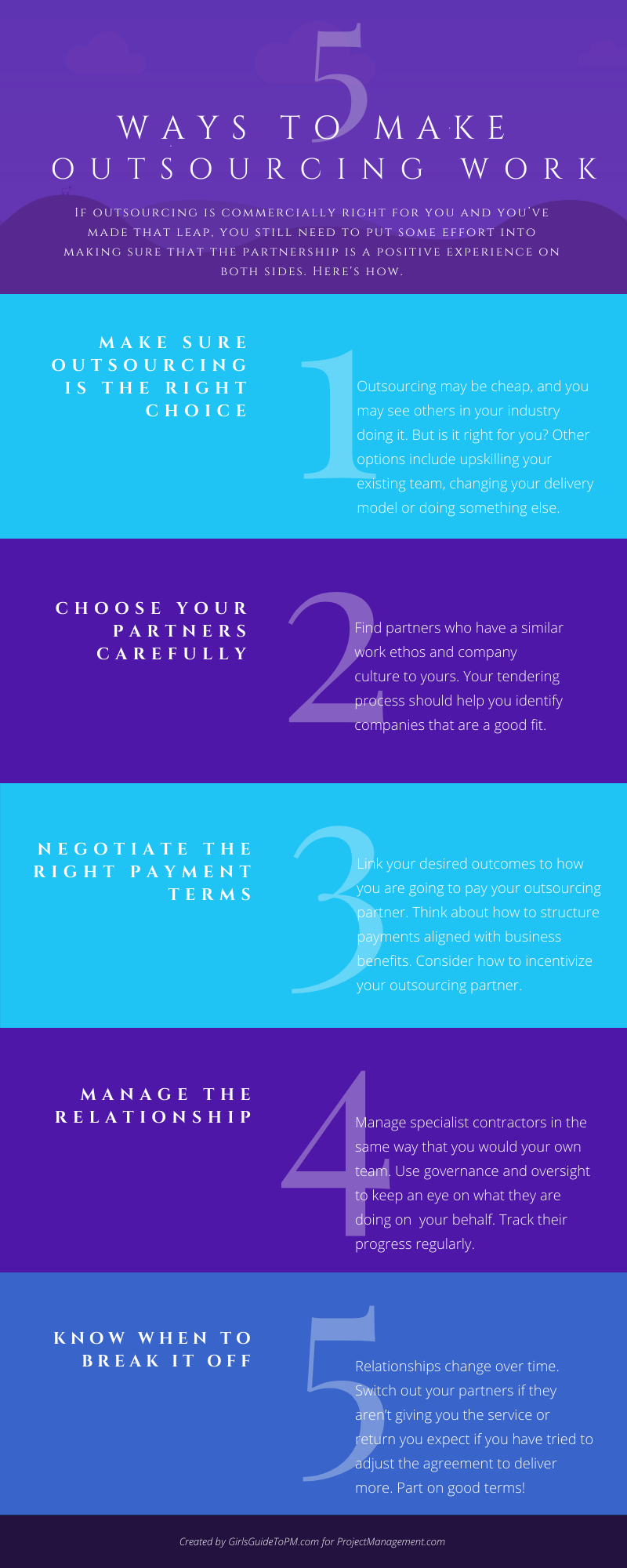
If outsourcing is a commercially viable option for you and you’ve made that leap, you still need to put some effort into making sure that the partnership is a positive experience both for your and your outsourcing partner. The infographic below shows five focus areas for making sure your outsourcing relationship is a positive as possible.
The 5 areas are:
|

Quantitative Risk Analysis: Process Overview
Categories:
risk
Categories: risk
|
This article is the ninth part of my look into project risk management, and today the topic is quantitative risk analysis. What is quantitative risk analysis?Well, it’s difficult to spell, that’s what! And often confused with qualitative risk analysis. Simply put, it’s the next step after you’ve identified the likelihood, probability and any other risk metrics that you consider important. It’s the process of getting a number from those risk assessments and seeing what the financial, resource and time impact would be should the risks happen. On large projects it’s a way of providing greater levels of confidence and management oversight by reviewing substantive risks in a very structured way, allowing the team to work out what the best course of action is to manage the risk. InputsThe inputs to this process are:
What documents should you review?Most of your project documents could be considered fodder for this process, but beyond the risk register and risk report here are the most important ones: Assumption log – review any assumptions and constraints that affect risk. Basis of estimates – this will tell you how estimates were created and the less scientific ways of developing estimates will represent a higher risk to the project. Cost and resource estimates – use these as a starting point to work out the cost or resourcing variability for any given risk. Duration estimates – use these as a starting point to work out variability in the schedule. Cost forecasts – these are helpful if you are calculating confidence levels because you can compare the quantitative cost risk analysis to your forecast and see how on track you are likely to be. Schedule forecasts and milestone list – ditto for confidence levels related to scheduling. Tools and TechniquesThere are also quite a lot of tools and techniques that will be helpful in carrying out this step of your risk management process:
The expert judgement input you need here is going to be quite a specialised skill, so if you have risk certified professionals on the team, use them to support you. Data analysis can be undertaken in a variety of ways and you can select which is going to be the most appropriate for the type of risk you are assessing. Simulations like Monte Carlo analysis which simulators the combined effects of individual risks to see what their impact would be on successfully completing the project. Sensitivity analysis helps you understand which individual risks are most likely to affect the projects outcomes. You’ll typically see these represented in a tornado diagram. Decision tree analysis is a way of visually representing several different options for dealing with risk and reviewing what the impact of each of those options would be. It helps you choose the best risk management approach, and it typically focuses on working out the cost of different choices. Influence diagrams show the interconnections within the project, highlighting what relationships influence particular outcomes. In itself it isn’t going to share many insights about the impact of risk, but it is a good starting point for seeing how different stakeholders or tasks connect and influence each other. OutputsThere is only one output from this process and that’s the risk report. Update the report with the formal outcome of the analysis. If you have only used this process for some risks, those are the ones you want to update – it’s fine if you don’t have the same level of detail for every risk, because you are prioritising effort and time on the risks that are going to have the impact for your project. Do you always have to do quantitative risk analysis?No, you don’t. It is a good technique to use if you’ve got good data. If your risk data is skimpy and your baselines are more guesswork than expert judgement, all you are doing is building an analysis on shaky foundations. This is an appropriate process for large, complex, strategic projects or where there is a requirement to do it because a contract or stakeholder says so. However, if you choose not to go ahead and quantitatively analyse risk, then be aware that it’s really the only reliable way to aggregate and review the overall risk exposure for your project and onwards up into the rest of the portfolio. So if you need that data, you’ll have to do it. Next time I’ll be looking at how to plan risk responses. In case you missed them, and to save you a job digging through the archives, here are the quick links back to the previous instalments: Read part 1 here: An introduction to risk management Read part 2 here: Trends and Emerging Practices in Project Risk Management (Part A) Read part 3 here: Trends and Emerging Practices in Project Risk Management (Part B) Read part 4 here: Tailoring Risk Management Read part 5 here: Planning Risk Management Read part 6 here: The Risk Management Plan Read part 7 here: Identify Risks Process Read part 8 here: Qualitative Risk Analysis Pin for later reading
|


The Benefits Management Process [Video]
Categories:
benefits
Categories: benefits
|
In this video I explain the six steps for managing the benefits realisation process on your project. They are:
There’s more detail on each of those steps in the video, but if you prefer to read the highlights, you can find a text overview here: Pin for later reading
|


Archiving Project Data
Categories:
project data
Categories: project data
|
Over the last couple of months I’ve looked at some of the tech trends affecting us as project delivery professionals working in an online world. One of the technical challenges I haven’t talked about yet of using collaboration tools is how you archive the data effectively. Archiving tools are available, but they are yet another system to integrate within your technology landscape. There’s nothing to say that their development will keep up with the constant evolution of the SaaS marketplace; in fact, I think it’s fair to say that they aren’t. Forrester reports that only 15% of businesses actively capture and archive data from collaboration sites (Hayes & McKinnon, 2015). The old approaches to data management and records compliance just don’t cut it with new communication channels, even where interoperability makes it possible. This problem is going to get worse before it gets better. Regulatory bodies will catch up with the increase in data being stored across collaboration tools and online and will demand that companies manage their archives more effectively. Organizations will be forced to adopt more robust methods of managing archives with the associated cost of data management that comes with this. Archiving strategies need to be built in conjunction with the adoption of online tools and with flexibility in mind. All the trends I’ve talked about – like AI, robotic processing automation and interoperability - bode well for both the manufacturers of project management software, and (one would hope) the people using them. Better data, better collaboration, and better end-to-end systems should increase the likelihood of success on projects because it all contributes to better decision making. And I believe collaboration tools are already improving the results of teams where they are being used – I certainly see that in the conversations I have with my mentoring clients and the project managers I work with every day. However, the great results we expect from tech will only come about if the tools being applied meet a genuine business need. You can’t layer tools into a broken, uncommunicative team and expect them to suddenly work together, just like that. The team culture has to be ready and open to change, the infrastructure has to be there, the management desire to want virtual and online working to succeed has to be there – and people have to see the benefit. The business need that drives all of that is likely to overlap the areas of technology, collaboration, and culture. The way people work online—both in and outside the project environment—is not perfect, and we can expect to see more evolutions and innovations in the years to come, both in terms of tools and the way in which interactivity is encouraged and fostered. I hope that we will eventually look back and realize that this was the time that organizations made the shift to the collaborative project environment. While the societal change may feel fast, in organizational terms, it is infiltrating slowly. Project leaders are essential in supporting innovation and effective collaboration in all its forms.
|

 This article includes a few points that were made in my PMI book: Collaboration Tools for Project Managers. Given what we’ve been going through and seeing so far this year, it felt appropriate to try to pick out some comments on tech for teams and where that might be taking us – because it seems to me that virtual working is here to stay.

