Key Achievements for Project Cost Management [Infographic]
Categories:
cost management
Categories: cost management


| I’m often asked about ‘the minimum’ for any given project management process – as if the rest of the process is somehow superfluous and anyone who does those extra bits is wasting effort. I think most project management processes are implemented with ‘the minimum’ in mind – or at least they should be. However, project cost management is a big topic and it got me thinking about the kinds of things I would consider ‘winning’ at managing the project’s financials. What would the minimum be? Ultimately, if stakeholders are happy and the work is progressing and under control, then I’m winning! I’ve put what I think the key achievements for project cost management should be in the infographic below. I’m not sure that ‘achievements’ is quite the right term because this is our job we’re talking about, not some kind of badge-collecting exercise. But I couldn’t think of anything better! Leave a comment below if you’ve got a different term I should be using. These are the things that I consider to be the basics for myself doing cost management on a project. Your ‘minimum’ list might be different. And if it is, let us know in the comments!
|
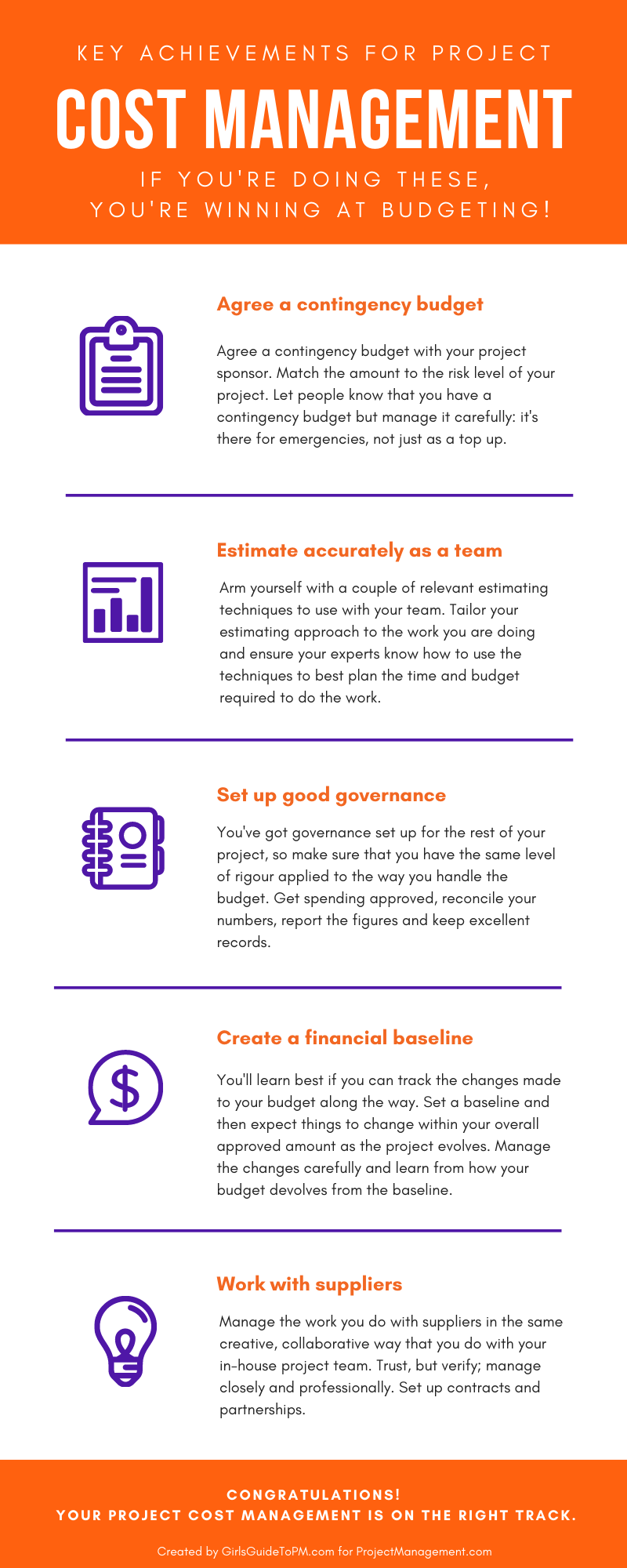 The key things are:
Qualitative Risk Analysis: Process Overview
Categories:
risk
Categories: risk
|
This article is part eight of my look into project risk management, and today the topic is qualitative risk analysis. I did not expect this to turn into so many parts, but risk management is an in-depth topic and there’s a lot to cover! In case you missed them, and to save you a job digging through the archives, here are the quick links back to the previous instalments: Read part 1 here: An introduction to risk management Read part 2 here: Trends and Emerging Practices in Project Risk Management (Part A) Read part 3 here: Trends and Emerging Practices in Project Risk Management (Part B) Read part 4 here: Tailoring Risk Management Read part 5 here: Planning Risk Management Read part 6 here: The Risk Management Plan Read part 7 here: Identify Risks Process What is qualitative risk analysis?What is it, apart from being a word that lots of people (myself included) stumble over and get confused with quantitative risk analysis (more on that next time). Qualitative risk analysis is simply the process of prioritising the risk based on probability of occurrence and impact, as well as some other characteristics if they are relevant. It’s what most of us would recognise as an important step in project risk management – the part where we decide which are the risks we are going to focus on because we don’t have time to spend effort on all of them. Perform Qualitative Risk Analysis is the third process in the Knowledge Area of Project Risk Management. The point of doing it is to prioritise individual risks by looking at how likely they are to happen (probability of occurrence) and how bad they would be for the project if they did happen (impact). When you look at those two data points, you can prioritise all the project risks. As with risk identification, it has to happen throughout the project because risks come and go and also change in severity. Something that has a low probability of occurrence today could have a dramatically different likelihood of occurring tomorrow if something else happens to make it so. The process doesn’t talk much about risk proximity although it is mentioned in a ‘other factors you can consider’ list in the PMBOK® Guide. I find proximity another useful measure for prioritising risks. That looks at how soon the risk is likely to happen if it happens at all. Risks that are likely to occur far in the future can be postponed for a bit while the team focuses on risks that have a likelihood of occurrence for next week. In the process we review the risks we identified and prioritise them based on our subjective opinions and those of the team. Therefore it’s only useful if we also understand the risk assumptions and attitudes being brought to the table by the people doing the assessing. It’s important to note that the assessment of risk is relative – you compare the risks on this project to each other, and come up with a relative priority. If you compared them to the risks on another project, you’d probably get a different result. InputsThe inputs to this process are:
The stakeholder register is important because it gives you input as to who should be involved – and because assessing risk is generally subjective, even if you do try to use data-based categories for the assessment, it’s helpful to know what their risk tolerances and appetite are. If you use a neutral (professional) facilitator, they can help uncover some of the bias in the team and assess the risks more objectively. You’d hope, anyway. Tools and TechniquesThere are also quite a lot of tools and techniques, many of them centering on interpersonal skills and professional knowledge. The tools and techniques you’re likely to use include all of these (there are quite a few to choose from, you won’t necessarily use them all on the same risk – pick and choose what makes sense to help the analysis of the particular risk you are looking at):
There are quite a few ways you can do data analysis. Risk data quality assessments: This is where you look at how reliable the data is that you are using for your assessment. If the data scores low, you will want to get some better data on which to base your next steps and action plan. Risk probability and impact assessment: This is what most people think of when they think of risk analysis. It’s the table you will find in your risk management plan that tells you how a risk will score based on how likely it is to happen and the impact to the project or business if it does. Other factors: You can consider pretty much anything you like when you make your judgements about risk. The PMBOK® Guide lists a few including proximity (as we saw above), controllability, urgency, connectivity and strategic impact. Use as many criteria as you can do reliably and repeatably so you’ve got lots of data to go on when you make your risk assessments. I tend to find that organisations stick to probability and impact, and some go as far as adding in proximity (how soon the risk is going to happen, if it happens). However, there are others, like how easy the risk would be to manage, how easy it is to detect and control, strategic impact and how connected it is to other risks – because that would influence a wider section of our risk pool The challenge with doing the assessment is identifying unconscious bias in both the individuals involved in the process and the process itself. You’ll need to be aware of the risk appetite of the organisation and just challenge everything. Do your best! OutputsThe outputs of the process are updates to the project documents, specifically:
The end result of this process is that you have a bunch of documents to update. At the end of the process you get a list of risks (from the process to do risk identification) with a weighting or score of how risky they are. That feeds into a future process which is to look at what you are going to do about those risks. You’ll want to make sure your assumptions log, risk log, issue log and risk report are all up to date. These are all living documents so in case you hadn’t realised by now, this process is something that repeats during the life of the project. You’ll be doing risk prioritisation pretty much in every team meeting, or I’d recommend at least on a monthly basis. Share the documents with whomever needs to see them so the whole team has access to the latest information. In my experience, as you talk about the riskiness of risks, you also formulate ideas for what you might do to mitigate them. So the processes happen in parallel, often within the same risk workshop. It’s helpful to understand them as separate activities, but don’t worry if you end up planning risk responses at the same time as having a conversation about how troublesome the risk is likely to be. Next time I’ll be looking at quantitative risk analysis. Pin for later reading
|


4 Tools for Managing Cost Control [Video]
Categories:
cost management
Categories: cost management
|
In this video you'll learn 4 different tools to manage cost control on your project. Cost control is an important aspect of project management, and there are things you are already doing on the project that can help you manage your finances more effectively. For more information, read this article: https://www.projectmanagement.com/blog-post/19000/4-Tools-for-Cost-Control. Pin for later reading
|


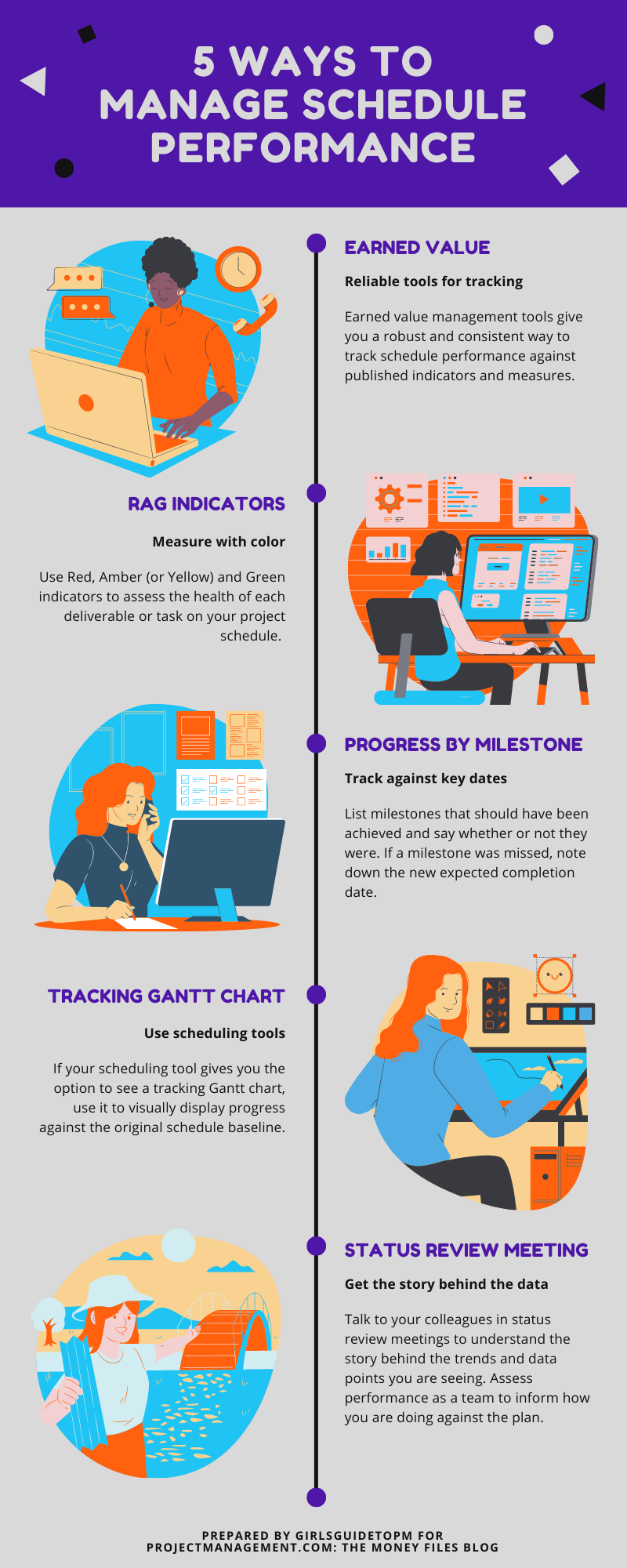
How to Measure Schedule Performance [Infographic]
| Someone emailed me the other day asking about how to use percent complete to track progress on their project schedule. It’s not the worst way to measure performance, but as I’ve got more experienced at putting schedules together, and the work I do is more uncertain, I’ve got less interested in using percent complete. It means very little (at least, the way we were using it – which was basically a guess to feed into a schedule that was also mainly guessing given the level of complexity and uncertainty, and changes every week). So I started thinking about schedule performance tracking – and there are plenty more ways to measure your progress than sticking to percent complete. The infographic below shares some of the ways I know to measure your performance. You wouldn’t want to use them all on the same project necessarily, but it’s good to have options. Which ones do you use?
|
Interoperability: The key to efficient working
Categories:
collaboration tools
Categories: collaboration tools
|
We’re using more and more tools now – companies that didn’t previously have online collaboration tools are now signed up to an annual subscription, so even if you can now get into your workplace, a lot of project management teams are still working virtually. There are changes that come when you add more tech tools into the estate. You have to invest in keeping your collaboration tools relevant and up-to-date. You should also keep an eye on the future so that if you need to switch systems or link them together, you can. This is interoperability—the ability to use different tools together to provide a single, streamlined technology platform for your company that does not rely on manual rekeying of data. In my experience, a single platform is better for enterprise data mining, as the fewer interfaces you have to deal with, the easier that exercise is. But it’s also unrealistic, especially if your business strategy has been to invest in best-in-class tools for each area instead of a single, “do everything” enterprise product. If you do have multiple systems, interoperability will help you get the data out. Traditionally, linking systems together has been through data integrators or other pieces of software that built connections and interfaces between various tools, matching up the records and allowing you to transfer data between them. Increasingly in the online space, interoperability is being provided by third-party tools that handle the feeds for you, allowing smaller businesses to get their systems talking to each other without the need for bespoke developments. Products like Zapier do this. It lets you build “zaps” which effectively work on a “if this happens, do this” basis. For example, if you upload a file to Dropbox, you can automatically sync it to your project management system. More tools today are offering application program interfaces (APIs) as well, which are effectively the data standard for that product. By making these standards available, they have done half the integration for you. They let developers build the other half of the integration and match them up, then you can push data into project management tools from other systems and vice versa. Interoperability of MethodologyInteroperability is something we need to consider in the broadest possible sense, as well as the impact on tech. We need to do more to understand interoperability between ways of working, blending virtual and on-premise teams and the approaches they use to manage projects. Businesses don’t limit themselves to managing projects using agile or waterfall approaches. The same company can have project managers using PRINCE2®, Scrum, and A Guide to the Project Management Body of Knowledge (PMBOK® Guide). Project collaboration tools need to be flexible enough to deal with all of those methodologies, and to be tailored to support internal processes as well.
This article includes a few points that were made in my PMI book: Collaboration Tools for Project Managers. Given what we’ve been going through and seeing so far this year, it felt appropriate to try to pick out some comments on tech for teams and where that might be taking us – because it seems to me that virtual working is here to stay. Pin for later reading:
|
 The marketplace today is not full of tools that only support one method, but it is something that decision makers should be aware of—choose a product that supports your future methodology and process needs and not just the approaches you use today.