5 Considerations for Project Testing
Categories:
project testing
Categories: project testing


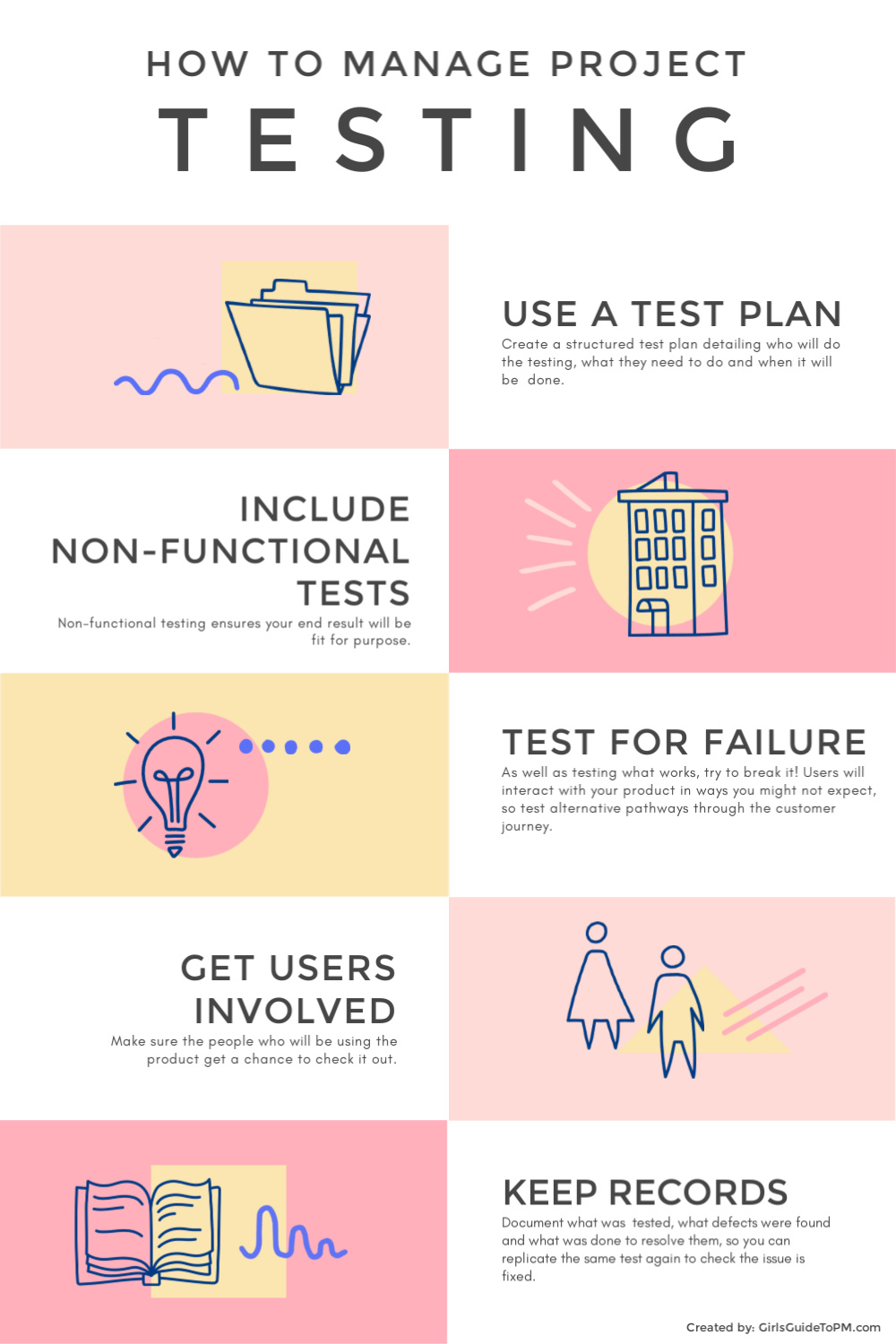
| The testing phase of a project is the time, in my experience, that the schedule gets squeezed. I’ve been on projects with an ‘official’ testing team made up of experienced, trained testers, and also worked on projects where the testing has been done by me. Yep. Not great. In most cases, it’s been somewhere in between, and often I’ve ended up training users in how to test so they can join the ranks of project team members helping squash bugs. The infographic below shows 5 things to think about when preparing the testing part of a project: Use a test plan (sounds obvious, but it’s extra – often unwelcome – documentation that is resisted) Include non-functional tests – because it’s not all about the stuff your users will be doing with the product, but also about security, scalability, data protection and more Test to the point of breaking – just because you use the product in the way it has been designed doesn’t mean users will. Test the ‘wrong’ way to use it and see what happens Get users involved – obviously Keep records – because trying to remember exactly what steps you took to get a bug, so you can replicate what you did and see if the bug is now fixed… that’s no fun, trust me!
|
5 Behaviours of Successful Project Managers
Categories:
success factors
Categories: success factors
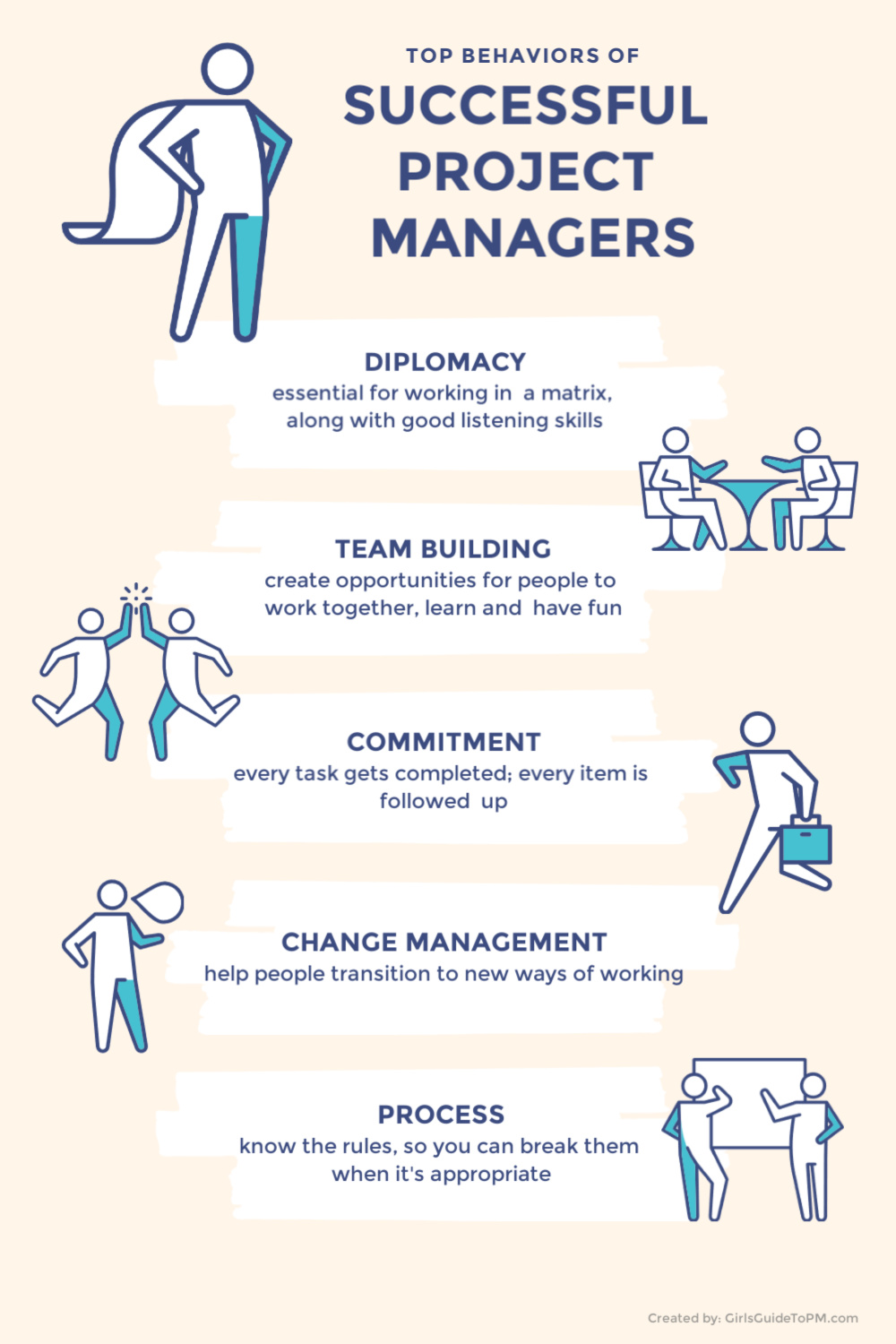
| What makes a project manager successful? It’s no secret that it’s hundreds of small decisions and behavioural traits. I’ve been thinking recently, as I’m writing a new book, about the things I believe make the biggest difference. The infographic below isn’t based on scientific research, but on my experience working with project managers and leading teams. What do you think makes the biggest difference in whether a project manager is successful at work or not? Let me know in the comments, I’d love to hear!
|
What is ROI?
Categories:
ROI
Categories: ROI
|
Return on Investment. That’s a term you’ll have come across before, I’m sure. Let’s dig into what it means and how we can use it on projects. What’s the best ROI?Big. Big is best! The bigger the ROI, the better, so in terms of project selection, prioritise projects with the biggest return. Return on investment is a calculation used to work out the rate of return for a particular investment over a specific period of time. In the business cases I am most familiar with, we worked out ROI over a 5 year period. I say “worked out” but often it is a case of plugging a few numbers into a spreadsheet that Finance provided and typing the output into the business case. Or the Finance team simply provided the numbers, based on what I gave them from the project financial projections. ROI is often expressed as a percent. For example, if you are building a new hospital, the ROI on the new facility might be 6%. That’s 6% of the initial investment, so in order to deduce anything useful from ROI it helps to know the initial investment cost too! If it costs us £10,000 to build a new hospital (ha ha) then that’s a very different ROI to if it cost £10 million. There are multiple different ways to calculate return on investment, and for 99.9% of what you do as a project manager, you aren’t going to need to know how it’s worked out, so I’m not going to cover that today. What do you use ROI for?The major point of ROI in a project environment is to compare projects. Because you are creating a percent figure, you can compare across projects, even projects that are substantively different, with different lifecycles, delivery methods, or for different clients. ROI is a great leveller in the stakes for project selection. Pin for later reading:
|


How to stay afloat in times of organisational change [Video]
|
In this video I look at 3 things you can do to help calm the overwhelm when the business seems to be changing around you more quickly than you can keep up! I talk about making sure change management, risk management and day to day operations on projects go as smoothly as possible, freeing you up to cope with whatever project-related changes are being thrown your way. Pin for later reading:
|
5 Tips for Project Closure
Categories:
project closure
Categories: project closure
|
Done? Great! It’s time to wrap up your project neatly. Here are some tips for closing down a project in a smooth and measured way. 1. Update your project scheduleI’ve been guilty of not bothering to mark off the final tasks as complete. Who cares about them anyway? You know they’re done. Stop right there! You should tidy up your project schedule and make sure everything you completed is marked as complete. If tasks didn’t get finished, and that sometimes happens, you can add them to the closure documentation and the operational team can pick them up in future. This has happened to me multiple times and it’s fine. Just add the outstanding work to the handover paperwork and make sure the receiving team knows what to do. Given timelines for projects, it’s often unrealistic to think that every last activity gets perfectly wrapped up with a bow before it’s time to close the work. It’s important because someone else might look at those files later and think you didn’t complete work when actually you did. 2. Update the risk logHave you closed off all your project risks? Some might need to be passed forward as ongoing risks for the operational team to be aware of. But anything that didn’t happen or where the risk has passed – those ones can get closed off on the log. Anything that is useful to discuss as part of lessons learned can get carried forward to the next point on the list… 3. Schedule and hold a post-implementation reviewWhere I work, we call this meeting a PIR or post-implementation review, but you might know it as a post-project review, retrospective or something else. The point is, you get together after the project and discuss what worked and what didn’t go so well. You’ve (hopefully) been capturing lessons learned throughout the project – this is an approach I advocate in my book, Customer-Centric Project Management. So doing one last review shouldn’t feel like too much work as it builds on what you have already been doing. Lessons learned sessions are a regular part of what project managers do, so you probably don’t need me to say more about them. 4. Sort out your project filingLook through your digital files and make sure they have sensible names and the right stuff is in each one. Someone else might need to review them later, if they are doing a similar project, so make it easy for your organisation to use the knowledge in your documentation. I think companies are bad at managing organisational knowledge, so don’t make it harder for your colleagues! I sometimes add a ‘start here’ or ‘readme’ file as a .txt in the main folder navigation menu. The aim is for people to look at that first and I can use the body of the file to explain how the folders are set up. 5. Celebrate!Whoo hoo! You’ve completed the project. Time to say thanks and celebrate how far you’ve come. Note: even if you didn’t deliver everything you said you would, even if the project is closed down early, it is still worth celebrating what you achieved. Team morale will be better because you’ve taken the simple, easy step of thanking everyone for their contribution. They’ll go on to future projects feeling better about this one, even if it ended up stalling or being closed down prematurely. If you did deliver something awesome, as I hope you did, enjoy the feeling of completing a worthwhile project! Pin for later reading:
|