


Deep Dive: Project Scope Management Part 2: Collect Requirements
Categories:
scope
Categories: scope


|
It’s time for part 2 of our journey through the Scope Management Knowledge Area from the PMBOK Guide®-- Sixth Edition. Today, it’s the turn of the Collect Requirements process. This process happens early in the project so that everyone has clarity on what the project is supposed to deliver. It also has the output of the requirements traceability matrix, which, if you are working on a project with many requirements and moving parts, is really helpful. I’ve only used the matrix properly on one project – much of what I do doesn’t require a full traceability matrix. So don’t feel you have to use one if it will not make your life easier and add value to the whole process. Collect Requirements ProcessThis is the second process in the Knowledge Area. The term ‘collect’ doesn’t sit very well with me. I know, from talking to business analyst friends, that the language has moved towards ‘eliciting’ requirements. Requirements aren’t simply lying around waiting to be collected. There needs to be some active involvement in finding them, understanding them and collating them into a format and structure that can be used by the project team. You could argue that elicitation is only part of this process, but personally, I prefer to talk in the round about eliciting requirements. InputsThe inputs have changed from the Fifth Edition, but not substantively. The inputs to this process are:
The objective of this process is to create the requirements documentation – in other words, to arrive at a position whereby everyone has a clear understanding of the agreed project scope. Tools & TechniquesWhile the list of tools and techniques looks quite different, I don’t think they are substantively different. The new tools and techniques for the Sixth Edition are:
Tools that have dropped off the list include:
You can see why I think the lists are different, and yet… not really that different. These are all things you can do to elicit requirements and gain consensus on what really should be in the scope of the project. You wouldn’t want to use them all, but you would pick and choose different tools and techniques to ensure you were making progress towards getting that final list. OutputsThere is nothing new in the outputs to this process. At the end of working through this process, you’ll have the requirements documentation and the requirements traceability matrix prepared and written (and approved). There’s nothing formal that defines what format your requirements documentation should be in. I tend to use work package description documents, product breakdown structure documentation, and sometimes simply a list of bullet points. You could use user stories. Your requirements paperwork can be as detailed and formal as you like. Do what’s required based on the level of commitment you seek to get and the need to be specific at this point in the project. Trends and tailoring is something we’ll come to at the end of this process, but remember it applies the whole way through – you can make the process as big or small, as simple or involved as you want to. Next time I’ll be looking at the third process in this Knowledge Area: Define Scope. Pin for later reading:
|


How To Measure Project Performance
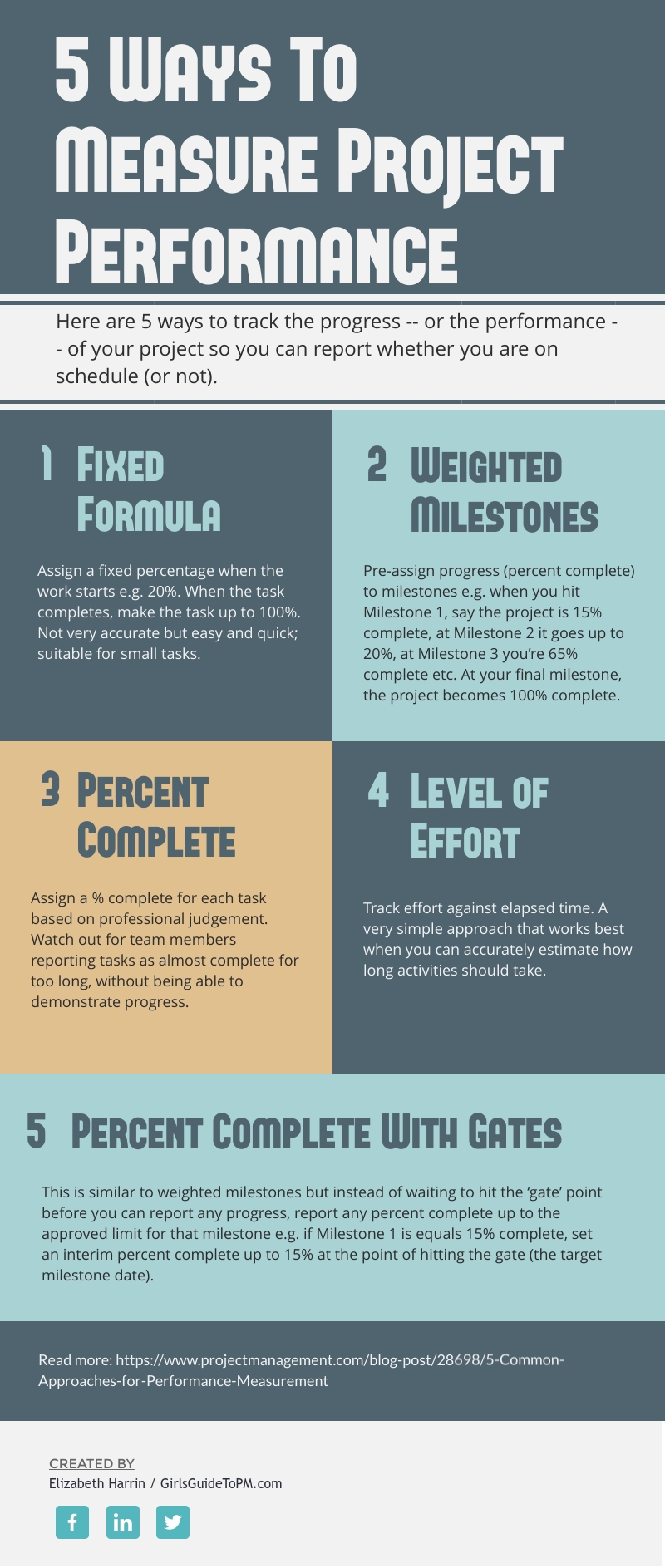
| We need to measure project performance to see if the project is on track. The graphic below shares some ideas on the different ways you can measure work performance. None of these suggestions is better than any other – they are all appropriate for different projects, environments and levels of project management maturity.
Do you use any of these approaches to measure progress on your projects? Why (or why not)? Let us know in the comments section below! For more on this idea, and a bit more background on the performance measures, check out this article: |
7 Things to Include in a Business Case [Video]
Categories:
business case
Categories: business case
| You’ve got a new project… and new sponsor asking for input into the business case. This video gives you a quick refresher on the top 7 things that you should include in the business case. Include these elements to help you business case sail through the approval process! |
Dates Every Budget Holder Should Know
Categories:
budget
Categories: budget
|
When you’re managing a project budget, there are some key dates you should know! These general accounting dates can be laid over your project schedule so you don’t miss any major financial milestones. 1. Year EndFinancial year end could be any time in the calendar year. I’ve worked with businesses that align their financial year end to the tax year, to the end of the calendar year (i.e. December) or to the date of incorporation (in the case of my business, that’s May). It doesn’t matter when year end falls for you, as long as you know when it is! Year end is important because it marks the close of one financial period and the start of another. You may have to get involved with accrual calculations and budget carry overs. If you miss the deadlines, you might not get your project budget in the next financial year! 2. Project Phase DatesSome businesses work by releasing project funds according to the stage of the project. In other words, you don’t get the full amount of the project budget on Day 1. As the project moves through the lifecycle, funding is released in chunks. Normally the dates align to stage gates or project reviews, where the steering group will approve the project to move to the next phase. That then triggers the release of the funding required to do the next phase of work. Be ready! Especially if you need to change your original forecasted budget request based on what you have learned during the current phase. 3. ReportingReporting dates relate to so many different areas of your project. They are important for project budgeting because you will need to prepare a short budget summary to go into the report. As you approach the reporting deadline day, make sure your financials are up to date so you can drop the most recent figures into your report template. 4. Tax DatesTax rates don’t change often, but I did once work on a project where the rate of VAT changed halfway through the work we were doing. It made budgeting very confusing! If you know of upcoming changes to tax (typically linked to government announcements and budget cycles), then watch out for whatever impact that might have on your project and make sure you note the date the changes come in! 5. Project ClosureYes, you surely know the project closure date – the target milestone you are working to for everything to be done! It’s important for budgeting purposes because you may have to calculate budget at completion, or staff run rates, all of which need you to know when the final expenses on the project will be accounted for. What other dates should project budget holders know about? Let us know in the comments below! Pin for later reading:
|


4 Tools for Cost Control
Categories:
cost management
Categories: cost management
| Staying on top of your project expenses is really important if you want to bring the project in on budget. However, how you actually do that changes as you go through the project. You’ll want to take a different approach to cost control depending on where you are in the project and how you need to respond to the project budget situation. The graphic below shows four tools for cost control at each point in the project lifecycle. You can pick and choose from these to select a way to manage expenses on your project, wherever you are in the lifecycle.
For more on this idea, check out this article. http://www.projectmanagement.com/blog/The-Money-Files/19000/ |



