What to ask your supplier [Video]
Categories:
supplier management
Categories: supplier management


|
I’ve worked on projects where all the resources are in house, but it’s more common (at least in my experience, to have some external supplies needed on a project. Whether that’s external legal advice or buying a software product, many project managers have to work with suppliers. But what should you ask them before you start work? This video gives you 3 key questions you should talk to your vendors about before the project starts. They give you a way to have a conversation about working practices and expectations before you start really building one of the most important relationships you’ll have on this project. Watch the video below and then share what you typically ask suppliers in the comments below. For more information about working with suppliers, and a bonus 2 extra questions to ask, check out this article. Pin for later reading:
|


Managing Money Q&A (Part 9)
Categories:
budget
Categories: budget
|
Every so often I do a roundup of questions that I’ve been asked, relating to the topic of this blog – project budgeting. Let’s dive in to some more of your questions about project budgeting! What’s the best tool for managing your project budget?It depends! Unfortunately, there’s no simple answer to this. The answer depends on how your company expects budgeting to happen. Many companies rely on Excel to track and report project budgeting. I have an Excel spreadsheet myself that tracks invoices and purchase orders, as well as current budget and forecast. We have a corporate template so all projects track the same thing, although because it’s Excel it is possible for project managers to amend the spreadsheet and personalise it. There is some latitude to track what’s important to this particular project. For example, sometimes I need to track spending in different currencies or with different tax rates, and not all projects at my company require that. So – while I can’t give you a one-size-fits-all answer to this question, the answer lies in your PMO or Finance department. Talk to them about their requirements. Do they want you to enter data in your project management software (that’s the main alternative to spreadsheets) or do they have another way they want you to track your budget? If there is no corporate standard, you have the latitude to work it out yourself. Spreadsheets are the easiest to get started with. Ask another project manager what they do, or search projectmanagement.com for templates. How much contingency should I add?This question comes up a lot! And unfortunately, again there isn’t a simple answer. You might have organisational standards about how much contingency gets added to a budget. But in my experience, that isn’t the case. Project managers are largely left to their own devices and are expected to work out contingency themselves. You should ask yourself:
The answers to these questions will help you work out whether you need to be generous with contingency or whether you can cut it back a bit. The riskier the project, the more different it is from things your company has delivered in the past, and the level of confidence you have in the whole thing determine the contingency. A reasonable starting point is 10% on the whole project budget. Cut it down for areas where you have confidence – like project initiation and close down, where the tasks are relatively standard and you can estimate the work more accurately. You might need to boost up contingency on project areas where you are doing unique work that hasn’t been done before and where your estimates are basically guesses. Always make your contingency explicit in the budget and explain to your sponsor why it’s in there. What’s a project budget summary?It’s just the headlines of the budget. For example:
That’s it. You use the budget summary in your project status reporting. It goes in the box about project budget update (or whatever your similar section on your report template is called). All it’s for is to give the project sponsor and the wider stakeholder group the short version of where the project is with its spending. They don’t care if you’ve spent £3.50 this month on stationery suppliers for team members on the road. They only want to see the big picture, and the summary statement gives them that. If you feel that the total + current spend + narrative doesn’t give them enough information (or they are constantly asking you for more detail) then provide what’s necessary. They may want estimate to complete or some other type of information. Ultimately your project reporting should deliver what they want to know about the project, so ask them if your summary is hitting the right points and if not, switch it up.
I’ve done other Q&A articles before. If you enjoyed this one, check out the other instalments in this series. And if you have questions for me, please drop me a message! I’d love to feature your question in an upcoming article. Pin for later reading:
|

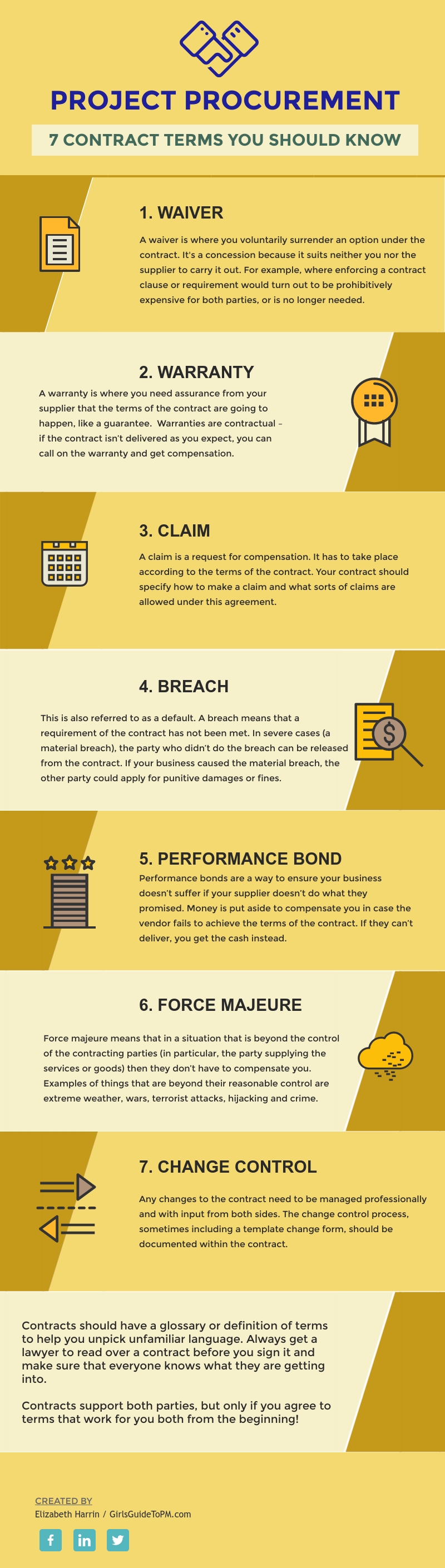
7 Procurement Terms You Should Know
Categories:
procurement
Categories: procurement
| We need to measure project performance to see if the project is on track. The graphic below shares some ideas on the different ways you can measure work performance. None of these suggestions is better than any other – they are all appropriate for different projects, environments and levels of project management maturity.
Do you use any of these approaches to measure progress on your projects? Why (or why not)? Let us know in the comments section below! If infographics aren’t you thing, you can get almost the same information (with perhaps a teeny bit more detail) over at this article: |
Deep Dive: Project Scope Management Part 3: Define Scope
Categories:
scope
Categories: scope
|
Check out the previous parts: The Define Scope process happens early in the project so that everyone has clarity on what the project is supposed to deliver. Unclear scope means unclear expectations. And that nearly always leads to confusion, dissatisfaction and conflict on the team. So take the time to actually define what is in and out of scope – that’s what this process is all about. Define Scope ProcessThis is the third process in the Knowledge Area. We are still in the Planning process group. InputsThe inputs have changed slightly from the Fifth Edition, but it doesn’t feel major. The inputs to this process are:
The objective of this process is to create the scope statement. You are trying to take the requirements from the previous process, prioritise and review them and make a final list of what you will actually be delivering as part of this process. It is different from the Collect Requirements process because you may have collected requirements that you cannot deliver (or choose not to deliver) in this phase. The work that you are currently doing may not extend to all the requirements that were discussed and documented. You may have to prioritise what you can deliver. It’s the final list of requirements, plus anything else that needs to be considered and included, that ends up as your scope statement. Tools & TechniquesNot much has changed with tools and techniques. We have:
Alternatives generation and facilitated workshops have dropped off the list. However, interpersonal and team skills is pretty broad and would cover running a workshop, or any kind of meeting. Data analysis is also a broader technique than what was there before. Alternatives generation is one way of analysing data, but not the only the option. We’re seeing throughout this refresh that the terminology, tools and techniques have got broader to allow for more tailoring and personalising. I’m of the opinion that’s a good thing. OutputsThere are no new or changed outputs to this process. We still have the project scope statement and the project document updates. The objective at the end of the process is to have a statement of scope. It should include what’s in scope, what’s specifically excluded from scope, and anything else you feel the need to document to ensure everyone is on the same page about what is going to be delivered. Scope statements come in various formats, and while you’ll be able to find templates, and may even have one from your PMO, feel free to tweak and amend the document so it suits the needs of your project. Aim for your scope statement to be really detailed, so that people can’t misinterpret what is going to be delivered. Think about what users, processes, tools, technologies, policies and so on are going to be impacted or changed as a result – and which ones won’t. You can also include items for the scope of future phases (useful so they don’t get forgotten). However, these should be reviewed and revised at the point that the future phase is initiated, just in case the business has moved on and the scope items are no longer relevant. Next time I’ll be looking at the fourth process in this Knowledge Area: Create WBS. Pin for later reading:
|
 It’s time for part 3 of our journey through the Scope Management Knowledge Area from the PMBOK Guide®-- Sixth Edition. Today, we’re looking at the Define Scope process.
Make or Buy Decisions [Video]
Categories:
procurement
Categories: procurement
|
Your project needs things. But should you buy them, or make them yourself? It’s a big decision, and one that affects lots of industries and deliverables. My experience has mainly been make or buy in the software world. Should we develop our own software, or buy a tool that is known to be best in class? With software particularly, there are a lot of considerations. Cost. How easy it will be to interface any off the shelf product with your existing architecture. Supporting it once it’s built and installed. Managing upgrades. So many questions! While this video doesn’t have all the answers, it might help clarify the big picture for you so you can start a confident conversation with your management team about the things you need to procure for your project. For more information on project procurement and what you should be considering, check out this article. Pin for later reading:
|