3 Ways to Talk About the Accuracy of Estimates [Video]
Categories:
Estimating
Categories: Estimating


|
Project estimating is something we have to do a lot. And being good at estimating generally means being accurate in the estimate. That doesn’t mean you have to get your budget figures defined to the nearest penny. But you do have to work out your numbers robustly and present them in a way that is clear to stakeholders. They need to understand how you are using the numbers and what they are looking at. There are three ways to talk about the accuracy of estimates:
Find out more about how these different types of estimates are defined and calculated using ranges in this short video. Read more articles about estimating. Pin for later reading:
|

How To Facilitate an Estimating Session
Categories:
Estimating
Categories: Estimating
|
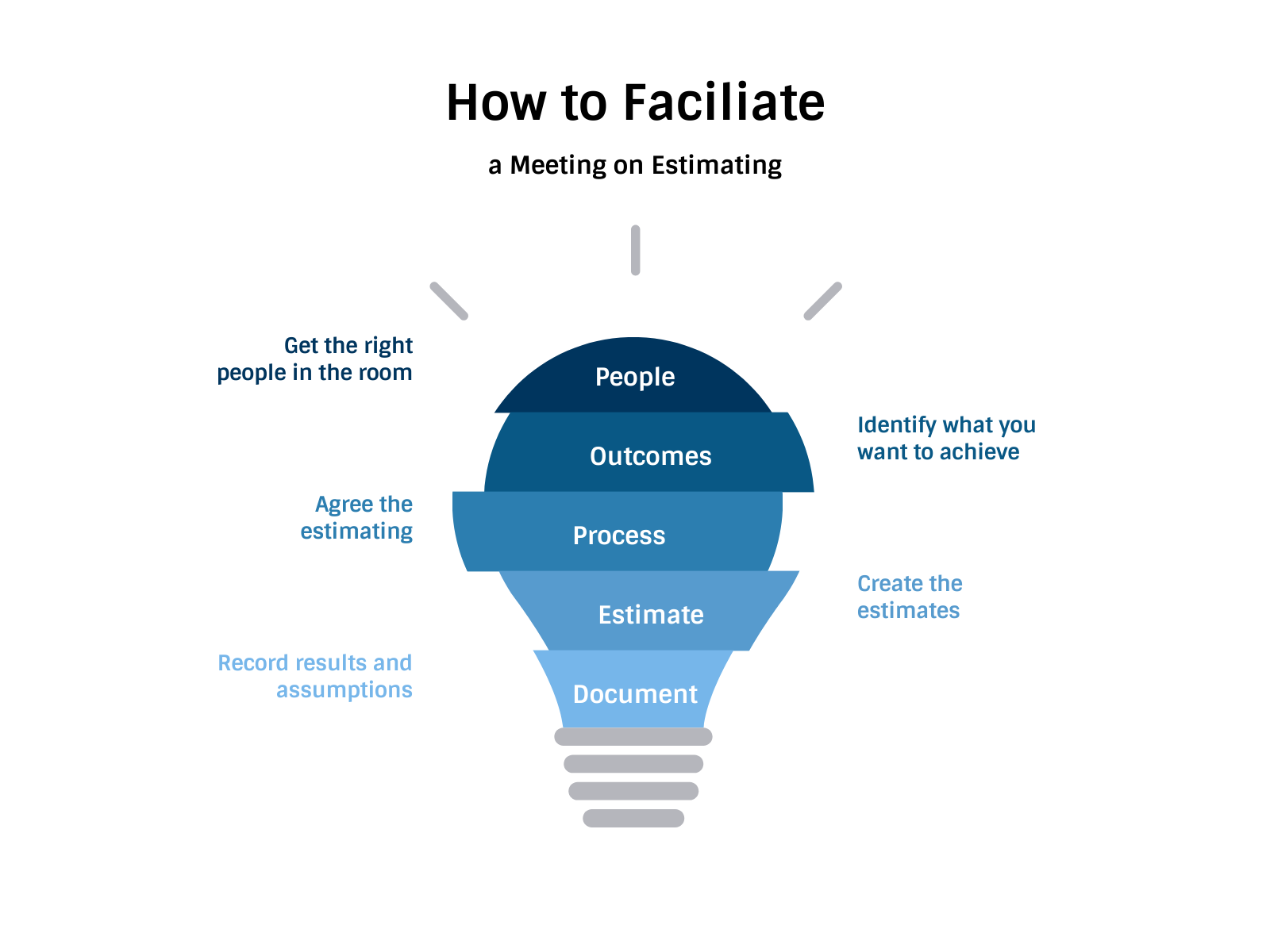
So you need to estimate some work for your project? Great. Project managers need estimates to help with planning, scheduling and budgeting. Estimates are useful things. But how do you get there? Estimates come from talking to people. Even if you use scenario-based software or modelling tools, you have to talk to people to get the parameters set up correctly. The easiest way to do this is to run an estimating session. Here’s how to facilitate the meeting so you get the outcome you need. 1. Get the right people in the roomFirst, get the right people in the room. I’d recommend having separate meetings with separate groups of colleagues. There’s nothing more boring than having to sit in a meeting where people are estimating tasks that have nothing to do with your work, waiting around for your chance to talk about how long your work is going to take. If you don’t need everyone there together, split them up. You need to have people who have the knowledge to contribute to the estimating process. These will be people who:
Your meeting attendees don’t have to hit every item on that list, but they should be knowledgeable and helpful to the ultimate goal of the meeting, which is to come up with estimates for your project plan. And that brings us on to… 2. Have clear outcomesYou can have a loose agenda, but you need to have clear outcomes. What are you estimating: the whole workstream or a particular phase? A set of tasks for the coming month? Are you estimating time or money or both? If it’s time, do you want to get duration or effort out of the meeting (or both)? If you are clear about what you need to achieve before the meeting closes, you are more likely to get there. Keep bringing people back to the ultimate goals of the meeting and reminding people what you need from them. You can keep the meeting on track far better with clear goals – and generally, people want to be out of a meeting room as soon as possible! 3. Agree the techniques or approachWhat tools, methods, approach and techniques are you going to use? People often get hung up at this stage because the language is off-putting. Is chatting with your expert peers really a technique? The PMBOK® Guide – Sixth Edition would describe this as Expert Judgement. All this step means is work out how you are going to do the estimating. Make sure everyone understands how it is going to happen. For example, if you are using Monte Carlo simulation, then you’ve got software and a process for doing it. If you are making up the estimates based on a set of sticky notes on the wall and a long debate ending with a guesstimate, that’s fine too. Just get everyone on the same page. Have an open conversation about how vague you are prepared for the estimates to be, and at what point they would be firmed up. How are you going to track confidence levels? (Are you going to note down confidence levels at all?) Sorting out things like this at the beginning of the meeting will ensure everyone understands the context for the estimate and can explain it to others when they leave the room. If part of your approach requires looking at past project data (a very handy and robust way to estimate similar tasks) then I’d suggest you have that ready and accessible. Run a few reports or download some planned/actual data before the meeting so you don’t have to waste time in the session itself trying to find the figures you need. 4. Do the estimatingNow you come to the part where you have to do the estimating. You’ve got the right people. They know why they are there and what you need to get out of the session. Now talk to them. Use the tools you’ve decided on. Run simulations, stick sticky notes on the wall. Pull up holiday calendars and plan around vacation time. This part is the bulk of your meeting. Go through each item and estimate it. Make sure everyone has a chance to contribute. If you notice disagreements in the estimating process, try a technique like three-point estimating to bring most and least likely scenarios together in a way your experts can agree on. 5. Document and use the estimatesDocument how you got to the estimate. You might think you’ll remember, but in three years, when someone asks you to run an estimating session for their project, trust me, you won’t remember exactly how you arrived at the end result. Sometimes I don’t even remember how an estimate was calculated and we only worked it out a few months ago. Write down your assumptions and the constraints you took into account when coming up with the final figures. Note the confidence levels and anything else you considered when you were discussing the estimate. Finally, all you have to do is use the estimates. Incorporate the outcomes into your project schedule or budget. Look at what impact that has. Update resource calendars and any other documentation that might change as a result of the new numbers. Then get on and deliver those tasks! |
Deep Dive: Project Schedule Management: Sequence Activities
Categories:
Scheduling
Categories: Scheduling
|
Today’s deep dive into the PMBOK Guide®-- Sixth Edition is into the third part of Project Schedule Management: the Sequence Activities process. I’m going to call out the differences between this process and what we used to have in the PMBOK Guide® -- Fifth Edition. We’ve already planned for the work (see part 1 of this Deep Dive) and defined the activities (see part 2). Sequence Activities ProcessThis is the third process in the Knowledge Area. We’re still in the Planning process group. This process is about putting the activities you’ve already defined into a logical sequence. The main output is your network diagram, which shows how tasks link. However, I don’t think I’ve ever created a network diagram for a project. I’ve certainly sequenced activities, but I’ve never done it in such a formal way. A few sticky notes on some flip chart paper or just common sense as I’m putting the Gantt chart together tend to be the way I go about it. I’m sure there are projects that would benefit from a detailed network diagram, and I don’t doubt that it is a useful tool. I’m from the school of thought that says don’t do things for the sake of them, just because the book says so, as long as you get the right result. I expect earlier in my career I spent more time checking the order of activities before defining my schedule, but now it all seems to happen as part of an integrated afternoon of planning. Back to the detail of this process… InputsThere are quite a few changes to the Inputs between the PMBOK Guide® -- Fifth Edition and Sixth Editions. Having said that, in essence the main change is that the detailed list of documents has been removed, and replaced with the generic Project Management Plan and Project Documents. These are nice catch all inputs that also allow a more broad interpretation of what needs to be considered for activity sequencing.
Tools & TechniquesThe only change to the Tools and Techniques is the addition of your project management information system. In other words, PMI acknowledges that you probably won’t create a network diagram using paper and pens. Your PMIS is most likely an integrated project scheduling tool. If it does Gantt charts, it probably does network diagrams too, so you can print one out to prove you have it if ever you need it. I have looked at network diagrams in Microsoft Project before, so despite not actively putting them together as a distinct step before scheduling, I have found them useful for a visual representation of the project overall, especially when some activities look out of sequence or I can’t work out how the dependencies should look. Software is helpful for:
|


3 Ways Processes Add Risk to Projects [Video]
Categories:
risk
Categories: risk
|
The processes you have for project management – or lack of them – can add significant risk to your project. But you don’t often find them called out on the risk log. Poor processes can add time delays, extra steps and confusion. They contribute to poor communication and overspending. They impact project quality. In short, processes that aren’t optimal can hinder your ability to deliver a decent outcome for the project. Unfortunately, processes are often constrained by the company you are in. If you are mandated to follow certain processes, you have little flexibility to do anything about them. That’s not a good situation to be in – ideally you should be able to tailor the process to the size and complexity of your project. I’ve highlighted three of the main process-related factors that influence risk on your project in the video below. Read more articles about risk. Pin for later reading:
|


3 Principles for Project Metrics
Categories:
metrics
Categories: metrics
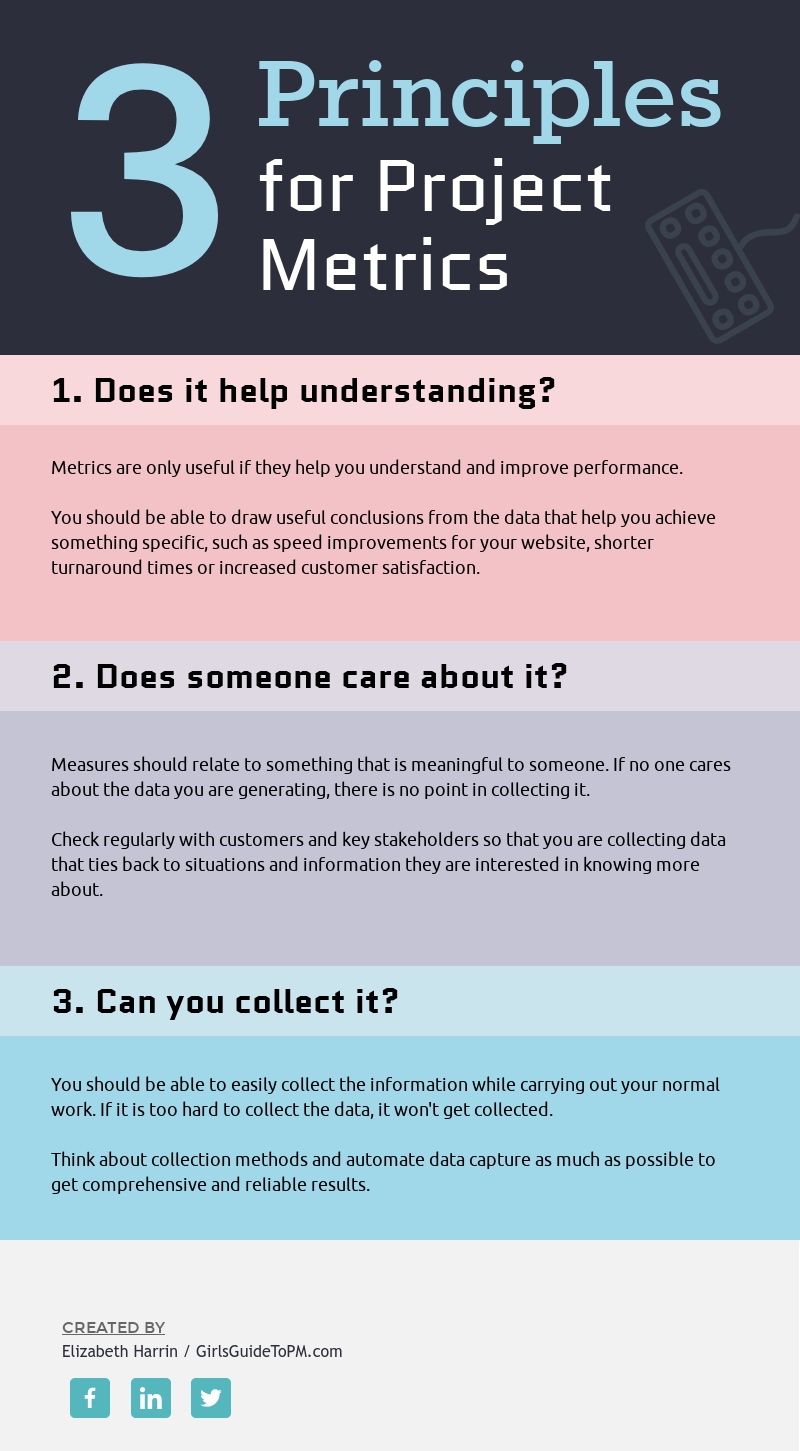
| How often have you looked at a set of data points and wondered what the… point was of capturing them at all? I’ve seen PMOs with measures for how many projects were closed in a month but not measures for whether those closed projects were done on time and on budget, for example. Sometimes I think our desire to catalogue and record everything goes a little bit too far. There isn’t any point in capturing data that no one cares about. This graphic shows three core principles for creating and using metrics. They are universally applicable but good for project managers because we have to think up (and then find ways to track) KPIs and success criteria measures for our projects. And if you’re in a PMO role, you must have a bunch of data points you are collecting too – I wonder how many of them make it into the reports you produce for stakeholders? And then how many stakeholders actually read and care about them? For more on the topic of what makes a good measure for your project, take a look at this article, which digs into some examples and how to make sure that you are creating measures that are useful, in more detail.
|