


Deep Dive: Project Schedule Management: Sequence Activities
Categories:
Scheduling
Categories: Scheduling


|
Today’s deep dive into the PMBOK Guide®-- Sixth Edition is into the third part of Project Schedule Management: the Sequence Activities process. I’m going to call out the differences between this process and what we used to have in the PMBOK Guide® -- Fifth Edition. We’ve already planned for the work (see part 1 of this Deep Dive) and defined the activities (see part 2). Sequence Activities ProcessThis is the third process in the Knowledge Area. We’re still in the Planning process group. This process is about putting the activities you’ve already defined into a logical sequence. The main output is your network diagram, which shows how tasks link. However, I don’t think I’ve ever created a network diagram for a project. I’ve certainly sequenced activities, but I’ve never done it in such a formal way. A few sticky notes on some flip chart paper or just common sense as I’m putting the Gantt chart together tend to be the way I go about it. I’m sure there are projects that would benefit from a detailed network diagram, and I don’t doubt that it is a useful tool. I’m from the school of thought that says don’t do things for the sake of them, just because the book says so, as long as you get the right result. I expect earlier in my career I spent more time checking the order of activities before defining my schedule, but now it all seems to happen as part of an integrated afternoon of planning. Back to the detail of this process… InputsThere are quite a few changes to the Inputs between the PMBOK Guide® -- Fifth Edition and Sixth Editions. Having said that, in essence the main change is that the detailed list of documents has been removed, and replaced with the generic Project Management Plan and Project Documents. These are nice catch all inputs that also allow a more broad interpretation of what needs to be considered for activity sequencing.
Tools & TechniquesThe only change to the Tools and Techniques is the addition of your project management information system. In other words, PMI acknowledges that you probably won’t create a network diagram using paper and pens. Your PMIS is most likely an integrated project scheduling tool. If it does Gantt charts, it probably does network diagrams too, so you can print one out to prove you have it if ever you need it. I have looked at network diagrams in Microsoft Project before, so despite not actively putting them together as a distinct step before scheduling, I have found them useful for a visual representation of the project overall, especially when some activities look out of sequence or I can’t work out how the dependencies should look. Software is helpful for:
|


3 Ways Processes Add Risk to Projects [Video]
Categories:
risk
Categories: risk
|
The processes you have for project management – or lack of them – can add significant risk to your project. But you don’t often find them called out on the risk log. Poor processes can add time delays, extra steps and confusion. They contribute to poor communication and overspending. They impact project quality. In short, processes that aren’t optimal can hinder your ability to deliver a decent outcome for the project. Unfortunately, processes are often constrained by the company you are in. If you are mandated to follow certain processes, you have little flexibility to do anything about them. That’s not a good situation to be in – ideally you should be able to tailor the process to the size and complexity of your project. I’ve highlighted three of the main process-related factors that influence risk on your project in the video below. Read more articles about risk. Pin for later reading:
|


3 Principles for Project Metrics
Categories:
metrics
Categories: metrics
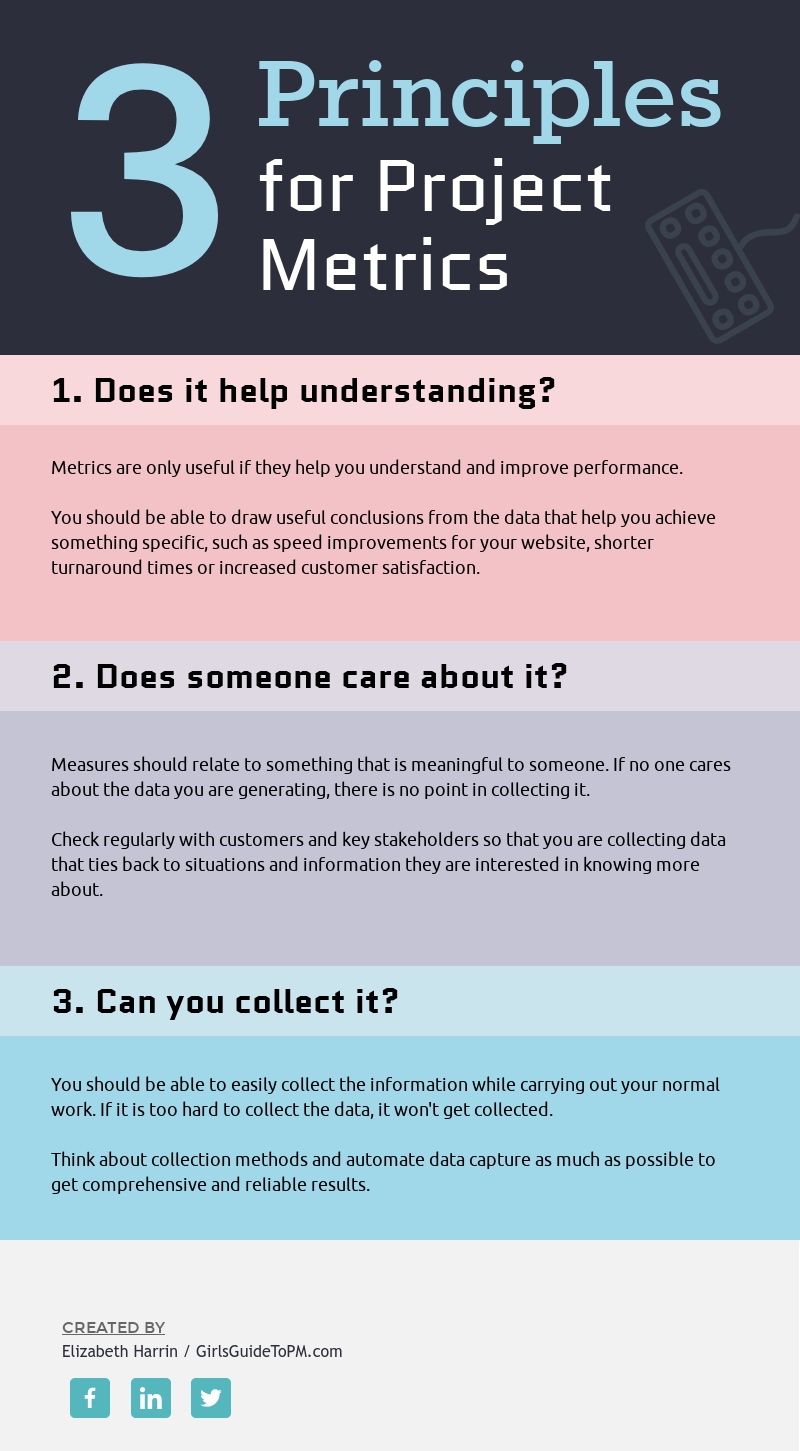
| How often have you looked at a set of data points and wondered what the… point was of capturing them at all? I’ve seen PMOs with measures for how many projects were closed in a month but not measures for whether those closed projects were done on time and on budget, for example. Sometimes I think our desire to catalogue and record everything goes a little bit too far. There isn’t any point in capturing data that no one cares about. This graphic shows three core principles for creating and using metrics. They are universally applicable but good for project managers because we have to think up (and then find ways to track) KPIs and success criteria measures for our projects. And if you’re in a PMO role, you must have a bunch of data points you are collecting too – I wonder how many of them make it into the reports you produce for stakeholders? And then how many stakeholders actually read and care about them? For more on the topic of what makes a good measure for your project, take a look at this article, which digs into some examples and how to make sure that you are creating measures that are useful, in more detail.
|
10 Things You Should Have Done Last Year on Your Project Budget
Categories:
budget
Categories: budget
|
It’s January: the time that we reflect on past achievements and future goals. So let’s take a moment to look back at how you did at work with your approaches to project cost management. I know, I know… you followed your team’s methodology to the letter and did All The Things. But really – did you? I know that for me, with all the deadlines to hit and meetings, reports to prep and executives with unrealistic expectations… I didn’t do everything as well as I would have liked. Let’s be a little bit honest here. Below, I’ve listed 10 things that you should be able to say that you did during 2018 that relate to how you should have handled your project finances. How many of these can you confidently say you did to the best of your ability? 1.I managed my project budgetIt might seem odd to include this, but I still hear from project managers on an alarmingly regular basis, who say they don’t have any oversight or influence into the project budget. The financials are handled by other people. They only have to track and manage the project tasks. This is wrong. So wrong, on so many levels. This attitude by management that implies project managers are not “good enough” to manage financial information undermines what we should be doing with the profession. You should have access to the financial information relating to your project and you should be the person handling project finances. If you don’t do it personally, that could be because someone else in the project team does it, for example, if you are a project administrator and the project manager does it. Or you are the project manager and you have a project financial admin person on secondment from Finance who handles the tracking for you. It should be someone on the immediate project team who you can talk to and who will tell you the truth about the numbers. 2.I set a project budget baselineDid you set a baseline for project costs? A baseline is a snapshot in time that shows you the total of your project financials at a certain point. It’s useful because you can use it to check how close you are to your original plans for spending. 3.I agreed a contingency amount with my sponsorIf you started a new project at some point in 2018, you should have had a conversation about contingency. This is added to your budget (it’s part of your cost baseline). It’s a little cushion for emergencies, the amount of which you can make up based on your best guess or a standard % measure, or you can work it out more scientifically by looking at risks and calculating amount required to adequately address them. Read more about the difference between management reserves and contingency reserves. 4.I tracked timeProject management time spent is an overhead for your project. You can work out the amount of time spent doing the managing if you track your time (as well as your team members). It’s tempting to log everything to a bucket task called ‘project management’ and book yourself at 100%. But that wouldn’t be accurate. Try to track your own time a bit more realistically, splitting it down by work package, project stage, type of activity or something else. It’s helpful to know how much effort it took to get a project off the ground, especially when you come to review benefits later. You can also include this information in the business case for future projects. It can help you better estimate the amount of management time required. 5.I celebrated success with my teamHopefully you had something you could celebrate in 2018. And celebrating can be done on the cheap (read more about how to motivate your team with spending anything). But it’s nice to be able to reward your team with something that does cost money, however small. Perhaps you took them out to lunch and the project paid. Or there was a launch event or something. Putting a small amount of money aside for celebrations is definitely a good thing. 6. I estimated accuratelyDid you follow the estimating lifecycle? While I’ve said in the title here: “I estimated…” I don’t actually mean you personally. I mean that you involved the right subject matter experts to get decent estimates. I mean that you used solid, robust estimating techniques to make good choices about how much your tasks were going to cost. I hope you got support from your colleagues and created a budget built on estimates you could rely on. 7. I applied good governanceGovernance for project budgets means you got approval to make changes, you understood and sought approval for spending management reserves and contingency funds as appropriate and you generally had good housekeeping for your financial records. Any changes that were made would most likely have downstream implications for other project documents, so hopefully you kept those up to date too. 8. I included financial data in project reportsGood governance can also cover proper reporting to your project board or steering committee. I frequently talk to project managers who don’t put financial information into their project reports. I get it – it’s time consuming to update your financials (at least for me; we are between project management tools and have reverted to spreadsheets for budget management for now). But really, what exec isn’t interested in how much the project has spent to date and is forecasting to spend by completion? Project financial information really should be in your monthly reports. 9. I worked with suppliers in a positive wayHopefully, 2018 was not full of supplier disputes for you. Perhaps you formally closed some contracts. Perhaps you worked with your procurement teams to bring on board new suppliers. Perhaps there was a supplier selection exercise that you facilitated on behalf of your project customer. There are lots of ways to work with suppliers – with any luck you built some positive working relationships that will carry you forward into 2019. 10. I had a risk budget and managed itRisk budgets are a particular challenge for me. I don’t often have the luxury of time to properly work out what risk management actions should be taken and allocate the funding – at least not before we dive straight into the delivery. However, if you can, calculating the risk budget is definitely worthwhile. Can you say you hit all the points? And are you going to hit them again during 2019? If some of these things weren’t on your personal achievements list, then that could be because they aren’t activities relevant to the role you are in, and that’s fine. However, I’d argue that most project managers should be able to say they did all of these. What else would you add? Let me know in the comments below! Pin for later reading:
|


3 Levels of Project Quality [Infographic]
Categories:
quality
Categories: quality
| How do you define the right level of quality on your project? Your project sponsor probably has expectations you need to meet. Your team has a level to which they can deliver. You have to find a way to balance the competing needs and hit a quality level that suits as many people as you can. At least, that’s a good approach if you want to avoid too many grumpy faces round the table at your project lessons learned meeting. This infographic, inspired by a fantastic short little book on project management called Project-Driven Creation by Jo Bos, Ernst Harting and Marlet Hesslelink, sets out the three levels of project quality that you can reach for your deliverables. Which one do you hit most often? Read more about this topic in the article here.
|



