What is BCF analysis?


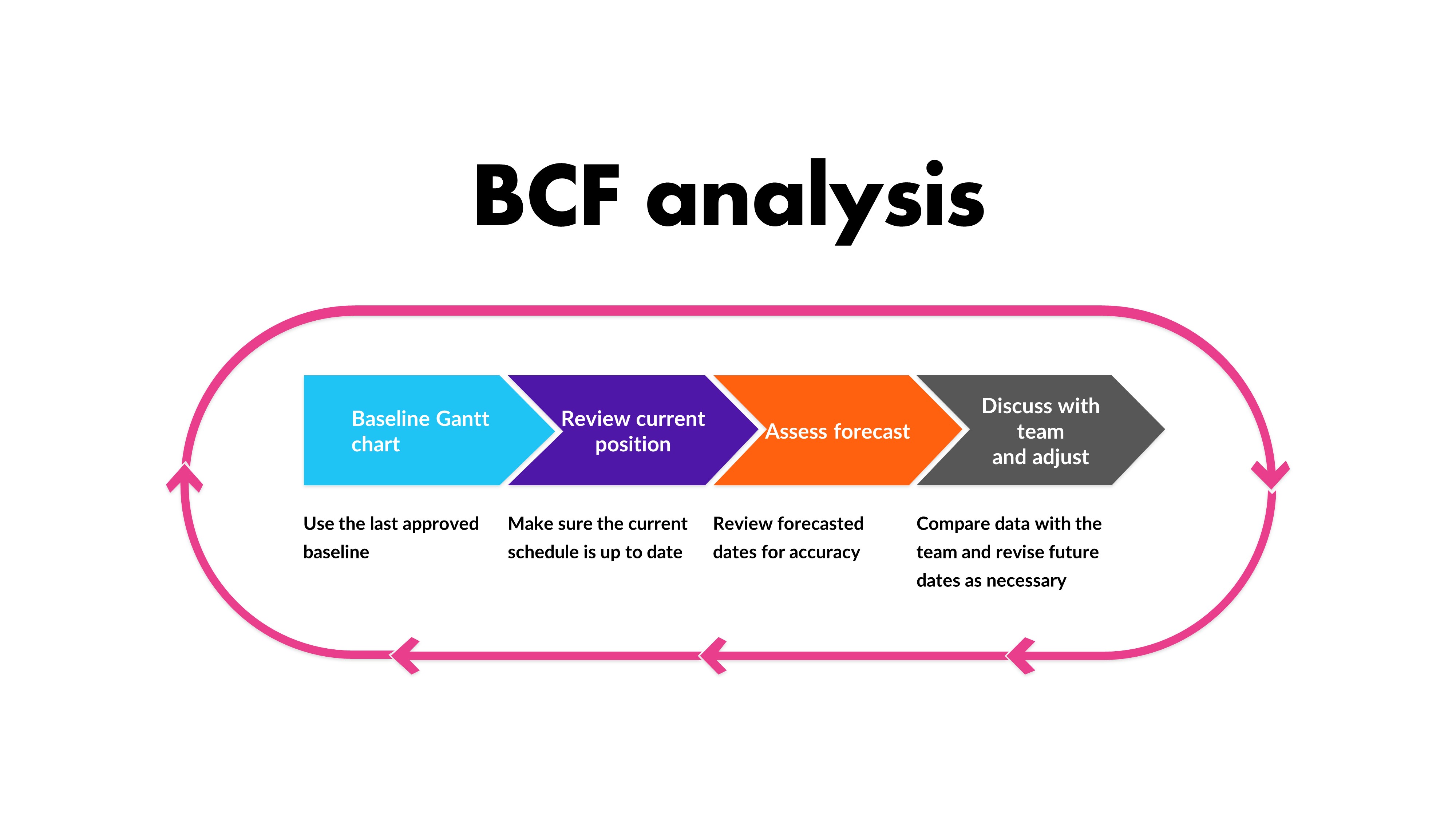
| You know all those baselines you save in Microsoft Project? All the snapshots of your plan you keep just in case? Well, they are hugely useful for looking at to compare actual performance against forecast, so dust them off and let’s start using them. BCF stands for Baseline-Current-Future and it’s a way of looking at comparative schedules. As a schedule control tool, it’s easy to use, easy to understand, and it’s a useful way of discussing project progress and performance with the team without having to go full earned value. Plus, it’s not much work for you as the project manager, as you probably already have the details available. Here’s how to do it.
The processFirst, take the baseline Gantt chart. This will be the latest saved version of your Gantt chart that is an approved baseline. I know software tools can keep baselines saved in the software, but I do tend to keep a separate version of the whole file saved with the date in the filename, just so I have a back up of exactly how the plan looked at the point of the last official review. You’ll also need an up-to-date position for what is happening right now, so if you don’t have team members entering data in real-time, you might have to give them some notice to get their data into the tool. Then, you’ll need the future scheduled dates; what you anticipate the rest of the schedule will look like. This is your forecast, and will be the information in your schedule for the dates that haven’t yet happened. Just give them a quick review to make sure they are still accurate and reasonable before you take them as finalised for this exercise. Compare the baseline against the current and future positions. You can do this with a table that shows the milestones, or a Gantt chart that shows the various different bars on the same chart so people can see slippages and changes. Talk to the teamWhen you have prepared your analysis of the baseline and current/future position, circulate the comparison for discussion. Ask:
And anything else you think is helpful to ensure that the discussion is productive and you get what you want out of it – which should be increased confidence in your future scheduled dates. You’ll probably find that there have been some changes that have not yet been reflected in the schedule. There might also be some interesting takeaways about why things changed. Feed these into the lessons learned documents – in fact, it might be valuable to have this discussion on scheduling as part of your pattern of retrospectives. Schedule analysis is a useful tool to understand what happened and take from that some actions or learning that would help you do things differently in the future. In addition, it helps with being able to set expectations for stakeholders so they have the confidence that the schedule is deliverable and the team are onboard with what they need to do when. What other tips do you have for using project baselines? Let us know in the comments! |
5 Ways to Improve your Budget Situation
| I’m lucky in that the projects I am working on at the moment have a requirement for resource time, but we can manage the work in-house so we don’t need to invest in anything else. However, in the past I have managed projects with substantial budgets – and also those with small budgets. Personally, I think that managing smaller budgets is harder because there is less wiggle room to lose a small amount in the rounding, but we have to work with what we have. When something on your project changes and your budget is reduced, you might have to look at creative ways to make the money go further. Here are some suggestions.
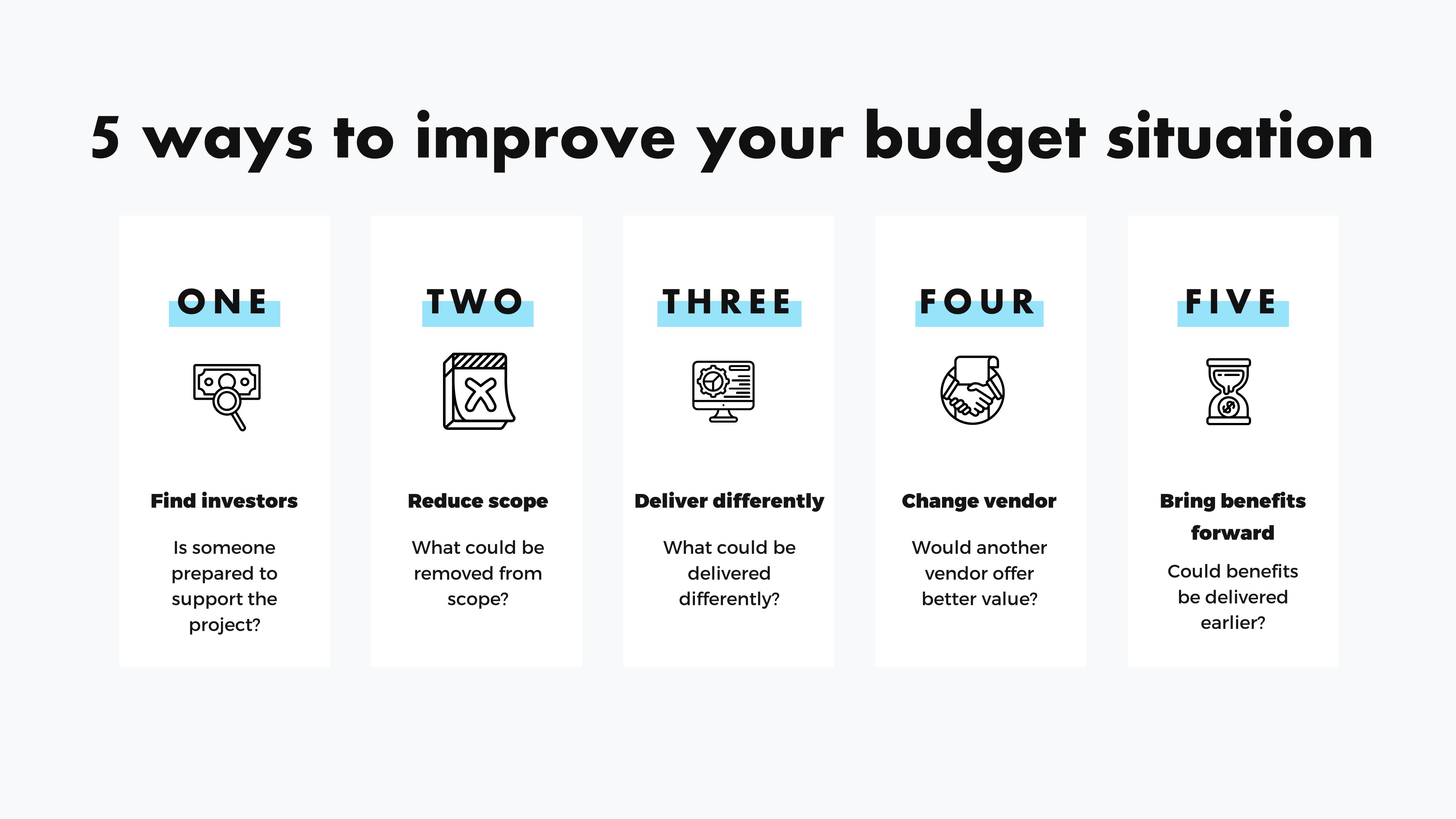
Find angel investors/donorsOK, let’s get this one out the way first! I got this example for the Project Management For Musicians book by Jonathan Feist, and it’s clear that it won’t work for all kinds of projects. I couldn’t run an SAP deployment by finding a lovely benefactor who just happened to want to sponsor an ERP implementation from the goodness of their heart. But if your project is to run an event, stage a show, or something similar, perhaps this is an option for you. For example, if a benefactor donated a certain amount, they could get a free ticket to the gig. I’m sure much of the world of PR and event management taps into this option all the time. If you do go down this route, just be sure to make sure whatever you do falls within the ethics guidelines of your organisation as you don’t want to be seen as taking or giving bribes or hospitality gifts that could get you and your company into trouble. I’m including this one really as a prompt to ask you to think creatively about the situation you are in and what might address it. Do less: reduce the scopeThe classic way to save money on a project is to do less. Look for chunks of the project that could be pushed into a Phase 2 or subsequent initiative. Typically, if you remove scope, you are also removing cost because the work takes less resource to get done. Analyse what could be removed to save money but would have minimal impact on the end result. There probably isn’t much that falls into this category, but there might be something. Do different: change the scopeAnother common way to reduce spend on a project is to look at changing the scope to deliver the goals in a different way. What about these switches:
What else could you switch? Let me know in the comments. Change vendorsIf your project involves buying in goods or services, you could also consider changing those providers. Perhaps another vendor would be cheaper, especially if you looked further afield. Depending on the work, changing vendors could be more expensive, especially in the short-term. Pulling experienced contractors who know your business off a project and replacing them with remote contractors will have a learning curve, even if the skillsets of the two consulting firms are identical. Factor that in before you make any proposals. Alternatively, consider the cost of bringing the work in-house. Would it be cheaper to hire someone on a fixed term contract than it would to get a supplier to do the work? Bring benefits forwardAnother option would be to look at how the project could be reordered to bring in some benefits earlier. For example, with a product launch, could you get a beta version out early to start bringing in some income that could be offset against future improvements. If the deliverables can start bringing in some cash, that could change the financing of the work and improve the budget situation on paper, which might free up resources or investment for the next wave of development. These are just ideas, and I hope you don’t have to use them! |
Why do we bother with business cases?
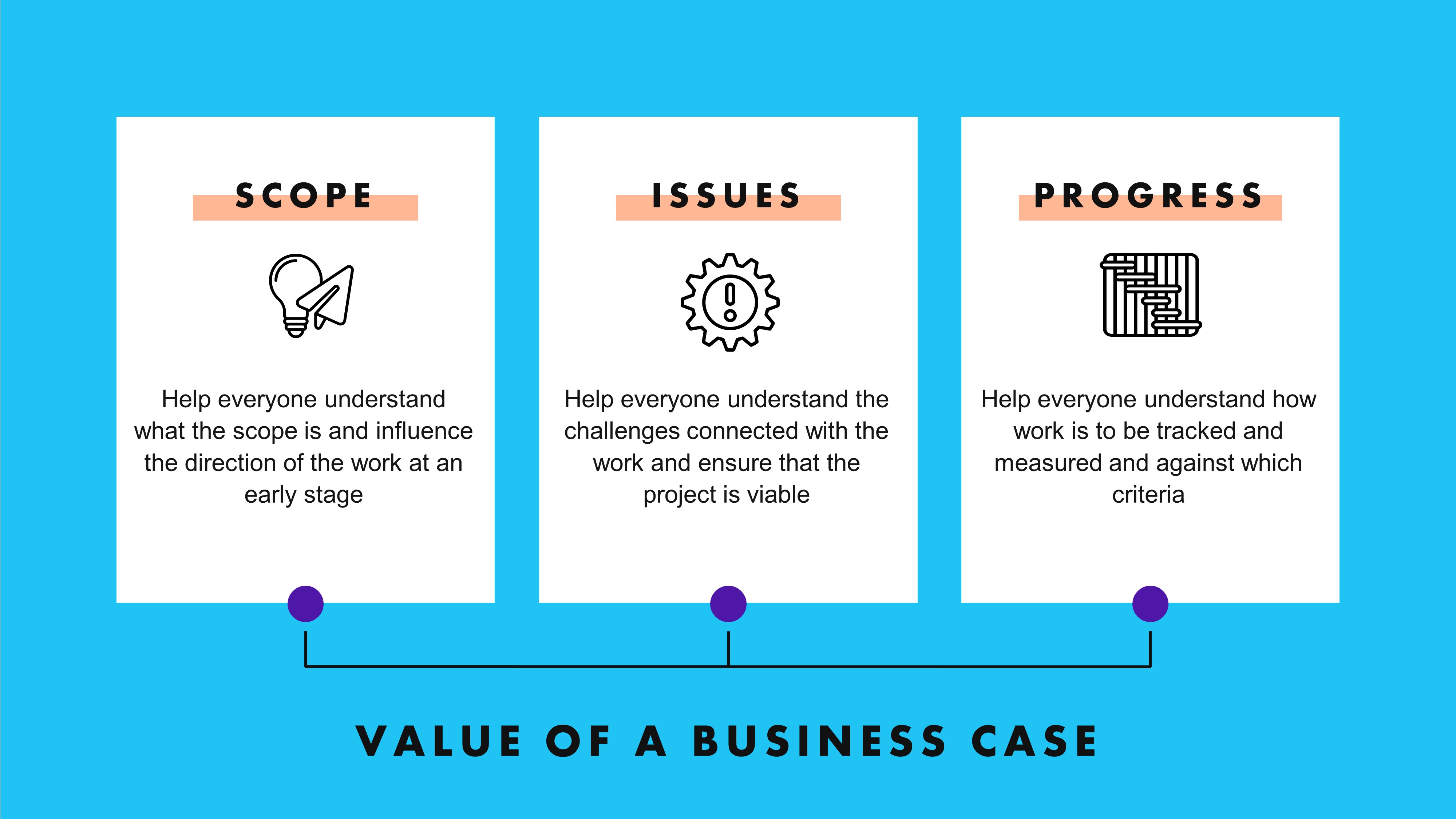
| Project documents (and there are some good templates here on ProjectManagement.com) are important to keeping projects moving, and many times, a project will start with a business case. You might accept the need to do a business case as part of the organisational process – just something you have to do to tick a box. Maybe your organisation doesn’t use them in a formal sense, but each project has to be justified in some way – whether that’s a slide deck or even an email. There is some ‘reason to work’ that kicks off a project. But have you ever really stopped to think about what role a business case really plays? If you do them, I think we shouldn’t take them for granted. If you don’t do them, it’s time to start. Here are a few reasons why it is advantageous to have a business case before the work begins. Understand the scopeThe process of putting together a business case helps everyone involved understand what the scope is going to be. And if they don’t like what that looks like, they have the opportunity to influence it early so the scope better aligns with the direction they want to take. Understand the issuesPerhaps there are concerns, issues, risks or challenges that decision makers need to be aware of – there always are. The discussions that feed into the business case help make sure that everyone is aware of what those are and what implications they might have for the work. Fact-based decision making will give the project a better chance of success. The leadership team can weed out the ideas that won’t work before any time and effort is spent on them. We can frame this conversation by thinking about project viability. Having a thorough discussion of the issues makes people aware of whether a project is viable and will continue to be viable throughout the delivery phases, despite any challenges that may arise.
Understand progressFinally, a good business case lays out information that is useful for managing the work, monitoring and controlling progress. For example, a schedule of stage payments or key milestones, scope elements or deliverables. The business case isn’t the project schedule and you will need more than simply the business case, but if it is a well-thought through, well-prepared document, there will be enough in there to help set up adequate project tracking. The document should also set out success criteria and/or benefits which give you the framework for evaluating success as the project progresses. As a project manager, you might be thinking that putting together the business case is not really your job, and you’d be right. However, on the projects I have worked on, it’s always been easier to get up to speed and start work when I’ve been involved from the business case stage or earlier. That doesn’t mean doing loads of work – just being interested and talked to and maybe asked an opinion about the resource information or timeline that should go into the document. Then when I come to lead the work (assuming it gets approved), I have a better understanding of the ‘why’ behind the project and the decisions that have already been taken. Do you have a business case template that you are happy with? If not, check out some of the templates on this site as a starting point, and adapt one to give you the information you need to start your projects from a good place. |
5 Risks for Delegating
| I don’t think of myself as someone good at delegating. I tend to want things done when I want them done, and it’s easier to do them myself rather than waiting for someone else to do them on their time (thinking about household chores here…). But as I have got on in my career, it has become more important to learn how to delegate, and to do it well. Here are 5 risks that present when you delegate something and what you can do about them.
1. The job is done badlyThere is a risk that the job is not done to the standard you require. This could happen if the person is not capable of doing the work correctly, perhaps because you’ve delegated to the wrong person – someone who has not been trained, for example. There might have been a hiring error: someone looked great on paper and performed well at interview but they aren’t really right for the role. 2. The wrong job is doneThere is a risk that the wrong task is done completely. This hasn’t happened to me often, but on one project we did have a team member edit the wrong version of a document, and that work had to be done again. Miscommunication was the reason that happened, so again, this risk should be totally within your control as the project manager to mitigate. 3. The job goes overbudgetThere is a risk that the work costs more than if you had done it yourself, for various reasons including it taking longer. I had this with copywriting I outsourced. The person who took on the job did an excellent job, but in the end it required more rework than I had anticipated, so it cost more. 4. The job takes longerThere is a risk that the work takes longer than planned. This could happen because the person you delegate to is busier than they thought they would (or that you thought they would be) or their priorities are changed by their manager. Or they simply work slower than you would do, and you estimated the task based on the speed that you would do it yourself. This can happen when work is delegated to less experienced colleague as well: typically, experienced staff take less time to do the same job as they don’t need to do so much research or checking. 5. The job is not done at allThere is a risk that the work is not done at all. This could happen as a result of you thinking you delegated but you actually didn’t: manager error, for example, the email got stuck in your outbox. Or perhaps you communicated so gently that they didn’t pick up on the fact you were actually asking them to do the work at all. It could also be an error on their side. Perhaps they dropped the ball and haven’t got round to it yet, or they have deliberately chosen not to do it and are ghosting you. I think this scenario is rare, but I suppose it could happen. What risks have you found from delegating? Any to add to the list? Or have you been in any situations where you’ve delegated and it hasn’t turned out exactly as planned? |

Estimating: How many ways are there to do it?
|
OK, the title of this blog post is a bit misleading. I don’t think I could count how many different ways there are to do estimating, I’m sure there are plenty of tools and techniques I’ve not used in my work as a project manager. But there are some high level options for thinking about, presenting and sharing estimates with key stakeholders, and that’s what I wanted to dive into today. I’m drawing on what PMBOK 7 says about different types of estimating, so you can refer back to that for more information. The guide talks about 5 different approaches to estimating, without mandating that any particular approach is used at any particular time – that’s up to you as the project manager to assess and choose the right estimating technique. Deterministic/ProbabilisticDeterministic estimates are those that represent a single point. For example, 16 months, or $5,250. These are the easiest to understand but (I think) the hardest to come up with unless you have a lot of past project data and simple tasks that repeat. Probabilistic estimates – why is that so hard to type?? – a those that represent a range. This is what I use most often in the thinking, even though when putting plans together we rarely represent the range in the schedule visually. This type of estimate often includes three factors: The estimate itself with a range e.g. $5,250 +/- 10% or 16 months +1 month/-1.5 months. This represents a weighted average based on several possible outcomes (like when you work out a three-point estimate with the most likely, optimistic and pessimistic outcomes), alongside what the range will be for the work. The result is often calculated by scheduling algorithms, but you can work it out manually, or even use professional judgement to make your best guess, as long as people know that’s all it is. That brings us to the second factor: confidence. A probabilistic estimate includes a confidence factor that represents how confident you are in the numbers. A 99.9% confidence factor would mean you’re pretty sure this is exactly how it is going to turn out. A 60% confidence factor – not so much. Thirdly, if you are using computer programs to simulate scenarios and calculate estimates, you will also have a probability distribution, that shows the data and the range. Absolute/RelativeAbsolute estimates give you a specific number that stands alone. A deterministic estimate can be absolute. An example would be that to buy one machine costs £12,000. Relative estimates are figures that only make sense in the context of other data. For example, buying more than one machine would be cheaper, but we don’t know how much by as the procurement team hasn’t finished the negotiations yet. A better example, and the one in the PMBOK® Guide, is planning poker for agile estimating. Story points and T-shirt sizing help teams size the work in relation to other pieces of work but alone, “XL” doesn’t mean much to anyone else. Flow-basedThe final flavour of estimating talked about in PMBOK 7 is flow-based estimating. This type of estimating is useful where you know the flow of the work: the throughput and cycle time. If you know how many items of work can be completed in a particular time period (throughput) and how long it takes one item to go through the process (cycle time) then you can estimate how long it will take for a number of items to be completed, assuming other factors like sizing are taking into account in the calculations. Regardless of how you do estimating, the data is only useful if people are bought into how it has been calculated and what the effort, duration or cost represents for them. Get the team involved in working out estimates and providing the assumptions that they are based on. Remember to adjust for risk, build in contingency where it makes sense to do so, and to keep estimates under review until such time as your confidence levels are sky high… which is usually once the work has been delivered and the task can be marked as complete! |